

Forum Replies Created
-
AuthorPosts
-
March 10, 2016 at 9:41 am in reply to: Event Tickets – creating an event ticket price for RSVP #1087305
George
ParticipantHey Lee,
No worries about the thread being here in the Community Events forum—we’re happy to help regardless. 🙂
In regards to your issue, what you said here is exactly right and is the core of the limitations you and your client are encountering:
But the cost field seems to have been disabled in the most recent version of the plugin in favor of “Free.” Is this correct?
When Event Tickets is active, the “cost” field is removed.
But you can add the field back, which seems like a great solution here. I would, in fact, recommend removing your template modifications first, and then using this article as a guide to adding the cost field back to your events even with Event Tickets activated so that you can have the best of both worlds → https://theeventscalendar.com/knowledgebase/use-the-event-cost-field-with-tickets-installed/
Once you do these steps, you should be able to have RSVPs on events, and specify a “cost” for each Event that is not just “Free”. However, you will still not need WooCommerce or checkout processes or payment processing or any of that….
🙂
I hope this helps!
GeorgeParticipantHey @Dellydooley,
Thanks for reaching out—I’m sorry to hear about these issues!
If you have 80 or 90 events per day, then in an average month this is around 2400 events being loaded on any month view page.
Our calendar itself can handle that, but the combination of our calendar, your web server, and your database likely won’t be able to handle this with any meaningfully-fast speed.
I’m sorry to bear that news.
When it comes to the inability to disable the “Enable month view cache” option, this is not something I can recreate—you should be able to turn all options on or off at will.
To help investigate that, can you share your system information with us? Here’s how → https://theeventscalendar.com/knowledgebase/sharing-sys-info/
Thank you!
GeorgeParticipantHey Paul,
The behavior you describe is exactly right, with one difference—they are not redirected to the built-in WordPress login/register page. They are redirected to a front-end version of the login/register form.
Then, yes, upon login they are redirected to the “Add an Event” page.
I hope this helps!
GeorgeMarch 10, 2016 at 9:08 am in reply to: anti spam plugin instead of reCAPTCHA API Keys activation with Google #1087279ParticipantHey Paul,
If you have any other plugins to help prevent spam, then definitely go ahead and try using them on your site!
However, unfortunately Community Events itself does not have any special integration with any other spam plugins other than its own reCAPTCHA integration.
I hope this information helps!
GeorgeMarch 10, 2016 at 9:06 am in reply to: Titles show up vertically, not horizontally, in dashboard #1087275ParticipantHey Kristine,
Really sorry to hear about this!
We cannot log into customer admins for any reason whatsoever, so unfortunately to get a good look at the issue, can you share a screenshot of the page where you have things in this vertical format?
You can do so by uploading the screenshot to Imgur.com, Flickr.com, CloudUp.com, or any similar image-hosting site; then just share the links to those images here and I’ll take a look.
—
Next, can you post your System Information with us here? Here’s how to do that → https://theeventscalendar.com/knowledgebase/sharing-sys-info/
Thank you!
GeorgeParticipantHey Tobias,
It’s unfortunately not easily possible to do this selectively, but I did write a snippet of code here for you that should help quite a bit—this will make events imported from Facebook link directly to the Facebook event on facebook.com.
If the event is NOT imported from Facebook, it will just link to its normal single-event page on your site.
Try adding this code to your theme’s functions.php file and let me know if it helps!
add_filter( 'tribe_get_event_link', 'tribe_maybe_make_permalinks_fb_links', 10, 3 );function tribe_maybe_make_permalinks_fb_links( $link, $postId, $full_link ) {
$event_id = 0;
if ( $postId instanceof WP_Post ) {
$event_id = absint( $postId->ID );
}$event_id = ( ! $event_id ? get_the_ID() : $event_id );
$meta = get_post_meta( $event_id );if ( ! isset( $meta['_EventOrigin'][0] ) || 'facebook-importer' !== $meta['_EventOrigin'][0] )
return $link;if ( empty( $meta['_FacebookID'][0] ) )
return $link;return sprintf( 'http://www.facebook.com/events/%s', absint( $meta['_FacebookID'][0] ) );
}
March 10, 2016 at 7:15 am in reply to: Something odd and messed up is happening in my footer on my Submit Event Page #1087145ParticipantHey Gregory,
You mentioned this in your post:
That footer area has a widget with code for a carousel of sponsor logos
1. Can you specify where this widget comes from? Is it something provided by your theme, or by another plugin?
2. Can you specify what “code for a carousel” you are using? What is the specific code? Copy and paste it into a Gist at http://gist.github.com and share a link to that Gist if you feel this is necessary; you can also just paste the code into here if it’s short.Thanks,
GeorgeMarch 10, 2016 at 7:13 am in reply to: Something odd and messed up is happening in my footer on my Submit Event Page #1087144ParticipantHey Gregory,
This is a bizarre issue and one that I’m really sorry to see on your site!
To figure out of it’s just your theme that is having its own footer, can you try activating a default theme like Twenty Sixteen on your site?
In this theme, is the Community Events footer any different than footers on other pages?
If the Twenty Sixteen theme’s footer works universally across pages, including your Community submission page, then we can confirm that your current theme’s sponsorship-related code is the source of the problem here.
Let us know what you find!
GeorgeParticipantHey Brandon,
Event Tickets Plus sounds like the right tool for the job here. It will provide the features you describe.
Now, Event Tickets Plus is an add-on to Event Tickets—not a “pro version” of it, but an add-on to it—so you will need both of these plugins installed and activated on your site:
• Event Tickets [free]
• Event Tickets Plus [premium]You would then need WooCommerce on your site, as well.
I hope this helps!
GeorgeParticipantHey Charlie,
Thanks for reaching out!
While you can indeed offer such discounts, and have tickets at various rates, there is unfortunately no out-of-the-box support for having this done automatically. 🙁
As an example, you could easily add two ticket types to an event: “Normal” and “Members”, where you set the Normal ticket to $20 and the Members ticket to $15.
But our plugin does not currently have any support for only letting that “Members” ticket be seen by members—it will be listed on your site. And there is no way to check for the person’s membership at checkout to ensure that only actual members are allowed to buy that tier of ticket. It’s not integrated with any membership plugins or such at this time.
I’m sorry to bear this bad news, Charlie! Let me know if there’s anything else I can try to help with.
Sincerely,
GeorgeParticipantHey Kate,
Ampersands work fine for me on my own site, so I’m wondering if there’s a theme or plugin conflict on your site where one of those pieces of software is applying too aggressive a filter on title content on your site—which leads to the ampersand issue you demonstrate in your screenshots.
Can you share your “System Information” with us? Here’s how → https://theeventscalendar.com/knowledgebase/sharing-sys-info/
Thank you,
GeorgeParticipantHey @Mattdancsecs,
We unfortunately do not have an integration with membership levels and such—limiting ticket tiers to specific user levels, I mean. 🙁
Also when I duplicate an event it does not duplicate the ticket so overtime we duplicate an event we need to reenter all the ticket info.
Our plugins unfortunately do not have any event-duplication features. So unfortunately at this time manual re-entry is required.
I’m sorry to bear this bad news!
Sincerely,
GeorgeParticipantHey @Lawrencepepper,
We unfortunately cannot help with CSS customizations—it’s a thing you have to take the reins on yourself (you can read more about this in the “Product Support” section of this page → http://theeventscalendar.com/terms).
That being said, you can target month view links with CSS along the lines of the following:
.tribe-events-month-event-title a {

    color: #cc9900 !important;

}
If you need to write custom CSS on your site, definitely check out a [free!] tool like Firebug if you use FireFox, or the Developer Tools for either Safari or Chrome. They have “Inspector” tools that let you zoom right over the element whose styles you would like to change.
I hope this helps!
GeorgeParticipantHey @Devra,
Thanks for reaching out. You are correct in your statements about how the only list/single-event.php file that exists is within the core plugin, The Events Calendar. There is no such file in Events Calendar Pro.
As for the customization you are trying to do here, it sounds like it might be possible with pure CSS, so no template modifications would be needed at all—of core plugin files or of your own theme-template versions regardless.
To help determine if this is the case, can you clarify whether your main goal is to remove the bottom two links on the bottom of the single-event view as shown in the screenshot below?
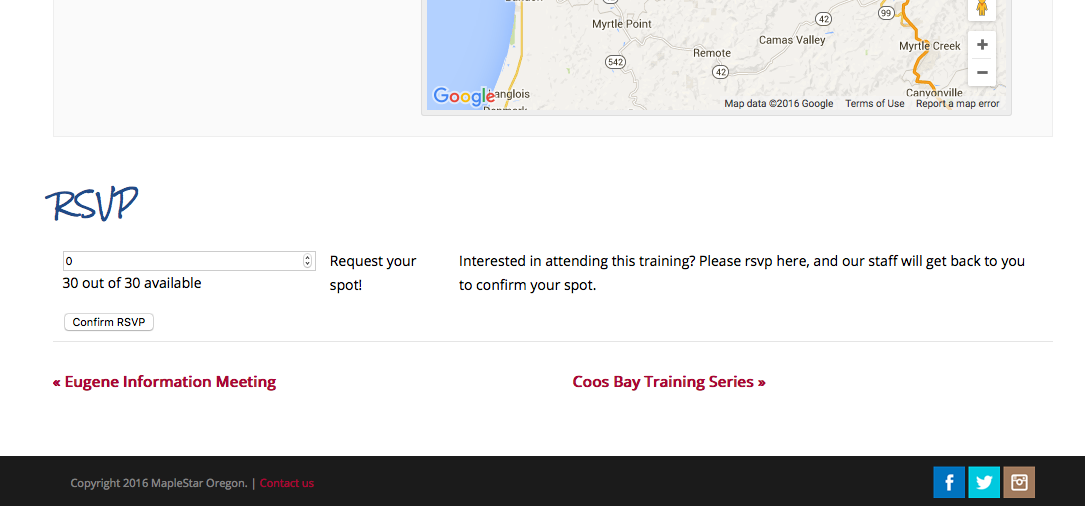
In that screenshot, for example, “Eugene Information Meeting” and “Coos Bay Training Series” would be hidden….
Let me know if this is your goal and I can share some CSS to hide these links! If you are interested in doing it via template modifications anyways, then you likely will be able to do it by applying the same changes you made to list/single-event.php to BOTH list/single-event.php and then also just the main single-event.php file—whose path is just src/views/single-event.php.
Cheers!
GeorgeParticipantHey James,
Sorry to hear about these issues! We are happy to issue a refund and that might be the course of action here, because unfortunately there is little we can do about theme conflict issues. 🙁
In the meantime, can you clarify what specific actions you did when you describe doing this:
But I updated my blog index a couple of days ago,
What do you mean by “updating your blog index”, specifically? Do you mean just publishing more blog posts? Are you referring to some theme settings that you adjusted? Let me know.
Thank you!
George -
AuthorPosts