
Home › Forums › Calendar Products › Events Calendar PRO › single-event.php override not working
- This topic has 4 replies, 3 voices, and was last updated 10 years, 6 months ago by
Support Droid.
-
AuthorPosts
-
March 7, 2016 at 6:19 pm #1086124
Devra
ParticipantPRO doesn’t have its own single-event.php template for the single event template, correct? This just uses the main Events calendar template from the plugin’s src/views/single-event.php, correct?
We are finding it problematic that the standard template is forcing events from other categories to show up in prev/next–it’s really problematic for us to have event categories’ events intermixing anywhere on the site!–so in our own version of the template, have removed this code entirely to do away with the problem.
We have uploaded this to /ourtheme/tribe-events/list/single-event.php, but the prev/next events are still showing up at the bottom. See http://maplestaror.org/event/coos-bay-training/2016-04-01/ as an example.
It does not seem to be overriding the main single-event.php template. We would obviously like to do so without editing the source one, because that’s so likely to get overwritten on a plugin update. Please advise.
March 9, 2016 at 5:20 pm #1086929George
ParticipantHey @Devra,
Thanks for reaching out. You are correct in your statements about how the only list/single-event.php file that exists is within the core plugin, The Events Calendar. There is no such file in Events Calendar Pro.
As for the customization you are trying to do here, it sounds like it might be possible with pure CSS, so no template modifications would be needed at all—of core plugin files or of your own theme-template versions regardless.
To help determine if this is the case, can you clarify whether your main goal is to remove the bottom two links on the bottom of the single-event view as shown in the screenshot below?
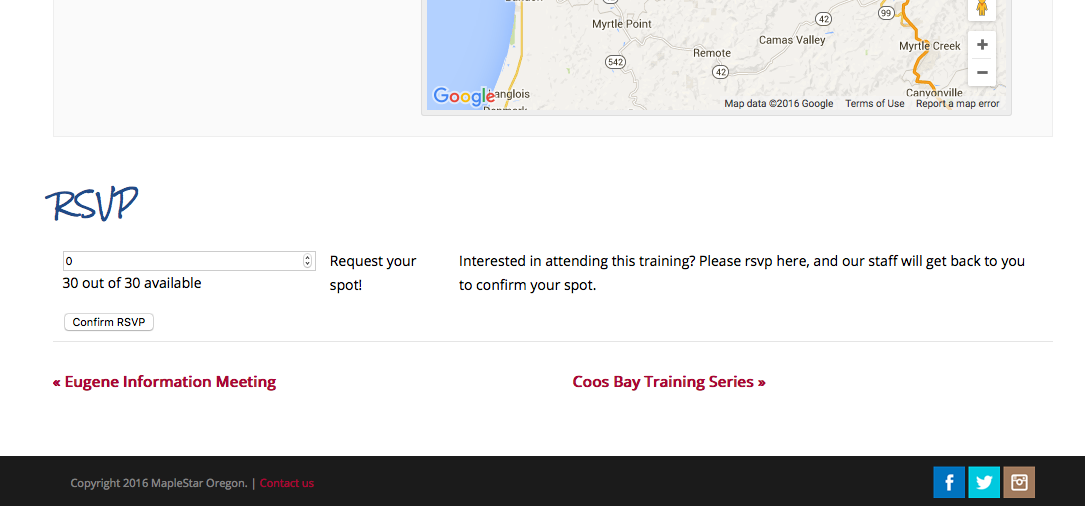
In that screenshot, for example, “Eugene Information Meeting” and “Coos Bay Training Series” would be hidden….
Let me know if this is your goal and I can share some CSS to hide these links! If you are interested in doing it via template modifications anyways, then you likely will be able to do it by applying the same changes you made to list/single-event.php to BOTH list/single-event.php and then also just the main single-event.php file—whose path is just src/views/single-event.php.
Cheers!
GeorgeMarch 10, 2016 at 11:09 am #1087335ParticipantHi, George–
Yep, that is the area we wanted to remove. I did, in the end, end up hiding this via css as you suggested.
But this does add (however little) to more markup and more of a concern, doesn’t give us a vote of confidence in being able to override/make other changes to this template that won’t get erased after updating. What would be the point in making changes to both list/single-event.php and the main single-event.php? Is it just to keep a copy on the server when single-event.php is likely to be overwritten by plugin updates?
We don’t actively need assistance on this, but am keeping it marked as such because the inability to override single-event.php should remain an open issue until resolved.
Thanks,
DevraMarch 10, 2016 at 5:32 pm #1087537ParticipantHey @Devra,
Both files are named single-event.php but they are not the same file or just a duplicate of each other.
What would be the point in making changes to both list/single-event.php and the main single-event.php? Is it just to keep a copy on the server when single-event.php is likely to be overwritten by plugin updates?
The point of it is that single-event.php in the root directory is the Single Post Type template. Similar to—not the same as, but very similar to—the WordPress Core template files single.php and singular.php.
The other various sub-directory versions of single-event.php are not for this sort of role. They are for a different role—they are for “individual events within a specific context.” That specific context is the view they are named under.
So, for example, if you have a List View with 10 events, then you have 10 instances of the list/single-event.php file. If you were to click any of these list view events to view a single event by itself, then the view when viewing that single event by itself is the root single-event.php.
They are different templates with different roles, and are loaded in different contexts. I hope this helps clarify things!
— George
March 25, 2016 at 9:35 am #1094118KeymasterThis topic has not been active for quite some time and will now be closed.
If you still need assistance please simply open a new topic (linking to this one if necessary)
and one of the team will be only too happy to help. -
AuthorPosts
- The topic ‘single-event.php override not working’ is closed to new replies.