

Forum Replies Created
-
AuthorPosts
-
March 13, 2016 at 5:15 pm in reply to: Events Calendar plus Events Calendar Pro Update from 4.0.1 to 4.0.7 #1088311
George
ParticipantHey Linda!
Thanks for reaching out.
YES, The Events Calendar must be installed for Events Calendar Pro to work. The Events Calendar is not so much the “free version” of the calendar features—think of it like WordPress itself, a “core” (or, in your words, “base”) spine of functionality that our premium add-ons like Events Calendar Pro add on to.
Next, in terms of “safely updating,” updating is not dangerous to begin with. 🙂 You should be able to auto-update when the notice to do so arrives in your dashboard; if such a notice doesn’t arrive, or if you want to manually perform the update, then you can get the files to do so at any time from here → http://theeventscalendar.com/my-account/downloads
If you want to test an update’s efficacy on the staging area before the production area, that’s fine—simply DO NOT enter your license key on staging, only keep it on production. The lack of license will make no impact on functionality whatsoever.
Then, manually update the files on your staging site by going to the link I shared above to download the files. See how things behave, and if all is well, perform the same update tasks on your licensed production site.
I hope this information helps!
Sincerely,
GeorgeMarch 13, 2016 at 5:10 pm in reply to: Changes in filter bar and/or how The Events Calendar/Pro works recently? #1088308ParticipantHey James,
If you head to Events → Settings → Filters in your site’s wp-admin, can you try clicking the “Event Category” options tab in the “Active Filters” section?
Once here, you should be able to choose “Autocomplete” as the filter type which should restore the functionality you want.
Here’s a screenshot of that for reference:
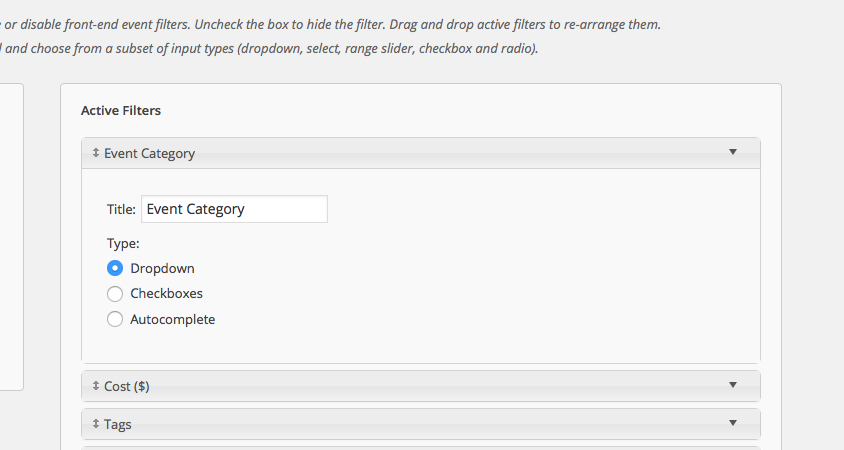
Can you confirm if this option exists on your site, and if changing to that option restores that functionality on your site?
If not, I can respond to your other queries—just wanted to see if this main thing helps!
Thank you,
GeorgeParticipantHey Jade,
Thanks for reaching out!
You can find translations for all of our projects here → http://translations.theeventscalendar.com/projects
At this time, the Hungarian translation for Events Calendar Pro is only about 61% complete. 🙁 And this might still include erroneous translations or outdated ones, unfortunately.
I hope that link is helpful and you can explore the Hungarian translations for our various plugins. You may determine it to be “complete enough” for your needs, but in full honesty it is not 100% complete by a big margin.
Sincerely,
GeorgeMarch 13, 2016 at 4:48 pm in reply to: When will Version 4.1, as described below, be released? #1088302ParticipantHey Frank!
There is still no confirmed, specific launch date at this time. We’ve missed the hoped-for range of “early March,” of course, so at this point the goal is to get it out before April is upon us. 🙂
Thank you,
GeorgeParticipantHey Amy,
Thanks for reaching out!
Events Calendar Pro does NOT include any of the features for Community Events.
However, to be clear, you do NOT need Events Calendar Pro to then also install Community Events. You can have just The Events Calendar and Community Events on your site, without adding Events Calendar Pro. Just wanted to point this out in case you thought otherwise. 🙂
Thank you,
GeorgeParticipantHey Jeremy!
Thanks for reaching out, and for considering our products.
Unfortunately, at this time what you describe here is not possible with our products:
With your solution, could we sell One “Ticket” to that whole series/instances of that Class and then “Check-In” Attendees separately and distinctly for each of the 12 “Instances” of that one Ticket being used?
This is something we’re keen on building into our plugins eventually, though the roadmap for that is on the scale of many weeks and several months, so it’s not something that will be imminently available in time for your project. 🙁
I’m sorry to bear this news! Let me know if there’s anything else I can try to help with.
Sincerely,
GeorgeParticipantHey Chris,
Thanks for reaching out!
The plugin cannot be re-purposed in the way you describe without extensive code customizations. So, if you are comfortable writing all of the custom code yourself, or are willing to hire a developer to do that for you, then yes you could theoretically do what you describe.
But there is no simple way to do this “out of the box,” and we unfortunately aren’t able to help with customization projects like that. So it’s possible, but would require a pretty significant amount of time and energy to complete.
If you think that such a level of customization is not required, and want to simply change the “name” of everything so that, instead of “events” and “organizers”, for example, you have “courses” and “health professionals” or something, you can do this sort of change much more simply—you can change the names of these labels using the functions described in these Knowledgebase articles:
• “Events” → https://theeventscalendar.com/knowledgebase/changing-the-word-events-to-something-else/
• “Organizers” and “Venues” → https://theeventscalendar.com/knowledgebase/relabeling-the-venue-organizer-sections-in-event-meta/I hope this information helps!
Sincerely,
GeorgeParticipantHey Chris,
Thanks for reaching out!
There are no known conflicts with that plugin at this time. There’s a smattering of topics on our forums that relate to issues on a site where both plugins are installed alongside each other, but a specific conflict between these two plugins is not identified.
And the threads I could find are from 2013. 🙂
All that being said, there is no special integration we have coded for that plugin or anything. So at best the plugins will work alongside each other without issue; but there is no “working hand-in-hand” element to this, where either have features specifically designed with the other in mind.
There should not be any issues. If there are, you can confirm the nature of the conflict by using the steps here → https://theeventscalendar.com/knowledgebase/testing-for-conflicts/.
And please note that we have a full no-questions-asked refund policy if the refund is requested in 30 days of purchase. I hope this helps lower the feeling of risk in trying out our plugins! → https://theeventscalendar.com/knowledgebase/refund-policy/
– George
ParticipantHey Furkan,
Thank you for reaching out, and for your interest in our plugins!
We unfortunately are not able to help out with the sort of configuration and setup things you mention here. For a full breakdown of the support that comes with one of our pro licenses, check out the “Product Support” section of this page here → http://theeventscalendar.com/terms
Thank you!
GeorgeParticipantHey Brooks!
Yes, you can simply deactivate the license on your beta/development site and then add it to the “Live” site when you’re ready. 🙂
I hope this helps!
GeorgeParticipantHey @leonardchamber,
I’m sorry to hear this—I cannot produce this error at all, still, and am sorry for back-and-forth in trying to isolate the cause of things here.
The specific lines of code that are being referenced seem to imply an issue with a get_option() call on your database, but your system information isn’t missing any of those options. So the behavior is odd and I cannot reproduce any similar problems.
There are two paths forward I can think of from here, which I’ll describe below.
Path 1: Continuing to Troubleshoot
If you want to continue investigating this, I’m happy to do so and am investigating this myself regardless. To do this, can you clarify if you’ve done the full set of troubleshooting steps that are outlined in this article? → https://theeventscalendar.com/knowledgebase/testing-for-conflicts/
I know you’ve deactivated WordFence and appreciate your doing so—the full steps above, however, are thorough and will definitively rule out (or reveal) the presence of a code conflict here.
Check on the issue after EACH step in that process and see if anything improves.
Path 2: Disabling PUE Altogether
The main error on your site is related to our PUE checker, which you can disable outright by adding this line of code to your site’s wp-config.php file:
define( 'TRIBE_DISABLE_PUE', true );
Adding that line should unhook the function where the main error is arising from.
Let me know which way you’d like to proceed, here! If you’re interested you can do the investigatory steps first, and then disable PUE according to the second option while the investigation continues.
Thank you for your patience here!
GeorgeMarch 13, 2016 at 9:03 am in reply to: The month-calendar in mobile view shows full weekday-names #1088242ParticipantHey @Jürgen,
To be clear, I’m not recommending reinstalling everything on your site just yet! 🙂 Those steps I recommended are only about DEACTIVATING some plugins temporary, not DELETING them.
Apologies for the capitalized words there—just wanted to emphasize those for absolute clarity.
If you want to go the route of reinstalling things regardless, then yes, you can export and re-import data in a number of ways. A simple method is described here, for example → https://theeventscalendar.com/knowledgebase/using-wordpress-export-tools-to-migrate-events-content/
However, even if you delete The Events Calendar and Events Calendar Pro that should not erase any event data whatsoever. Once you reinstall, all of the data should reappear without issue. 🙂
I hope this helps! Let me know how you choose to proceed and what you find by doing so.
Sincerely,
GeorgeParticipantHey @Reinhard,
Thank you for this information!
Nothing is outright problematic here, and if you tested your theme to no avail, then unfortunately the best way forward I can think of from here would be to just keep using the CSS solution I shared.
I’m glad to hear that solution is helpful. I will close up this thread for now, because you mention that the CSS fixes things, but if other issues arise please open a new thread any time!
Thank you,
GeorgeParticipantExcellent—thank you for this information, @Robokev!
I just tested this on my local site and it worked fine; the excluded date was successfully excluded….
Also, your Tribe plugins are up-to-date, so there’s no “update” recommendation I could make.
Because of these two factors, I’m wondering if you would be able to go through all of the steps here → https://theeventscalendar.com/knowledgebase/testing-for-conflicts/
After EACH STEP in that process, try creating a new simple testing recurring event, with an exclusion—let the event generate, and then check it out on the front-end.
Does anything change with these test events that you create along the way?
Now, this process might sound tedious but it is much faster to do than it sounds. It also is the only way to definitively reveal or rule out a conflict at this point, which might be the case here because I cannot recreate this problem with the same versions of the Tribe plugins you are running.
Let us know what you find!
Thank you,
GeorgeParticipantThank you for this information!
I don’t spot anything outright problematic, but am wondering if the WordFence plugin is blocking license-check requests which is leading to the error on your site related to “PUE Checker”.
If you deactivate that WordFence plugin temporarily, does anything improve with regards to those notices?
Thank you!
George -
AuthorPosts