
Home › Forums › Calendar Products › Community Events › Changes in filter bar and/or how The Events Calendar/Pro works recently?
- This topic has 3 replies, 2 voices, and was last updated 10 years, 7 months ago by
George.
-
AuthorPosts
-
March 11, 2016 at 4:21 pm #1088043
bcitweb
ParticipantWe had been a couple point releases out of date and were running The Events Calendar 4.04, and the Pro and Filter Bar plugins 4.01. With this setup on our dev environment, the category filter was a multi-category select with predictive text entry, which worked on both desktop and mobile. This multi-category filtering use case also met the spec for our project.
When we moved everything to production, I installed the most recent Events Calendar, 4.07, but left the filter bar and pro plugins at 4.01, since we’d done some custom CSS and didn’t want any inadvertent functionality changes. However, with this setup the multi-category select changed to a standard single dropdown. Since I thought this might be a filter bar or pro issue, I upgraded to the latest releases of those, but the filter use case change remained. I went through all the release notes and couldn’t see an obvious feature change related to this anywhere.
My first question is why and when this was changed. Second, since we really want this functionality, my other questions are about rolling back to the setup in the first paragraph:
- If I uninstall the Events Calendar 4.07 properly through WP plugin admin, does anything at all get left behind (tables or other things) which might cause strange behaviour?
- Can I do the scenario from my first question above and then either move the 4.04 files from my dev environment and re-enable, or is there a better rollback path?
I have attached some screenshots of the two filter scenarios in action so you know what I’m referring to.
Initial multi-category select/predictive text filter:
https://drive.google.com/open?id=0ByWDTXhdmaQtc1dmOTRjT3FjQ2MNew, less functional single category dropdown:
https://drive.google.com/open?id=0ByWDTXhdmaQtRTNSNWl2QlREYVUThis is kind of a crunch thing right now, so please get back at your earliest.
Thanks.
March 13, 2016 at 5:10 pm #1088308ParticipantHey James,
If you head to Events → Settings → Filters in your site’s wp-admin, can you try clicking the “Event Category” options tab in the “Active Filters” section?
Once here, you should be able to choose “Autocomplete” as the filter type which should restore the functionality you want.
Here’s a screenshot of that for reference:
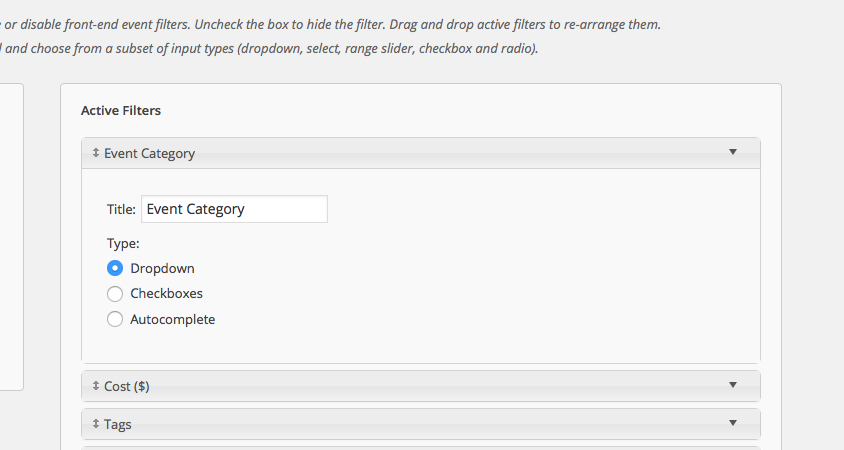
Can you confirm if this option exists on your site, and if changing to that option restores that functionality on your site?
If not, I can respond to your other queries—just wanted to see if this main thing helps!
Thank you,
GeorgeMarch 13, 2016 at 5:53 pm #1088324ParticipantHey George;
Thanks for the quick response over the weekend. That did the trick, thanks so much. I swore I replicated every. little. setting. when setting it up on our prod environment, but somehow I missed ticking that checkbox … (face palm) I think I replicated the filters but didn’t go into the type of category filter.
Thanks again, much appreciated.
March 14, 2016 at 11:55 am #1088580ParticipantNo worries! 😀 Glad to have helped—I’ll close up this thread, but open a new one any time if other questions/issues arise.
Sincerely,
George -
AuthorPosts
- The topic ‘Changes in filter bar and/or how The Events Calendar/Pro works recently?’ is closed to new replies.