Forum Replies Created
-
AuthorPosts
-
George
ParticipantHey Alejo,
Thanks for your interest in our plugins!
We have no special integrations with that theme, but as long as that theme itself is well-coded, there should not be any issues.
If you find conflicts with our plugins and that theme, please note that we have any awesome refund policy and you can get a full refund within 30 days of your purchase of one of our plugins → https://theeventscalendar.com/knowledgebase/refund-policy/
Thank you!
GeorgeParticipantHey Benjamin,
Thank you for your question! Unfortunately, this is not possible:
Is there any way we can configure Event Tickets to automatically activate second batch tickets only after the first batch of tickets run out i.e. the stock of first batch (early bird) tickets goes down to 0?
The only thing our plugins provide is automatic activation of ticket sales based on date—like, for example, Ticket Type A start selling on April 15 at 5pm, then Ticket Type B starts selling on April 20 at noon.
There aren’t other automatic ticket-sale activation or deactivation options at this time, unfortunately. 🙁
Sorry to disappoint!
Sincerely,
GeorgeParticipantHey Stefaan,
Thanks for reaching out! I cannot promise a full solution here, because this unfortunately is a limitation of the Genesis theme’s design choices—the genesis_before action being used there does not run in our plugins by default, so the main thing (or, at least, the first thing) to ensure is that the action runs on Events Calendar views.
To ensure this, there are a few things I can think of.
The simplest approach that I would first recommend exploring is just changing the “Events Template” option in your Events Calendar settings. There might be a template already in your theme that has the required Genesis actions.
To do this, head to Events → Settings in your wp-admin and find the option called “Events Template”. Try out every single option here—save changes after choosing a template, then check out the events page and see if the Genesis menu behaves any differently on your events page.
If the steps above do not help, then we can proceed with other testing.
However, one thing I’m curious about is if you can ensure that your events page is publicly viewable? I went to http://www.ooooooo.be/ and it was unfortunately a 404 error, no content was visible. 🙁 We cannot log into customer sites for any reason, so if possible, can you make your events page publicly viewable? I will take a look and see if I can spot any details relevant to your issues.
Thank you!
GeorgeMarch 15, 2016 at 8:08 am in reply to: I see a plugin for Events from Facebook to Tickets but not the other way #1089061ParticipantHey @Charles,
Sorry to bear the bad news here, but we unfortunately don’t have any functionality to go from your WordPress site to Facebook. 🙁
Sorry to disappoint!
Let me know if there’s anything else I can help with, on this topic or another one.
Sincerely,
GeorgeParticipantHey @dcantato,
I’m sorry to hear that your “related events” results are sub-par. Tags and categories are weighed equally by the function that loads related events, but if you would like to change the function at all, you can indeed do this.
Modifying the function OR adding location-based relationships are both, unfortunately, code customizations. I say “unfortunately” because we cannot help with code customizations. Check out “product support” on this page for more information about that → http://theeventscalendar.com/terms
That being said, there are two filters you can use:
• tribe_related_posts_args
• tribe_get_related_postsThese are quite powerful on their own and I hope you find them useful. To learn more about these filters, and about the function that gets related posts in general, then head to this file in your plugin files for Events Calendar Pro:
events-calendar-pro/src/functions/template-tags/general.phpThe function to look for is called tribe_get_related_posts().
I hope this information helps. Best of luck with your customizing!
– George
ParticipantThank you so much for this information, @Robokev, and for your patience!
I have tried recreating an event series with the exact configuration you describe.
I didn’t have the specific problems with exclusion you describe—only 2 events generated, with the exclusion for March 20th working fine for me—but I’m curious about the specific time-related issues you have. I.e., how the behavior changes just by setting the event’s start time to 5 minutes before 7pm.
That is odd!
I notice in your System Information that there doesn’t seem to be a timezone setting on your site; if you head to Settings → General in your site’s wp-admin and add the appropriate timezone here, does anything change at all with this behavior?
Thank you so much for your patience and persistence with this—we HAVE had bugs with exclusions in the past, so I am not doubting your claims one bit. I am simply having trouble recreating them—based on your findings with the timezone setting, I will escalate this issue as a bug regardless and see if other members on our team find similar issues.
Thank you!
GeorgeMarch 14, 2016 at 1:09 pm in reply to: Something odd and messed up is happening in my footer on my Submit Event Page #1088654ParticipantHey Gregory,
I unfortunately don’t know anything about A Small Orange, nor many other hosting companies. 🙁
Speaking only from firsthand experience, the companies I listed are excellent. For “managed hosting” alternative that I’ve had good experiences with in the past, I’d rate GoDaddy a 6/10, Media Temple a 7/10, and A2 Web Hosting an 8.5/10.
Each of those three offer lower-cost hosting than the others I listed.
There’s not a whole lot else we can share regarding web hosting, but I hope this information helps. You can’t go wrong with any of the options I’ve listed in this reply or the one from earlier, in my opinion!
Cheers,
GeorgeParticipantHey Gerald,
I appreciate your clarification of things!
the behavior you describe makes it clear that WP Directory is the culprit—there is unfortunately not a quick solution here, and it sounds like the plugins are inherently not going to work alongside each other.
If this necessitates a refund, please let us do that—I’m really sorry for the trouble here! You can get a refund of our plugin by following these steps → https://theeventscalendar.com/knowledgebase/refund-policy/
In the meantime, if you’re at all interested in trying to suss out the specific error, you might be able to find a specific PHP error by seeing if any errors pop up on your site if you head to your site’s wp-config.php file and change this line of code:
define('WP_DEBUG', false);to this:
define('WP_DEBUG', true);After making this change, take another look at the broken license tabs and see if any PHP errors display there.
If so, copy and paste those errors in their entirety, and then paste them into a Gist at http://gist.github.com. Then you can share that Gist with us AND with the folks on the WP Directory support team.
This might help!
Sorry for the trouble here, @Gerald.
Sincerely,
GeorgeParticipantHey Reinhard,
Thank you for your writeup. We unfortunately do not have any such program or process for trial licenses at this time. The best thing we offer along these lines is our no-questions-asked Refund Policy.
As long as you request a refund within 30 days of purchase, we can issue a refund immediately at your request if you follow the steps here → https://theeventscalendar.com/knowledgebase/refund-policy/
So, the best and only option to pull off a sort-of “Trial” like you mention would be to purchase the licenses, try them out, and then request a refund within 30 days from the date of purchase if you find that our plugins do not do the job.
I’m genuinely sorry about this being the only option!
Sincerely,
GeorgeParticipantNice! Cheers. 🙂
March 14, 2016 at 12:49 pm in reply to: No place to add license and it's not letting me download my included plugins #1088638ParticipantHey Jason,
Sorry to hear that issues persist. We cannot log into customer sites for any reason, so please do NOT post any login information for your site, but I’m wondering if a look into your site’s admin would be helpful here.
To do this, follow these exact steps:
1. Google “how to take a fullscreen screenshot” in whichever browser you are using. If it’s Firefox or Chrome or Safari, there should be an easy method.
2. Then, go to the “Edit” screen for your test event.
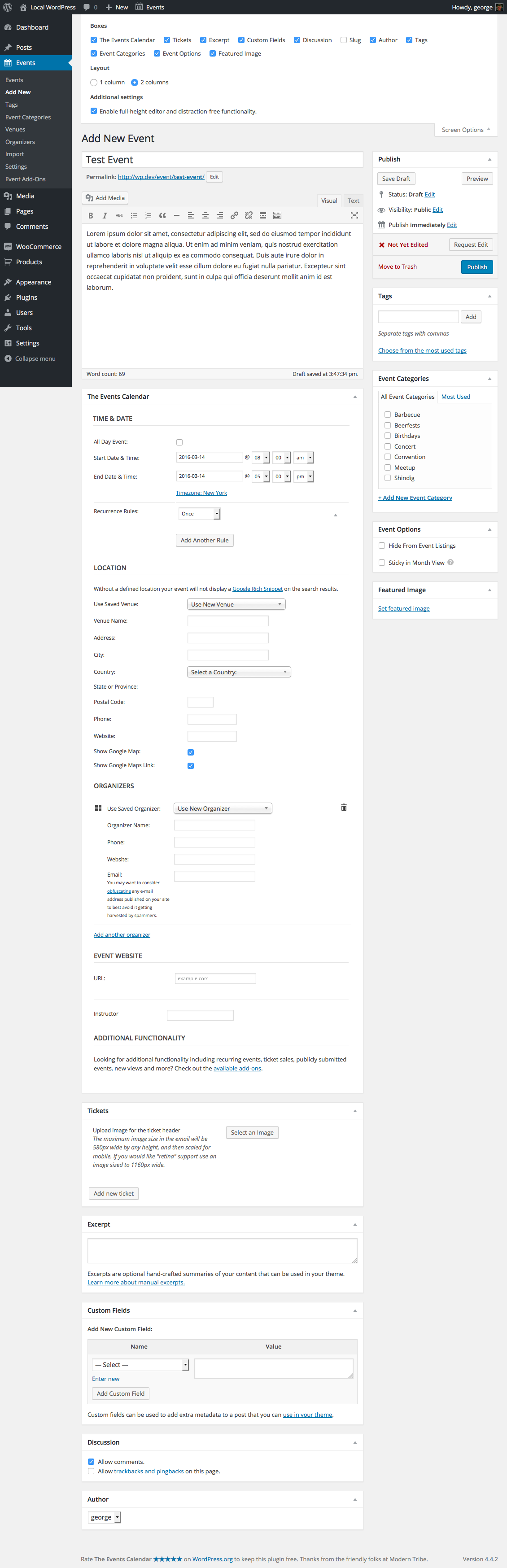
3. Then, click the “Screen options” tab in the upper-right-hand corner of this Edit-event screen. This should expand a list of checkboxes.
4. Then, take a screenshot of the FULL ADMIN PAGE using the method you learned in step #1.
5. Finally, upload the screenshot to Imgur.com, Flickr.com, CloudUp.com, or any similar image-hosting site; then just share the links to those images here and I’ll take a look.
As an example of what your screenshot will hopefully look like, here’s a screenshot of my own “Edit event” screen with the “screen options” tab open:
https://cldup.com/GUCQT1C7Zr.png
If you share a screenshot just like that, with the “Screen options” tab open, that should be very helpful.
Thank you for your patience here! I cannot recreate your problem so these extra steps will be immensely helpful.
Sincerely,
GeorgeMarch 14, 2016 at 12:37 pm in reply to: The month-calendar in mobile view shows full weekday-names #1088635ParticipantThanks for the follow-up, Jürgen.
The good news is that it doesn’t seem to be impacting the actual performance of the maps—nothing seems to break outright, I mean.
As for the notice itself, I cannot recreate it. It may be arising because your hosting situation—this seems to be a shared host, for example. Is it? If so, then the IP addresses from this host might be making many requests to Google thus causing this error or something. I honestly do not know. 🙁
I am glad it doesn’t seem to be affecting the functionality at all—do you agree that it is not? If so, it might be best to just chalk this up to a fluke for now, and then if issues start arising we can reopen an investigation here.
Let me know what you think!
Thank you, and sorry for not knowing exactly why this error is arising. It’s a weird one!
Sincerely,
GeorgeMarch 14, 2016 at 12:29 pm in reply to: Want to buy the Pro version, testing the free version first, plug-in error #1088631ParticipantThank you for this!
There is a discrepancy here in your event URLs—what I mean is that your site’s URL is listed as this:
• http://www.dannyvermeeren.nl
Then, your site’s Events URL slug is listed as this:
• evenementen
However, the link to your events page that you shared is this:
• https://www.dannyvermeeren.nl/Online2/evenementen/
1. Where is the “online2” coming from?
2. The events slug CANNOT be a sub-folder. It cannot be /online2/evenementen, for example—it can only be /evenementen
3. If you disable whatever is adding that online2 sub-folder to the slug, so that https://www.dannyvermeeren.nl/Online2/evenementen/ becomes https://www.dannyvermeeren.nl/evenementen/, does anything improve?
Thank you,
GeorgeMarch 14, 2016 at 12:21 pm in reply to: No place to add license and it's not letting me download my included plugins #1088607ParticipantSo, in regards to your issues, I notice in your “System Information” that Event Tickets is not installed.
This is required for Event Tickets Plus to work—to clarify, Event Tickets Plus is not a “premium” version of Event Tickets. Instead, think of Event Tickets as the “core” of ticket-related functionality. It provides RSVPs, for examples. Then, Event Tickets Plus is an add-on to Event Tickets that adds all the other functionality like WooCommerce-compatible tickets, etc.
So the first order of business here is to download, install, and activate Event Tickets. You can get that here → https://wordpress.org/plugins/event-tickets/
Once that is installed and activated, let me know if there’s any progress here.
— George
March 14, 2016 at 12:18 pm in reply to: No place to add license and it's not letting me download my included plugins #1088600ParticipantHey Jason,
Our standard response rate is one reply within 24 hours of your last reply. Your patience with this is appreciated.
— George
-
AuthorPosts