
Home › Forums › Ticket Products › Event Tickets Plus › No place to add license and it's not letting me download my included plugins
- This topic has 14 replies, 2 voices, and was last updated 10 years, 7 months ago by
George.
-
AuthorPosts
-
March 14, 2016 at 7:09 am #1088402
jason
ParticipantI bought a license, but when I click to get plugin it goes to the pay screen but it’s already purchased
Further, there’s no where to add licnese.March 14, 2016 at 7:20 am #1088411ParticipantHey @Jason,
Sorry to hear about these issues—when you write “when I click to get plugin,” can you clarify which specific thing you are clicking before prompted to pay for something?
Share a screenshot of the specific link you click when this happens, if possible. You can do so by uploading the screenshot to Imgur.com, Flickr.com, CloudUp.com, or any similar image-hosting site; then just share the links to those images here and I’ll take a look.
Next, you describe how there is no place to add the license—can you share the “System Information” for the site where you have this problem? Here’s how to do that → https://theeventscalendar.com/knowledgebase/sharing-sys-info/
Thank you!
GeorgeMarch 14, 2016 at 7:31 am #1088429ParticipantThis reply is private.
March 14, 2016 at 10:58 am #1088552ParticipantAny updates? id love to get this working today if possible.
March 14, 2016 at 12:18 pm #1088600ParticipantHey Jason,
Our standard response rate is one reply within 24 hours of your last reply. Your patience with this is appreciated.
— George
March 14, 2016 at 12:21 pm #1088607ParticipantSo, in regards to your issues, I notice in your “System Information” that Event Tickets is not installed.
This is required for Event Tickets Plus to work—to clarify, Event Tickets Plus is not a “premium” version of Event Tickets. Instead, think of Event Tickets as the “core” of ticket-related functionality. It provides RSVPs, for examples. Then, Event Tickets Plus is an add-on to Event Tickets that adds all the other functionality like WooCommerce-compatible tickets, etc.
So the first order of business here is to download, install, and activate Event Tickets. You can get that here → https://wordpress.org/plugins/event-tickets/
Once that is installed and activated, let me know if there’s any progress here.
— George
March 14, 2016 at 12:23 pm #1088613ParticipantTHANK YOU
I realized that about an hour ago after trying to sort it out myself.
I have since installed that core plugin for tickets but tickets are still not showing on my events.
I had set up a test event and the price is listed but there’s no ticket option shown. I have woocommerce activated and set up. Cant seem to figure it out.March 14, 2016 at 12:49 pm #1088638ParticipantHey Jason,
Sorry to hear that issues persist. We cannot log into customer sites for any reason, so please do NOT post any login information for your site, but I’m wondering if a look into your site’s admin would be helpful here.
To do this, follow these exact steps:
1. Google “how to take a fullscreen screenshot” in whichever browser you are using. If it’s Firefox or Chrome or Safari, there should be an easy method.
2. Then, go to the “Edit” screen for your test event.
3. Then, click the “Screen options” tab in the upper-right-hand corner of this Edit-event screen. This should expand a list of checkboxes.
4. Then, take a screenshot of the FULL ADMIN PAGE using the method you learned in step #1.
5. Finally, upload the screenshot to Imgur.com, Flickr.com, CloudUp.com, or any similar image-hosting site; then just share the links to those images here and I’ll take a look.
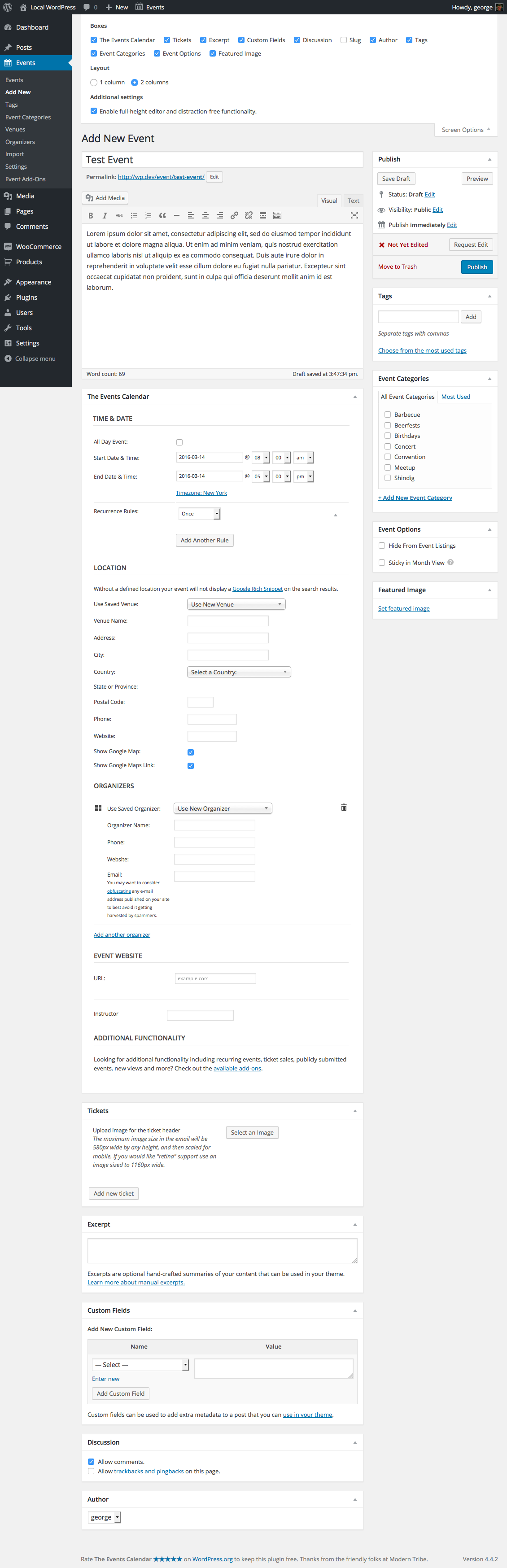
As an example of what your screenshot will hopefully look like, here’s a screenshot of my own “Edit event” screen with the “screen options” tab open:
https://cldup.com/GUCQT1C7Zr.png
If you share a screenshot just like that, with the “Screen options” tab open, that should be very helpful.
Thank you for your patience here! I cannot recreate your problem so these extra steps will be immensely helpful.
Sincerely,
GeorgeMarch 14, 2016 at 2:08 pm #1088772Participantsee here for all screen shots…
 March 15, 2016 at 12:01 pm #1089275Participant
Any progress?
March 15, 2016 at 6:11 pm #1089445ParticipantHey Jason,
Thanks for these screenshots.
In your edit-event screen, does the ticket you’ve created have a “start sale” date or “end sale” date?
Thank you,
GeorgeMarch 15, 2016 at 6:52 pm #1089460ParticipantYes I’ve tried all that. I went through setting by setting, like by line and tried everything. Still no ticket sale option showing and my business is at a standstill until I get this working, I dropped eventespresso in the hopes that this would work out of the box, please help.
March 17, 2016 at 7:33 am #1090252ParticipantHi Jason,
You said your sample events page was here: http://www.seazengallery.com/events/
I cannot find the test event “Test Paint n Sip” there—can you link to an example event that you’ve added tickets to? I’m curious to see if there’s a CSS issue here that leads to the ticket form being hidden.
Thank you for your patience!
GeorgeMarch 17, 2016 at 7:40 am #1090261ParticipantAfter a couple days of not hearing back, I updated everything and for some reason the next day , it started working. NOt sure what happened.
March 17, 2016 at 8:08 am #1090278ParticipantGlad to hear it!
Best of luck with your site,
George -
AuthorPosts
- The topic ‘No place to add license and it's not letting me download my included plugins’ is closed to new replies.