

Forum Replies Created
-
AuthorPosts
-
March 17, 2016 at 12:56 pm in reply to: Need to be able to parse calendar based on login credentials #1090534
George
ParticipantA Simple Method for Achieving Two Calendars
There is a simple way to selectively hide events from non-logged-in users, but have those events displayed everywhere on your site for users who are logged-in.
It works in three parts:
Part 1. Make an Event Category site that all “hidden for non-logged-in users” Events will be categorized in. If an event should be hidden from non-logged-in users, put it in this category.
Part 2. Write some CSS to hide all events in that category on your site by default.
Part 3. Write some more CSS to SHOW the events in that category IF the current user is logged in.
Part 1: Make an Event Category
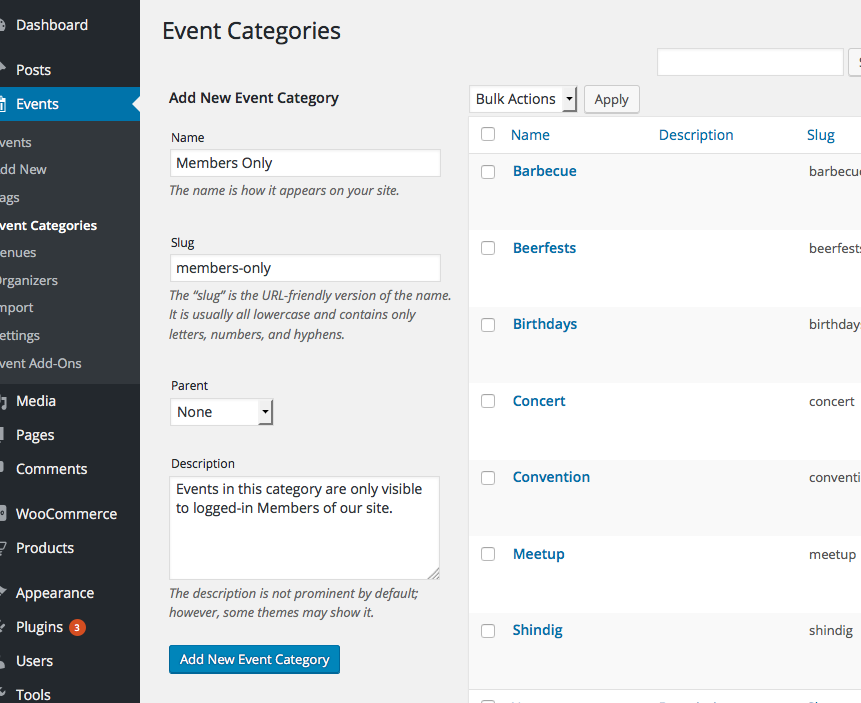
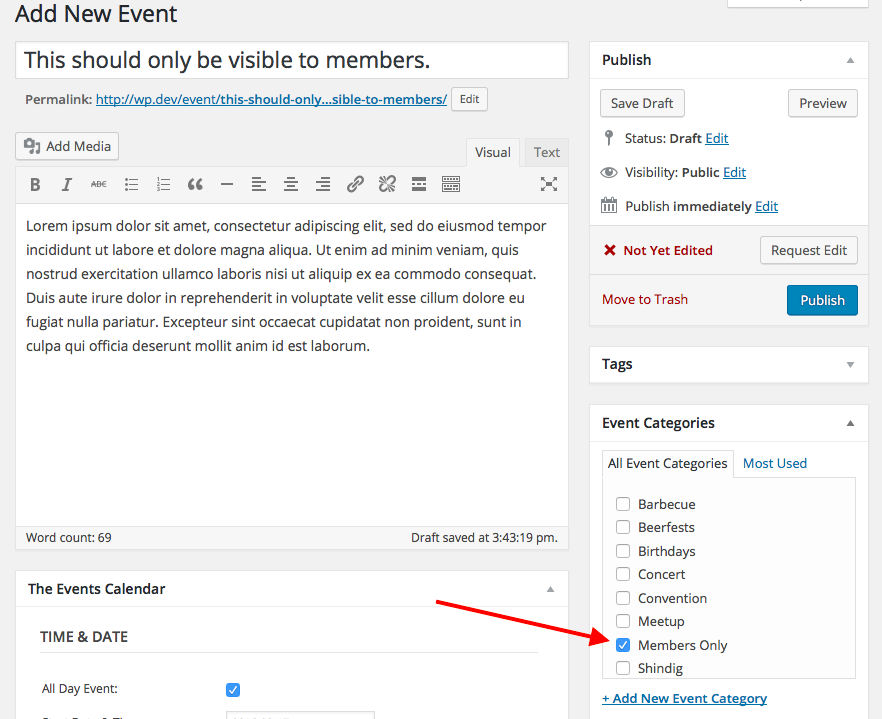
This is the category that will help identify which events should be visible only to logged-in users on the front end. Here are two screenshots, where the first one shows the creation screen of my “Members Only” example category, and the second one shows the application of this Category to an example event:
Part 2: Write CSS to Universally Hide That Category
Once you publish that event, it will, of course, show up on the day on which it will occur:

The Event Category I created was called “members only”, with the slug “members-only”, so to hide these events with CSS you just add CSS like this:
.type-tribe_events.tribe_events_cat-members-only {

    display: none !important;

}
Now those events are hidden:

And not just in the month view, either! The events in that category will be hidden from all front-end views.
Part 3: Write CSS to Selectively Show That Category if the User is Logged In
Now we just add another bit of CSS below the CSS shared above—this additional section of CSS will keep the “display: none;” rule by default, but IF the user is logged on, the events will show like normal:
body.logged-in .type-tribe_events.tribe_events_cat-members-only {

    display: inline-block !important;

}
There you go! You can do this MULTIPLE categories if you’d like, as well.
You will have to take the reins from here, completely, but I hope this is enough to get you started. If you need some help writing the custom CSS on your site, definitely check out a [free!] tool like Firebug if you use FireFox, or the Developer Tools for either Safari or Chrome. They have “Inspector” tools that let you zoom right over the element whose styles you want to modify and so on.
Cheers,
GeorgeMarch 17, 2016 at 12:38 pm in reply to: Need to be able to parse calendar based on login credentials #1090521ParticipantHey Craig,
Thanks for reaching out. What you describe is unfortunately not possible through any default, or “out-of-the-box”, means with our plugins.
To any extent that it is possible, custom code will be required. We unfortunately cannot help with custom coding, so you essentially have to take the reins on implementing this “dual calendar” configuration on your site.
There are numerous ways to go about doing this. I will write another reply here showing the simplest method, which essentially just relies on custom CSS. This is the only method I can share here, as it’s the simplest. The other methods are very complex and require much PHP-level code-customizing. If you’re interested in these more complex/complete solutions, you would have to write that custom code or hire a professional developer to write the code for you. We have a list of great developers here → http://m.tri.be/18k1 (and have no affiliation with any of these folks—they’re simply some well-respected names in the community that we’ve compiled to share in situations like this one).
Stay tuned for my next reply, which will cover the basic method of doing this with CSS and event categories.
Thank you,
GeorgeParticipantAbsolutely, Colin—I’m sorry to hear that our plugins won’t meet your needs, but am happy to help make things right.
If you follow the steps on this page, we can issue a refund near-immediately → https://theeventscalendar.com/knowledgebase/refund-policy/
Thank you!
GeorgeParticipantHey @Victoria,
Thanks for reaching out. Here’s a response to each of the items you posed. First, I would like to address your “Bookings”-related questions:
1. Self-Service Cancelations
Provides a way for clients to cancel their appointments online rather than having to call in and verbally cancel.3. Recurring Visits
The clients can schedule recurring appointments through the online booking site, allowing them to book several meetings in advance.4. Instant Quote at Booking
The system can be set to provide an instant quote to clients to show them the cost of their appointment.None of these features are built into our plugins, and our plugins are not built for bookings handling at all. Our plugins have basic ticket-sales features; so, for example, there isn’t a way for users to cancel their own orders that they’ve paid for, but with WooCommerce’s refund system you can refund ticket orders as desired.
But that doesn’t sound quite like what you’re looking for, and your other booking-related requests are not things our plugins provide. 🙁
2. Mobile Scheduler
Be easily accessible with a mobile device or may include a mobile app.Your theme is what ultimately dictates how well your site will look and function on mobile devices. Our plugins themselves, however, are indeed built to work well on mobile devices. So, yes in some sense, but your theme could usurp our mobile functionality.
5. Text Reminders
This system is able to send text message reminders to your clients of their scheduled appointment in addition to the standard email reminder.No, our plugins do not provide this feature. 🙁
6. Automatic Time Zone Conversion
This program will automatically adjust appointment times so that clients can see those available in their own time zones rather than the company’s time.Yes.
7. Wait Lists
You can create wait lists for popular appointment times and send instant notifications to customers when they become available.We unfortunately do not have this feature in our plugins at this time. 🙁
8. Intake Forms
You can allow clients to fill out intake forms at the time they book their appointment to help reduce check-in time in the office.We do not have these features.
9. Group Calendar
Each individual staff member’s schedule is listed on a universal group calendar so that everyone in the office is aware of when each other is available.We not have this feature.
10. Client History and Reports
You can see at a glance when clients have booked appointments; how often they have missed, rescheduled or canceled appointments; and any outstanding payment balances.Our plugins do not provide this features.
I hope this information, while much of it might be a bit of bummer, is helpful.
Thank you!
GeorgeParticipantThank you for sharing this, @Andrea!
This is related to problem in our code for the 4.1 release—as you noted, this shouldn’t cause any actual bugs or issues on the site itself, but is not an ideal directory name by any means. 🙂
We’re working on a solution; I will post an update when we have some actionable steps that can be taken to resolve this.
Thank you!
GeorgeParticipantThe only meaningful difference between our test environments is that I only have Modern Tribe plugins installed and activated on my site.
There could be plugin conflicts on your site interfering with exclusions, though I doubt it. And you have unfortunately already done the tests laid out in our “Testing for Conflicts” article 🙁
March 17, 2016 at 8:08 am in reply to: No place to add license and it's not letting me download my included plugins #1090278ParticipantGlad to hear it!
Best of luck with your site,
GeorgeParticipantHi Bart,
The ticket forms in 4.1 may indeed appear a bit differently on your site. To experiment with the appearance and see what 4.1 does on your site, simply remove the custom code I have shared temporarily. The way things look with my custom code removed are the way things look “by default” in your theme, and may indeed be good enough for you without the custom CSS I recommended earlier.
As for the text being in English, yes, every time there is an update there are unfortunately new and different strings that might not be translated in time for the release. We unfortunately have no role in this; Translations are entirely community-generated things, and so your language simply may not be up-to-date yet with 4.1. To learn about how translations work with our plugins, and how to possibly contribute some of your own, check out these links:
• Translating The Events Calendar: http://theeventscalendar.com/knowledgebase/translating-the-events-calendar/
• Translating our premium add-ons: https://theeventscalendar.com/knowledgebase/adding-or-updating-a-translation/
• Changing the language on your site: https://theeventscalendar.com/knowledgebase/changing-the-language-on-your-calendar/
Finally, to make your margins wider or to make any other design customization on your site you will need to write custom CSS to do this. If you need to write custom CSS on your site, definitely check out a [free!] tool like Firebug if you use FireFox, or the Developer Tools for either Safari or Chrome. They have “Inspector” tools that let you zoom right over the element whose margins, colors, etc. you need to change.
If you are not comfortable writing CSS yourself, then you will have to hire a developer to make the customizations for you. We have a list of great developers here → http://m.tri.be/18k1 (and have no affiliation with any of these folks—they’re simply some well-respected names in the community that we’ve compiled to share in situations like this one).
Thanks,
GeorgeMarch 17, 2016 at 7:40 am in reply to: The month-calendar in mobile view shows full weekday-names #1090260ParticipantHey Jürgen,
I’m sorry to hear about this! I do not have these issues myself when updating to 4.1, so I will reach out to some developers on our team for further insight here.
Thank you for your patience!
GeorgeParticipantHi Tobias,
Thanks for reaching out. One thing I noticed here is that the support forum’s security features here have stripped some of the characters in my original code!
So, if you copied and pasted the code from these forums into your site, that is why the “view on Facebook” link might be working.
Instead of using the code on this forum thread, I have pasted the ACCURATE and COMPLETE code into a Gist here → https://git.io/vawLa
Get rid of the original code you copied from this thread; and instead, replace it with the code from that Gist.
That might help!
Cheers,
GeorgeParticipantThank you for the update, Kevin. I am baffled by this—every single time I create recurrence exclusions they work fine.
I appreciate your patience while we continue to investigate this!
Sincerely,
GeorgeMarch 17, 2016 at 7:33 am in reply to: No place to add license and it's not letting me download my included plugins #1090252ParticipantHi Jason,
You said your sample events page was here: http://www.seazengallery.com/events/
I cannot find the test event “Test Paint n Sip” there—can you link to an example event that you’ve added tickets to? I’m curious to see if there’s a CSS issue here that leads to the ticket form being hidden.
Thank you for your patience!
GeorgeParticipantGlad to hear it! 🙂
Best of luck with your site,
GeorgeParticipantThank you, Stefaan—do keep me posted on the site, and share a link when it’s live!
In the meantime, you might find some success by modifying the default events template file directly.
To learn how to make customized versions of The Events Calendar template files, check out this guide here → https://theeventscalendar.com/knowledgebase/themers-guide/
Then, using those principles, make a customized version of this plugin file in your theme:
the-events-calendar/src/views/default-template.phpThe default version is a pretty simple and basic file—what I suggest is adding the Genesis action that can be seen in your example code snippet (the genesis_before() action, specifically).
So, something like this might be a helpful customization of that file → https://git.io/va2jN
This might not resolve the issue, but is worth a shot. Some sort of customization like this will ultimately probably be required anyways. Let me know if this helps at all with the issues.
Thank you,
GeorgeMarch 15, 2016 at 6:11 pm in reply to: No place to add license and it's not letting me download my included plugins #1089445ParticipantHey Jason,
Thanks for these screenshots.
In your edit-event screen, does the ticket you’ve created have a “start sale” date or “end sale” date?
Thank you,
George -
AuthorPosts