

Forum Replies Created
-
AuthorPosts
-
George
ParticipantThanks for reaching out James!
The features you are trying to implement are possible, but not “out-of-the-box” with our plugins unfortunately. So it would require custom coding to implement 🙁
We cannot help with custom coding, so to implement the features you describe, you would have to write that custom code or hire a professional developer to do it for you. We have a list of great developers here → http://m.tri.be/18k1 (and have no affiliation with any of these folks—they’re simply some well-respected names in the community that we’ve compiled to share in situations like this one).
Please let me know if there are any other issues or questions I can try to help with!
Thanks,
GeorgeParticipantThanks for reaching out Susan!
The features you are trying to implement are possible, but not “out-of-the-box” with our plugins unfortunately. So it would require custom coding to implement 🙁
We cannot help with custom coding, so to implement the features you describe, you would have to write that custom code or hire a professional developer to do it for you. We have a list of great developers here → http://m.tri.be/18k1 (and have no affiliation with any of these folks—they’re simply some well-respected names in the community that we’ve compiled to share in situations like this one).
Please let me know if there are any other issues or questions I can try to help with!
Thanks,
GeorgeParticipantHey Tanya!
While I’m not sure why this is happening, and we unfortunately aren’t able to help troubleshoot why your custom template seems to be causing this, I was able to write some CSS that should hide that first instance of the extra content above the the filter bar.
That CSS is as follows:
body.post-type-archive-tribe_events .tribe-events-before-html:first-of-type {

    display: none;

}
Try adding this to the bottom of your theme’s style.css file, and let us know if it helps! ?
— George
ParticipantHey Nathan,
Sorry to hear about these issues, and about that first download link not working. We’ve made a new link for you here: https://cloudup.com/cTTyPMPYIHD
Can you use the methods described in that other thread, with the files in the link above, and let us know if that helps?
— George
February 27, 2017 at 11:13 am in reply to: Issue with Genesis Framework and Customize Functionality #1246360ParticipantReally sorry to hear about this, Brett!
This is actually known bug that we’re working on — a fix should be coming in the next week or two, hopefully, so please stay tuned to this thread. I will update it when there is news of the fix!
Please let me know if there are any other issues or questions I can try to help with in the meantime.
Thanks!
GeorgeParticipantHey Narinder,
You can totally write custom code if you want to, and can override any template in our plugins. The Themer’s Guide is a good place to start learning how to do that.
We cannot help with any coding, however — please read about that here: https://theeventscalendar.com/knowledgebase/what-support-is-provided-for-license-holders/
If I am misunderstanding your question, I apologize — please let me know if so and if there are any other issues or questions I can try to help with.
Thanks!
GeorgeParticipantHi Jim,
Thanks for reaching out.
Events Calendar Pro does not include any Facebook-importing tools, so there may be more to this than just an Events Calendar Pro license.
Given the nature of private license keys, we cannot help with this stuff on a public forum like this. But we are to happy to help! 😀
Please email this query to support at theeventscalendar.com — please copy the full text of your license keys and paste those license keys into your email, if possible, so we can look up the licenses and help from there.
We’ll continue the conversation over email — see you there!
GeorgeFebruary 27, 2017 at 11:01 am in reply to: Ticket amount not counting down after tickets sold #1246349ParticipantThis reply is private.
ParticipantThis reply is private.
ParticipantThis reply is private.
February 27, 2017 at 10:37 am in reply to: “The URL provided did not have events in the proper format.” error #1246328ParticipantNo worries at all Colin — in fact, thank you for your patience with my delayed reply over the weekend here.
Happy Monday! 😀
In regards to your issues, I downloaded the calendar ICS file and found that it’s empty, as shown in this screenshot (click for a larger-sized image):
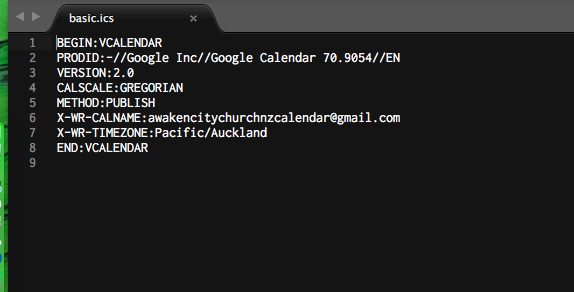
☝️ Can you confirm if this calendar is, indeed, empty for you—and if it’s meant to be empty?
Thanks for your patience and persistence on this issue!
GeorgeFebruary 27, 2017 at 10:19 am in reply to: Adding Sidebar to Calendar & Single Events Pages #1246321ParticipantHey Jon,
There’s unfortunately not anything our plugins provide out-of-the-box to offer this sidebar functionality you describe. It would only be possible by way of custom coding, which is unfortunately not something we’re able to help with as elaborated upon here: https://theeventscalendar.com/knowledgebase/what-support-is-provided-for-license-holders/
If you’re keen on getting these features implemented, you could write that custom code or hire a professional developer to do it for you. We have a list of great developers here → http://m.tri.be/18k1 (and have no affiliation with any of these folks—they’re simply some well-respected names in the community that we’ve compiled to share in situations like this one).
I’m sorry to disappoint about these things not being easier to attain. Please let me know if there are any other issues or questions I can try to help with!
— George
ParticipantHey Dan,
My question about the “min” text, not the maps stuff — it looks like you are working on these issues in other forum threads, so it is best to keep working with the support folks in those other threads of yours.
I will close up this thread for now since this thread was just about the “min” text and that issue is resolved.
— George
Participant1. When you say it “should work”, can you clarify exactly how you hope it to work?
2. And then please specify how it is not working.
3. Next, can you please share links to specific events that are not working with the end-of-day cutoff as you would like? I’ll take a look at them specifically and try to identify the issues.
Thanks,
GeorgeFebruary 27, 2017 at 9:38 am in reply to: Event Order and Attendees numbers not matching. Big issue #1246289ParticipantI appreciate this information and am discussing this issue with another developer on our team; stay tuned for a more substantive update from me here.
— George
-
AuthorPosts