

Forum Replies Created
-
AuthorPosts
-
George
ParticipantHey John,
Thanks for reaching out. It may be possible to add physical products/tickets through some other means, but our plugins only offer support for digital tickets at this time. Folks can print out the tickets emailed to them, of course, but otherwise our plugins do not provide features for physical ticket delivery and such.
I don’t know of a specific alternative that does provide these features, but WooCommerce itself has many extensions and I would recommend searching for extensions on their official library here: https://www.woothemes.com/product-category/woocommerce-extensions/
I hope this information is clear and helps you move forward—let me know!
George
June 5, 2016 at 7:52 pm in reply to: Add to Calendar link in Purchase Confirmation or Conf. email #1122846ParticipantHey @Betsy,
Thanks for reaching out!
We unfortunately cannot help with any customizations or design modifications. Please read more here ? https://theeventscalendar.com/knowledgebase/what-support-is-provided-for-license-holders/
That being said, there are two functions that generate the Google Calendar and iCal export links respectively:
• tribe_get_ical_link()
• tribe_get_gcal_link()☝️ You can read these functions in your copy of The Events Calendar, in this file specifically:
the-events-calendar/src/functions/template-tags/ical.phpI would recommend playing around with these functions—please note that, especially with the Google Calendar function, they are not built for use outside the events loop, and so some tinkering and coding will be required unfortunately.
If you need more in-depth assistance with these customizations, I would recommend hiring a professional to assist you. We have a list of great developers here → http://m.tri.be/18k1 (and we have no affiliation with any of these folks–they’re simply some well-respected names in the community that we’ve compiled).
Sincerely,
GeorgeParticipantHey @Riccardo,
There is unfortunately no way to do this at this time. 🙁
The closest you can come is using the various widget shortcodes of the plugins. There is a “mini calendar” widget and corresponding shortcode, for example, that is not the full calendar but is a pretty decent imitation of the full “Month View”.
You can learn more about these widgets and shortcodes here ? https://theeventscalendar.com/knowledgebase/pro-widget-shortcodes/
Check out that page and explore those options—I hope it helps!
Sincerely,
GeorgeParticipantHey Mojtaba,
Thanks for reaching out!
At this time, our plugins only support a Gregorian calendar. 🙁
Sorry to disappoint!
GeorgeParticipantI’m sorry to hear this, @Inbar!
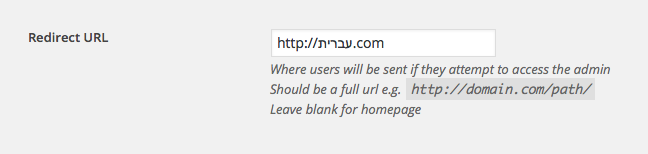
1. Can you share the exact value you are trying to use for the Community Events redirect URL? I tried a simple value in URL format and it worked fine. Here is a screenshot of the value I am testing. It saves fine every time:
2. Is your whole site is in Hebrew?
3. Can you please post your site’s “System Information”? Here’s how: https://theeventscalendar.com/knowledgebase/sharing-sys-info/
As for creating custom templates, this is something that we unfortunately cannot help with in support.
But you can learn how to do it by using our Themer’s Guide, available here ? https://theeventscalendar.com/knowledgebase/themers-guide/
Check out that guide, and then respond to the three items above—let us know what you find!
Thanks,
GeorgeParticipantHey @Sean,
Thanks for reaching out. Our plugins, at this time, do not offer much support for the same event occurring across multiple days. If it’s straight through—i.e., it starts Tuesday, goes through Wednesday, then ends at some point on Thursday—then our plugins can do that out-of-the-box.
But to happen a few hours on Tuesday, then a few on Thusrday, you would have to make two separate events.
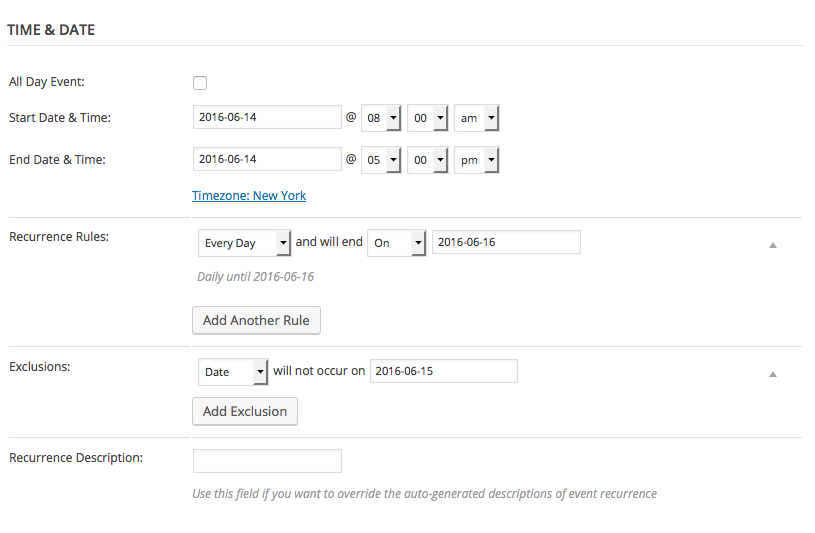
There is one method for having one event occur as you describe, which requires using the recurring event features in Events Calendar Pro. What you would do is, essentially, have the event recur daily for three days: Tuesday 4–8pm (for example), Wednesday 4–8pm, and Thursday 4–8pm.
Then, just add an “Exclusion” for that Wednesday in the middle, and you’ll be left with a single event on Tuesday and Thursday.
If this sounds a bit complicated, I’m sorry about that—it’s the best our plugins provide at this time. Here is a screenshot of the configuration I described above, which I hope helps:
Take a look at this information, and read more about recurring events here if you’re not familiar with them. Let us know if this helps!
— George
ParticipantHey Hans,
Thanks for reaching out. I’m sorry to bear this news, but at this time there is a core limitation in our plugins that is making this harder on you than need be.
It all comes down to what you describe here:
We have specific lessons that occur 4 Tuesdays in a row, at 2 times during that day, namely 10:30-12:00 and 19:30-21:00
The “2 times during that day” is the tricky part. Our current version of recurrence system does not allow for recurrences within the same day.
It is just not technically possible at this time.
We are working on improvements in this, but they are a bit more challenging to get right than it may seem. To be frank, improvements with same-day recurrences will likely not arrive in our plugins for at least another major release or two. 🙁
I’m sorry to disappoint, but hope this helps you move forward. We are working on this, but for the foreseeable future, some clever workarounds like the one you describe will likely be required for the desired affect. I would personally recommend creating two separate events and recurring them. So, one event is the 10:30-12:00 one, which recurs every Tuesday. Then the 19:30-21:00 event is another event altogether, itself recurring every Tuesday.
Let me know what you think, and if there is anything else I can try to help with.
Sincerely,
GeorgeJune 5, 2016 at 6:46 pm in reply to: Edit order and re-send ticket still sends the new tickets #1122838ParticipantHey @Shane,
Thanks for reaching out. There are two things I want to mention here.
First, this is not possible:
removing an event and adding a different event in the order
☝️ If you need to get a user/attendee to have tickets for a different event, the best method for this is to create a coupon code for a 100% discount and then let them use that to “buy” a new ticket to that new event. Our plugins and the email system do not support manual re-attachment of tickets to different events at this time.
However, there is some good news here, because our next major release (which should hopefully come in the next 7–14 days) is version 4.2. With version 4.2 of The Events Calendar and Event Tickets Plus, users will finally be able to edit their orders and some of the ticket information they entered upon purchase.
Now, “moving” the ticket to some other event will still not be possible, but editing some order details aside from that will be.
I am sorry if this information is disappointing—please let me know what other questions you may have and if there’s anything else I can help with.
Cheers,
GeorgeJune 5, 2016 at 6:39 pm in reply to: Venue CPT and the WP-Types Toolset. Venue Post Type not public #1122837ParticipantHey @Media325,
Thank you for reaching out. Just to set expectations early up front, we cannot help with any customization-related questions, which I only mention because you mention trying to make custom archive pages. We’re also unable to troubleshoot issues that may arise from a third-party piece of software, which WP-Toolset is of course…you can read more on this stuff here.
☝️ While that information is true, I would love to help point out some general things here that might help. For example, you should be able to use the filter tribe_events_register_venue_type_args.
While you will have tinker with the custom coding on your own, here’s a quick example of ensuring it is set to “public”, not hidden:
add_filter( 'tribe_events_register_venue_type_args', 'media325_make_venues_public' );function media325_make_venues_public( $args ) {
$args['show_in_nav_menus'] = true;
$args['public'] = true;return $args;
}
Try adding code like this to your theme’s functions.php file or a custom plugin, and let us know if it helps!
— George
ParticipantHey @Mattboggs,
Thank you for your patience here over the weekend.
In regards to the requirements for QR Code generation, the codes are generated using this PHP library: http://phpqrcode.sourceforge.net/index.php
The requirements are basic GD and Image functionality on the server, functions like ImageCreate() or the ones listed here.
There are a few possible culprits to this which are neither from the plugin OR from the theme. I would recommend looking into all of the following things:
• Server permissions: the “generation” of the image may be fine, but maybe it’s just not being written to the uploads directory on your server or something? To rule this out, please contact your web host and ask them to ensure that your site’s WordPress uploads and wp-content directories are owned by server, with their permissions set to 755 recursively. If this does not help, proceed with the next step.
• .htaccess file: If server permissions are confirmed “okay” and issues persist, ask your web host if the site’s .htaccess file may be interfering here. This is not very likely but is worth ruling out. They may have custom rules in their .htaccess file—as if so, and if they could reset it to a “default WordPress .htaccess file” at least temporarily for testing.
• Server restrictions or missing libraries: or A final thing I can recommend here is to ask your web host if they can otherwise identify anything on their end of things (the server itself) that may hinder the PHP-generation of images as done by our plugins and their use of the “phpqrcode” library. They may be omitting certain common PHP libraries or server-side tools from their servers.
I am genuinely sorry about the prolonged and uncertain nature of this issue. I hope that the information above helps, first the information about requirements to respond to the theme author with, and then the information about further steps you can take with your web host.
Sincerely,
GeorgeParticipant😀
ParticipantI’m really sorry about this, @winterlinde—this is, unfortunately, a recently-introduced bug that we are working hard on fixing.
Stay tuned for a fix! I do not have a specific ETA on when it will arrive, but it’s hopefully coming in a few short weeks.
In the meantime, for me the stylesheet DOES actually change on the front-end, but the change is just not reflected in the settings panel.
So, for example, if I choose the “Skeleton” stylesheet, and save changes, then in the settings panel it will still just stick to the “Tribe Events” stylesheet option as if I hadn’t changed anything…
BUT, on the front-end of the site itself, the correct Skeleton stylesheet is loaded.
☝️ Do things behave this way for you, too?
Thank you!
GeorgeParticipantHey @James,
Sorry to hear about this! I cannot recreate this behavior on my own site, so there are a few things that stand out as potential culprits here.
First, you say this:
Using the original WordPress search function (not the plugin one – doesn’t work!)
1. Can you clarify how the plugin’s own search features “don’t work”? This is alarming and could indicate a deeper code conflict that should be resolved, as it may be related to this other problem.
2. You say, “I’m using a custom theme with my own search.php file showing the results (all it’s doing is echoing out the titles of results).” Can you please share a link to a page on your site where I can do a search to see this duplication issue firsthand?
3. Can you also post your site’s “System Information” to help with the investigation of this issue? Here’s how to share that info ? https://theeventscalendar.com/knowledgebase/sharing-sys-info/
All of the above information will give us a great start on figuring out the problems here—thank you!
George
ParticipantThank you!
Instead of the CSS I originally shared, I would recommend replacing it with this CSS:
body.events-list #tribe-events-content .tribe-events-event-image {

    display: none;

}
Let me know if this helps! If not, leave the CSS in place and I will take another look.
— George
ParticipantHey Tyler,
There unfortunately isn’t a way to impose such limits with extensive custom coding that would fall far outside the scope of support we can provide.
You would have to embark on that custom coding on your own, or hire a professional developer to assist you. We have a list of great developers here, and have no affiliation with any of these folks; they’re simply some well-respected names in the community that we’ve compiled. ? http://m.tri.be/18k1
To try and help that along a bit, if you want to modify the time pickers to limit the time ranges available for the user to choose, open up your code editor and use its search tools to find these functions:
• tribe_community_events_form_start_time_selector()
• tribe_community_events_form_end_time_selector()☝️You can explore these functions and work backwards from within them to limit the amount of times shown to the user and such.
I hope this bit of information helps! Best of luck with your customizations and with your project as a whole.
Sincerely,
George -
AuthorPosts