

Forum Replies Created
-
AuthorPosts
-
George
ParticipantThis reply is private.
ParticipantThis reply is private.
ParticipantHey Glenn,
This is unfortunately not possible at this time:
So basically what I am after is the Photo View which can be placed in the widget area
☝️Well, this is “possible” in theory, but is a very extensive customization. The methods I shared above are only ways to add photos to the existing widget types; the list widget, namely.
When it comes to Event Rocket, this plugin is not an official plugin we make and it is also not actively maintained anymore. It is not possible to pull single files out of Event Rocket into our own plugins for the effect you want, unfortunately.
The only way to pull off what you describe is to hand-build a new widget from scratch, or to hire someone else to build that widget for you. We have a list of great developers here, if you’re interested → http://m.tri.be/18k1 (and we have no affiliation with any of these folks–they’re simply some well-respected names in the community that we’ve compiled).
Sorry to disappoint, Glenn!
George
June 10, 2016 at 9:35 am in reply to: Tons of Warning messages in error Log upon upgrading to version 4.2 #1125211ParticipantI’m really sorry about this, folks!
I admit to being a stumped, because I have tried reproducing these error notices to no avail thus far.
That being said, I’ve gone ahead and made a bug ticket for our developers to explore this and take a closer look at the issues.
Please stay tuned to this thread—I will mark it “Pending Fix” for now and will post any updates on these issues as I learn them.
Thank you for your patience!
GeorgeParticipantHey @Pau,
Okay, thank you for responding here—I think I better understand what you are asking!
1. Can you confirm that if you scroll down on that wpshinding.com page, you see the venue and city information and all of that as shown in this screenshot?
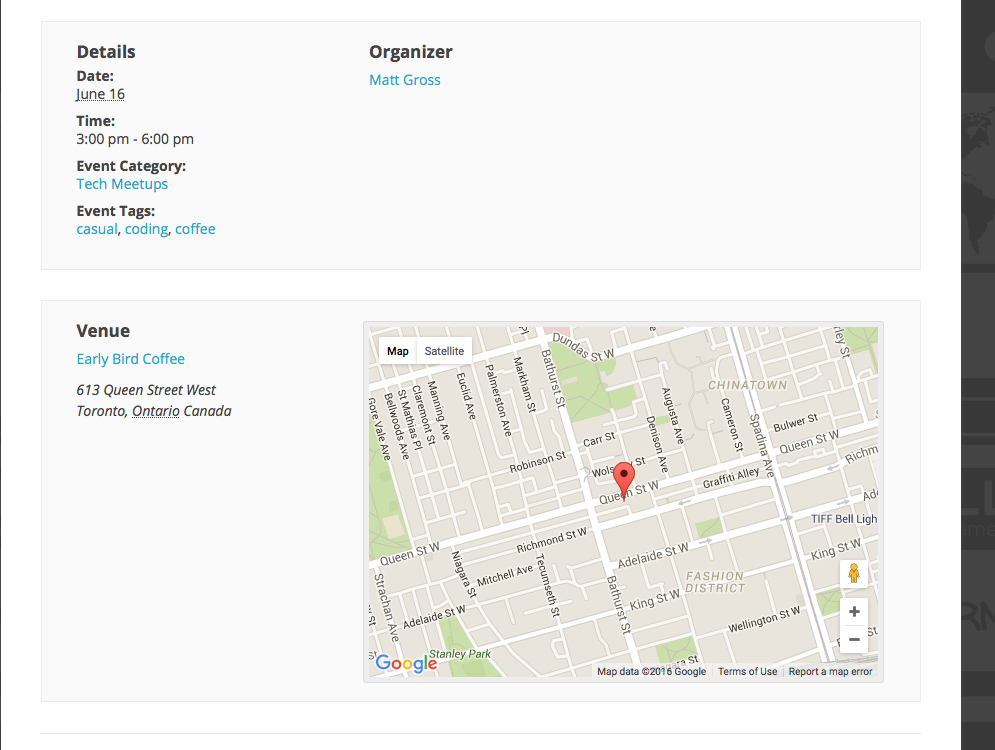
2. Can you confirm exactly where and how you are trying to get the venue and time information to display? So, say this is what the title section currently has:
Toronto Coffee & Code

June 16 @ 3:00 pm – 6:00 pm | Recurring Event (See all)
Are you trying to make it like this:
Toronto Coffee & Code

June 16 @ 3:00 pm – 6:00 pm | Recurring Event (See all)

Venue Name, City
3. Finally, can you please confirm that you are aware that doing this will require a customization on your end, and that you are aware that we cannot fully assist with customizations? I will happily help you get started in the right direction here, no worries! But just want to set your expectations early—I can show you the basics, but to get things “just right” and exactly how you want, you will have to take the reins and tinker on your own. This page covers our support policy in this regard ? https://theeventscalendar.com/knowledgebase/what-support-is-provided-for-license-holders/
Cheers!
GeorgeParticipantThank you for this information, @Becky, and for doing all of that testing.
One thing that may help here is updating to the most recent versions of our code—as of Wednesday this week, that is version 4.2.
Once you update The Events Calendar and Community Events both to version 4.2, do your problems persist? Do they improve at all?
Thank you!
GeorgeParticipantSorry for my misunderstanding there, @Dylan—thanks for confirming what feature you are referring to.
Reworking the ID generation is technically possible, i.e. you can in theory change it, but at this time it would be a very involved code customization to make for two main reasons:
1. You cannot make the changes by simply using actions and filters; in other words, you would have to modify core plugin code directly, which is something we strongly recommend against because you have to manually re-implement the customizations after each plugin update. (Because plugin updates overwrite existing core plugin code.)
2. The ID system is touched upon by several other systems that power tickets functionality. So, in other words, it’s not just an aesthetic change even if it may seem like one.
With all this being said, while we cannot help with code customizations, if you are curious to learn more I can tell you where to look in the Events Tickets Plus codebase anyways:
• You’ll want to start by reading through this class within the Event Tickets Plus plugin files: Tribe__Tickets_Plus__Meta__Unique_ID — this is responsible for generating the IDs and assigning them to tickets, as well as keeping track of the ticket sequences to ensure that their ticket numbers are in correct order.
• The class above relies on this other class, which you’ll also want to read: Tribe__Utils__Post_Root_Pool
I won’t be able to provide specific insights on the code from here; you’ll have to take the reins and tinker and explore on your own or with the help of a hired developer. (We have a list of great developers here, by the way → http://m.tri.be/18k1, and we have no affiliation with any of these folks–they’re simply some well-respected names in the community that we’ve compiled).
I hope this information helps!
GeorgeParticipantNo problem—I have created a ticket for our developers to fix this, so please do stay tuned to upcoming product updates where, hopefully, this will be fixed.
I don’t have an ETA on when such fixes will arrive, but it would likely not be more than a few weeks.
Sincerely,
GeorgeParticipant😀
ParticipantGlad to hear it!
I’ll close up this thread for now, but come back and open a new thread any time if other issues/questions ever arise.
Cheers,
GeorgeParticipantAwesome! Glad to hear it, @Janice.
I will go ahead and close this ticket for now, but if there’s ever anything else we can try to help with, come back and open a new thread any time.
Sincerely,
GeorgeParticipantHey Janice,
Unfortunately our plugins do not have any specific support for the “Sequential Order Numbers” extension, so it may not be possible to make them work together as desired at this time. 🙁 I’m sorry to disappoint!
In regards to there being any other way to number the tickets using Event Tickets Plus, there is no such way at this time. They do have sequential ordering now, as of version 4.2, based on the title of the event to which to which they belong.
So, for example, in this screenshot are tickets for an event whose title is “Test Tickets”. So the IDs are all prefaced with TT-, and then the ticket number:
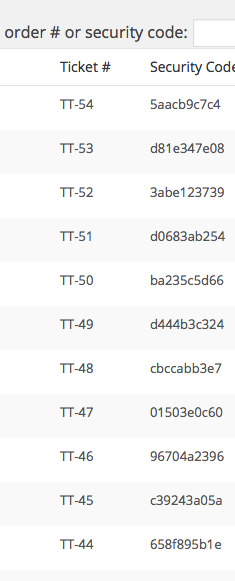
If the title for the events was, A Cool Simple Example, then the ticket IDs would be ACSE—X, where X is the sequential number…and so on.
There is no other ordering solution at this time. 🙁
Let me know what you think!
GeorgeParticipantHey Randy,
Will that iCal job kick off the moment the site is visited next or will it be that time +1 hour?
☝️Once the site is visited, then the job will kick off only if it’s been more than one hour since the last import. Otherwise the job will remain queued, but not run until the above condition is met.
As for making it more granular, there is no way to do this at this time. You might be able to do it by diving deep into the core plugin code on your own and rewriting/modifying the recurring-import code. But otherwise it is not possible.
Sorry to disappoint!
GeorgeParticipantThank you for sharing this solution, @Abigail! I hope that helps things for now—stay tuned to our next plugin releases for a proper fix.
Thank you for your patience with this!
GeorgeParticipantThis reply is private.
-
AuthorPosts