
Home › Forums › Ticket Products › Event Tickets Plus › Ticket Numbers and Woo Sequential Order Numbers Pro
- This topic has 9 replies, 3 voices, and was last updated 10 years, 4 months ago by
Janice Palmer.
-
AuthorPosts
-
June 8, 2016 at 4:37 pm #1124224
Janice Palmer
ParticipantI have Events Tickets Plus and Woo Sequential Order Numbers Pro and I am trying to add sequential ticket numbers to my tickets.
I have named my tickets B&B-10000 and I see this number in the Checkout and in the list of Orders in my admin.
This ticket number also appears in the emails that are generated, for example:
You have received an order from Janice Palmer. The order is as follows:
Order #B&B-10000 (June 8, 2016)AND
Hi there. Your recent order on Airdrie Oilmen’s Association has been completed. Your order details are shown below for your reference: Order #B&B-10000
However, the email containing the Ticket does not have a matching number, it says:
Ticket # BB-1Any suggestions on how I can get these numbers to sync?
Thank you,
Janice Palmer
Airdrie Web Design Ltd.June 8, 2016 at 9:03 pm #1124277George
ParticipantHey Janice,
Thanks for reaching out. This is an interesting question and situation—at this time, our plugins do not have any special support for that “Sequential Order Numbers Pro” extension, and that extension could be breaking the tickets outright because we do not support it.
Aside from the discrepancy of the order number in the ticket email, do you have any other issues while using this extension in conjunction with our ticketing plugins? Does anything else seem to break, for example? Or is all tickets functionality otherwise intact?
Thank you!
GeorgeJune 9, 2016 at 5:55 am #1124403ParticipantThank you George, that seems to be the only issue.
It looks like the use of the ampersand is not supported (although the woo documentation indicates that any character can be used) so it’s likely a conflict (the &-sign typically gets converted to & on the web). I can try changing the B&B to BB and see if that allows the numbering to work correctly.
The ticket numbering is really important – is there a way of altering the ticket numbers using the Tickets Plus plugin?
Thank you,
JaniceJune 9, 2016 at 7:32 am #1124468ParticipantHi George,
The ampersand doesn’t seem to be the issue:
– the actual ‘tickets’ are starting at the number 1 (as in BB-1)
– the invoice starts with the correct number as indicated in the Woo Sequential Numbers extension (as in BB-10001)So I have created a workaround as follows:
– I will start my Woo numbering system to match what the Tickets Plus plugin is displayingJanice
June 9, 2016 at 7:56 am #1124480ParticipantHey Janice,
Thank you for following up. Just to be clear, has the workaround you mentioned resolved this issue for you?
There is unfortunately little we can do in regards to what that other extension is doing with order numbers and all of that, so I just wanted to follow-up here and confirm the status of this issue at this time.
Thank you!
GeorgeJune 9, 2016 at 9:17 am #1124543ParticipantOK, so now I have yet another glitch……
Tickets Plus does not support Variable products and this is the only way to get the Sequential Order numbers working; e.g. I need 2 variations (in pricing) and if variable products feature is not available, then we will end up with the tickets having the same ticket numbers; since the tickets all start with 1.
Is there any way to number the tickets using Tickets Plus ?
Thank you,
Janice
June 9, 2016 at 8:35 pm #1124864ParticipantHey Janice,
Unfortunately our plugins do not have any specific support for the “Sequential Order Numbers” extension, so it may not be possible to make them work together as desired at this time. 🙁 I’m sorry to disappoint!
In regards to there being any other way to number the tickets using Event Tickets Plus, there is no such way at this time. They do have sequential ordering now, as of version 4.2, based on the title of the event to which to which they belong.
So, for example, in this screenshot are tickets for an event whose title is “Test Tickets”. So the IDs are all prefaced with TT-, and then the ticket number:
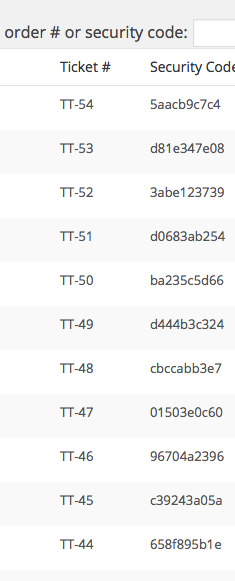
If the title for the events was, A Cool Simple Example, then the ticket IDs would be ACSE—X, where X is the sequential number…and so on.
There is no other ordering solution at this time. 🙁
Let me know what you think!
GeorgeJune 10, 2016 at 6:16 am #1125017ParticipantWhat you have described above is very similar to what I am trying to accomplish.
I see this now on the Attendees list; this is what I was trying to do with the Woo extension.
Thank you will take a closer look !
JaniceJune 10, 2016 at 8:23 am #1125075ParticipantAwesome! Glad to hear it, @Janice.
I will go ahead and close this ticket for now, but if there’s ever anything else we can try to help with, come back and open a new thread any time.
Sincerely,
George -
AuthorPosts
- The topic ‘Ticket Numbers and Woo Sequential Order Numbers Pro’ is closed to new replies.