Forum Replies Created
-
AuthorPosts
-
George
ParticipantSorry to hear about this, Asia!
1. First, who is the web host you are using? Can you share a link to the website of the web host company you are using?
2. Next, can you share what version number of The Events Calendar is being used on your site?
3. Finally, can you share an estimate of how many events you had on your site? Did you have very many events, for example? Or just a few events? If you can provide numbers or estimated numbers that would be very helpful: 100 events per month? A 1,000 events per week? 1 event per day? Let us know!
Thank you,
GeorgeParticipantHey Jenny,
Thanks for reaching out!
None of our plugins have any specific integration with Pardot at this time. 🙁
It may be possible with extensive custom coding, though—so if these features are crucial to you, I recommend seeing if any of the customizers listed on our Customizations page can help build something custom for you.
Sorry to disappoint! Please let me know if there’s anything else I can try to help with.
Sincerely,
GeorgeParticipantHey Jenny,
Thanks for reaching out.
One thing to clarify here is that Events Calendar Pro is not the pro version of The Events Calendar. It is a premium add-on to it.
So, if you buy Events Calendar Pro, you do not remove The Events Calendar from your site, for example — you have both plugins running side-by-side, with The Events Calendar providing the core features and with Events Calendar Pro providing some extra pro features.
With this in mind, then, the only way to list three events like you mention would be to use the [tribe_events_list] shortcode. This is indeed only available with Events Calendar Pro.
To learn how to use that shortcode, check out the documentation for it here → https://theeventscalendar.com/knowledgebase/pro-widget-shortcodes/#event-list-shortcode
You can see screenshots of various widget shortcodes like [tribe_events_list] here, so that you can get a sense of the output they make → http://wpshindig.com/event-widgets/
And remember — if you try out Events Calendar Pro but don’t like it, request a refund within thirty days of your date of purchase and we will issue a refund in full.
I hope this information helps!
GeorgeParticipantHey Amanda,
Thanks for reaching out.
Can you clarify what your question is here?
Are you asking if our plugins will let you import events from a Google Calendar and iCal? Do you mean iCal, or do you mean iCloud?
Let me know more about your question and what the question is and I will try to help! 😀
Thanks,
GeorgeParticipantThis reply is private.
ParticipantHey @blankbeard,
Thanks for your followup.
The reason I recommend updating is that our recent versions of Events Calendar Pro include fixes for some recurrence-related bugs.
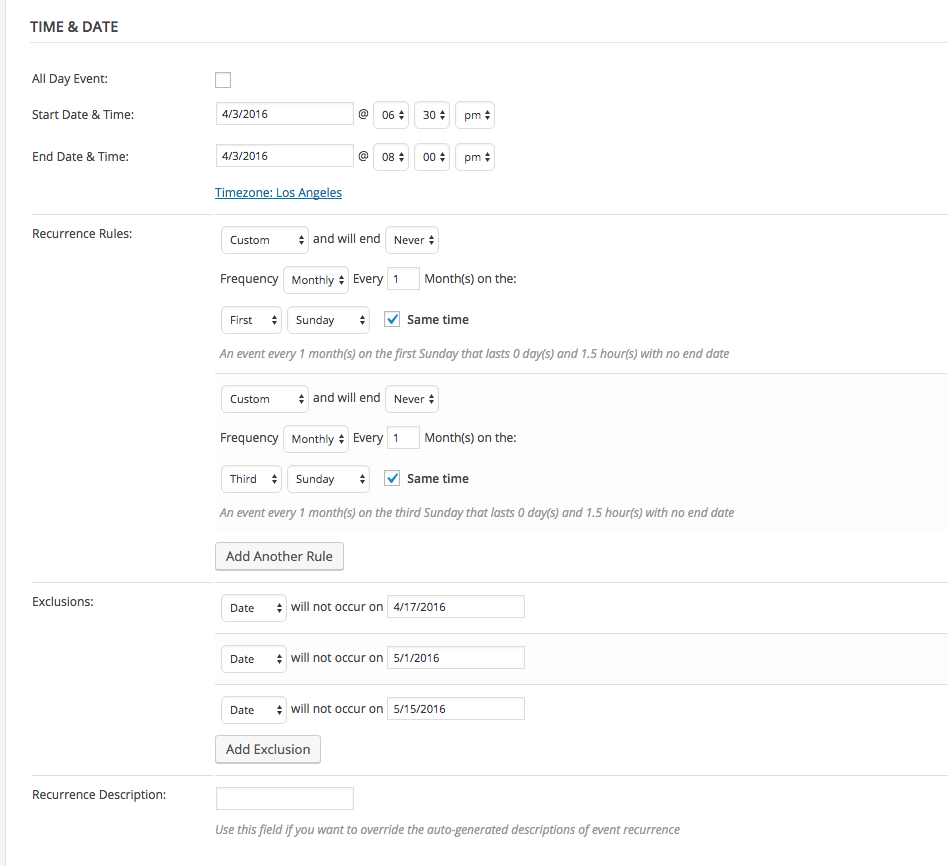
As for needing to wait two months, this shouldn’t be necessary — once you get up-to-date with Events Calendar Pro, you can set up a test event with similar recurrence settings as the event you have here, but have it recurring “weekly” or “daily” instead of “monthly”.
(I am referring to this screenshot that shows your recurrence config → https://theeventscalendar.com/content/uploads/2016/06/60d73d977897ce54.png)
If it seems that you don’t have any issues with events on this shorter time frame, then it may be a good indicator that things will be okay going forward with the other events.
If you don’t want to explore this route, then the only thing I can recommend is:
• Update to the most recent version of Events Calendar Pro on your site.
• Set an end date for the recurrence series, and do not leave it so that it ends “Never”. (See the screenshot above of your event config to see how you have it set to ending “Never”).
I am sorry about the limited number of ways forward, @blankbeard. But here’s the thing: even if we did find some issues with Events Calendar Pro 4.2.3, your current version of the plugin, the first step from there would be to update anyways.
Let me know what you think!
Sincerely,
GeorgeParticipantHey Kfir,
Thanks for your followup.
Generating a whole list of all events, regardless of their dates, is currently not possible without custom coding. We cannot help with custom coding, but you can learn how to query for events using the tribe_get_events() function here.
In regards to shortcodes, at this time you cannot have the main event views anywhere other than the main /events/ page. There is full shortcode support for this coming soon in the 4.3 release (“soon” as in early October). For now, there are only widget shortcodes which you can read about here.
As for the map issues:
1. Can you please share your site’s information (instructions here)?2. Can you share a link to your site’s events page? I tried going to http://craftandvalor.com/habitas/events to look into the Map issue but it was a 404 page.
Thanks,
GeorgeParticipantHey Tabytha,
Apologies for the delayed reply here!
It’s pretty tricky to modify those drop downs, unfortunately. There is no way to do it with plugin filters, for example, meaning you have to edit core plugin code. 🙁
I say “unfortunately” in regards to this info because editing core plugins code means that you will lose the code changes any time you update the plugin! And you have to manually add the customizations back after each update.
So, I strongly recommend against trying to modify the drop downs.
With all that being said, however, this file is where you can find the function you are looking for:
the-events-calendar/src/Tribe/Linked_Posts.phpAround line 713 you will find the saved_linked_post_dropdown() function, where you can modify it if you would like to.
Cheers!
GeorgeParticipantHey Rene,
Thanks for reaching out.
Google’s search results are unfortunately something that only Google has control over. There are a few things you can do to help your events turn in search results, but don’t expect any immediate changes when you search on google.com after making site updates—it can days, weeks, or beyond for Google to re-index an individual website and start including its event results in local event searches.
To maximize the possibility of your site’s events turning up in search results:
• Ensure you are always running the most up-to-date version of The Events Calendar
• Ensure you are always running the most up-to-date version of Events Calendar Pro
• Ensure you are using a theme that is well-coded and does not break anything the HTML head of its generated web pages.
• Ensure that you fill out all of the address fields of Venues, and that the information is accurate. Provide as much address / location information for any venue as you can.☝️ The Events Calendar and Events Calendar Pro both provide JSON-LD data to search engines like Google, so as long as you ensure these above things the JSON-LD should generate fine and then it is up to Google to start noticing and indexing them so that they show up in search results. 🙂
Cheers,
GeorgeParticipantHey @Kfir,
Thanks for reaching out.
Events do not get deleted when they are passed, and so all of your “past” events will exist and site users can page back through them.
You can see this in effect on our demo site, wpshindig.com/events. You can click “Upcoming Events” to see upcoming events, and “Previous Events” to see previous events.
So, all events are shown on the calendars by default.
I hope this information helps—if it doesn’t let me know what you mean in a bit more detail and I’ll try to point you in the right direction!
Cheers,
GeorgeSeptember 19, 2016 at 12:23 pm in reply to: License to add Ultimate Bundle in a premium theme for sale #1166034ParticipantHey Nitin!
Thanks for reaching out.
I would recommend sending an email with this proposition to support [at] theeventscalendar [dot[ com—include any relevant details you can think of, etc., and I will forward the email to a products manager for consideration from there.
I recommend this because private email conversations are better suited for this sort of dialogue. With that in mind, I will close this forum thread — but if you have any “support” topics you still want to address, like plugin issues or bugs, open a new thread any time.
I’ll see you over email! ?
Cheers,
GeorgeSeptember 19, 2016 at 12:02 pm in reply to: Multiple events with the same name – permalinks not working. #1166022ParticipantHey @Tish,
Thanks for reaching out!
I’m sorry to hear about these issues. I am having trouble recreating them on my own site, and so am curious if you have any more details can you share about the nature of these events.
For example:
1. Does it seem that only community-submitted events with the same titles have this problem? Or if you manually create events yourself in your wp-admin with the same title, do permalink issues persist with them, too?
2. When was the first time you noticed these problems? Have you had The Events Calendar and its add-ons running for a long time on your site (at least several months, for example), without issues, and then seemingly only after a recent update things started behaving this way?
3. Finally, for now, can you share links to any specific instances of events that have this issue on your site? Now, I know the issue is related to their permalinks not working…but if there are three same-title events, and one of them can be linked to, then share a link to that one event in that series for example.
Thank you!
GeorgeParticipantSorry to hear about this problem, @Andy!
I cannot recreate this issue, and we don’t have any other reports of it at this time, so I would recommend the following steps:
1. Deactivate the “Root Relative URLs” plugin on your site.
2. Go to Settings → Permalinks in your site’s wp-admin. Click “Save changes” here without actually changing anything; this will just refresh the permalinks on your site.
3. Go back to the settings page and see if the issue persists.
4. Try going to the /events page on your site and see if it is inaccessible.
5. If the issues persist in steps 3 and 4 above, then leave “Root Relative URLs” deactivated and proceed doing this same process for EACH other plugin on your site: deactivate a plugin that is not The Events Calendar, do step 2 here, then do steps 3 and 4 to see if issues persist.If you get to the point where The Events Calendar is the only plugin activated, and these issues persist, let me know!
Thanks,
GeorgeParticipant😀
ParticipantHey Jitender,
Thanks for reaching out!
Can you elaborate on your question a bit? What specific thing are you curious about?
I’m sorry for my misunderstanding of your question, but don’t currently understand it and want to make sure I can provide a helpful answer! 😀
Thanks,
George -
AuthorPosts