

Forum Replies Created
-
AuthorPosts
-
October 7, 2016 at 10:07 am in reply to: attendee list on template single event doesn't display #1173827
George
ParticipantHey Alexander,
Thanks for reaching out!
1. Do you mean the “Who’s attending” list?
2. If so, then have tickets sold for the event you linked to? If so, how many tickets?
3. Next, please post your site’s complete System Information to this thread. It’s very simple! Here’s how to do it → https://theeventscalendar.com/knowledgebase/sharing-sys-info/
Thanks,
GeorgeOctober 7, 2016 at 10:04 am in reply to: Allow viewers to create their own calendar view based on master calendar #1173826ParticipantHey Sacha,
Thanks for reaching out!
Is there a way for calendar viewers to filter in such a way that they could fill an empty calendar with just the events they want to attend?
☝️ This is unfortunately not possible at this time. 🙁 I’m sorry to disappoint!
Let me know if there is anything else I can try to help with.
Sincerely,
GeorgeParticipantHey Thomas,
Thanks for reaching out.
You say this in your post:
arguments like “category” or “categories” getting picked up but never ever used later on in
src/Tribe/Template/Month.php where it should be taken into account.☝️ To be clear, are you saying that category filters applied to shortcodes should be automatically applied to the main Month View calendar if the shortcodes are used on the same page as the Month View calendar?
If this is not exactly what you mean, can you clarify what you are expecting exactly?
Thanks!
GeorgeParticipantHey Adrian,
We can certainly help out here and issue refunds.
However, you describe buying the “Event Tickets Plugin”, when you actually need the “Tickets Plus plugin”.
To be clear, Event Tickets is free — https://theeventscalendar.com/product/wordpress-event-tickets/
Event Tickets Plus is the premium one.
So, maybe you’ve purchased the right plugin?
Let me know!
Please share a link to the product page on this site of the plugin you bought but did not want to buy; and then share a second link to the plugin you MEANT to buy.
☝️ Be sure to share these two links!
Thanks,
GeorgeParticipantHey Gitu!
The $89 fee is indeed an annual fee. So, the first purchase of $89 will make your license valid for one year from the day you buy it.
After that year is up, you can optionally renew the license. We often provide discounts for renewals, sometimes as high as thirty percent off the original price.
I hope this helps!
GeorgeParticipantHey Thomas,
A few folks have been reporting issues similar to this, and we’re investigating all of these claims.
There is an inherent aspect to this where Google controls what comes out on their search pages; so, for the issue where some events don’t even show up in the search results, there may be little that can be done there.
As for the time inconsistencies:
1. What timezone are you yourself physically in when you go to Google and search for “Niall Connolly Events”?
2. Can you post your site’s full system information to this thread? It’s super easy to do; here is how → https://theeventscalendar.com/knowledgebase/sharing-sys-info/
Cheers,
GeorgeParticipantHey Jordan,
Thanks for reaching out.
If you do not need a specific category from the export, then remove that code snippet from your site because it is not necessary.
To import events from http://theporneffect.com/ into another site, the feed URL you should enter into your iCal Importer is http://theporneffect.com/events/?ical=1&tribe_display=month
This will import all events. To have those events imported into a specific category on the other site, you can just select the Category to import into on the import screen as shown in the following screenshot (click for larger size):
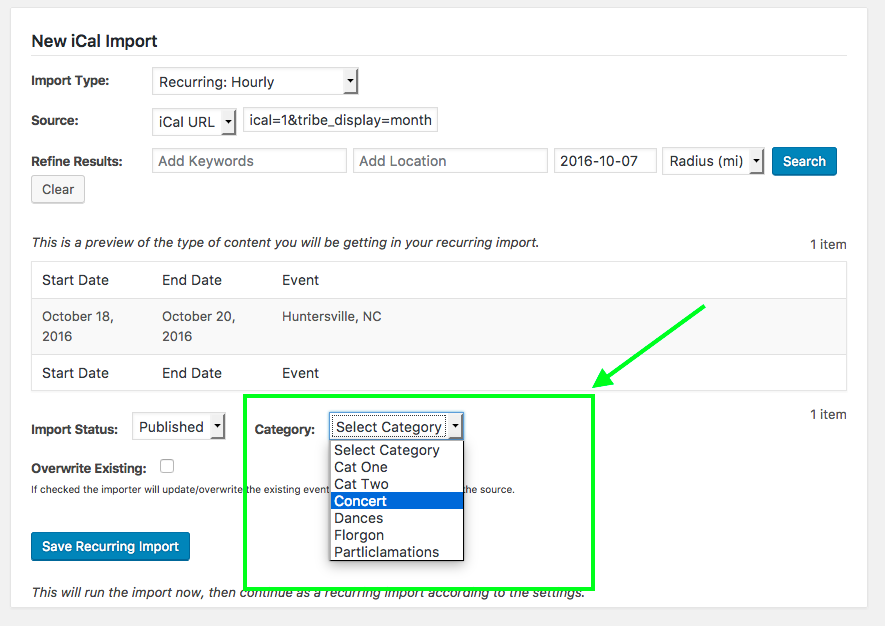
— George
October 7, 2016 at 9:00 am in reply to: Event Ticket Plus not auto sending tickets after numerous updates #1173745ParticipantThanks for this information Sabatha.
It sounds like things are…working now? Interesting.
1. Can you clarify what specific problems still persist?
In step three above, I asked you to make a test event with free tickets and “buy” them yourself with your own email address, and then seeing if you got the tickets email for this purchase.
You say this works fine.
2. Now, how about if you make a test event with “Premium” / paid tickets? Once you make this event, make a coupon code in WooCommerce that adds a 100% discount so that you can “buy” them for $0.00. Use your own email address at checkout to buy the tickets. Once you buy these tickets, does the tickets email arrive with any issues?
Thanks for your patience here!
GeorgeParticipantHey @Anders,
Thanks for reaching out.
Doing this is technically possible, but it’s not something our plugins currently support.
So, adding these features is currently only possible with some extensive custom coding. 🙁 We are not able to help with writing custom features like this, but we have a collection of resources here that might be helpful if you are keen on hiring someone to make these customizations for you → http://theeventscalendar.com/customizations
Sorry to disappoint!
GeorgeParticipantHey Liz,
Thanks for reaching out.
We unfortunately cannot help with design tweaks and custom coding, but I took a look at your events page to try and see what I could do.
I was unable to prevent the cut-off issues you describe 🙁 I tried a few different things, including playing with overflow and with z-index, to no avail.
I’m sorry to disappoint here!
I will reach out to some other folks on our team to see if anyone else can come up with something.
Stay tuned,
GeorgeOctober 6, 2016 at 7:32 pm in reply to: Can I have a header image on the photo view, but not on the individual listings? #1173541Participant😀
October 6, 2016 at 7:21 pm in reply to: Want to buy pro but free not working properly Events on Calendar partial popup #1173537ParticipantHi Janet,
When I go to the link you provide, I am met with a “New Site Coming Soon” page.
We cannot log into customer sites, so can you please temporarily disable this “New Site Coming Soon” page? Let us know when you’ve done that and I will take another look at things.
Cheers,
GeorgeOctober 6, 2016 at 6:30 pm in reply to: Event Ticket Plus not auto sending tickets after numerous updates #1173523ParticipantThanks for all of this information. Please leave your site in this state where there is no custom coding!
Now, I know we have done a lot of back-and-forth here, so I apologize for asking another “clarifying question”, but just to be certain about things in this current state:
1. In your site’s current state—no custom coding—do tickets orders get correctly marked as “Complete” when the orders are completed and their payments received? Or do they stay as “Pending”?
2. In your site’s current state—no custom coding—do other site emails get delivered without problems?
3. In your site’s current state—no custom coding—if you make a test event with free tickets and “buy” them yourself, with your own email address, do you get the tickets email?
Thank you for your patience here! I am determined to help resolve these problems and am just to reduce the number of variables and uncertainties so that we can pinpoint the nature of the problems.
Sincerely,
GeorgeOctober 6, 2016 at 6:14 pm in reply to: Can I have a header image on the photo view, but not on the individual listings? #1173520ParticipantThis reply is private.
ParticipantHey Jordan,
What is the iCal feed URL you are using in the hourly imports? Paste the complete feed URL here in your reply — I will test and see what I find.
Thanks,
George -
AuthorPosts