

Forum Replies Created
-
AuthorPosts
-
Geoff
MemberHi Ryan, thanks for writing in and checking out Event Tickets Plus!
Great questions. Event Tickets Plus does indeed allow those who purchase multiple tickets to assign a name, email and custom registration information to each ticket. I do want to note, however, that purchasing a ticket does not create a WordPress user account for each ticket purchased, though the person who does purchase the tickets can edit the information for each ticket after purchase.
2) The other thing we need to do with our convention pass purchasers is have them confirm their badge information before we export it to print badges.
Event Tickets Plus will not email attendees on your behalf, but you could certainly export the list of attendees from the plugin, import the email addresses into the email application of your choice, then contact all the attendees to remind them to confirm their information ahead of time. You can either include their information in the email you send using the data from the exported file, or instruct the purchaser of the tickets to check and edit their information directly on your site.
Also, will this work with other Woocommerce plugins/addons such as Dynamic Pricing that allows a discount structure for purchasers of multiple passes, etc.
I have not testing Event Tickets Plus with Dynamic Pricing personally, but I have seen reports here in the forums of folks who have both had success and not much success integrating the two. What I can say is that we have a full refund policy on all our products within 30 days of purchase, which should give you a good amount of time to make sure it works just right with your setup.
Does this help answer your question? Please let me know. 🙂
Cheers!
GeoffJanuary 2, 2017 at 8:06 am in reply to: Add HTML before event content: different /events page vs single events? #1212254MemberAwesome! I’m so glad to hear that’s what you were looking for — we just released that Extension Library and this is exactly the sort of feedback we were hoping to hear. 🙂
Yeah, styling can be tricky depending on the theme and how the stylesheets interact with those of the plugin. The extension itself shouldn’t be loading any new or different styles but definitely let me/us know if you bump into any issues with the CSS and we’d be happy to at least take a look and see if we can offer any pointers.
Cheers and happy new year!
Geoff
MemberHi Giacomo,
Great question!
I’m not sure that our plugins will actually be the best fit for you. For the time being, both Event Tickets and Event Tickets Plus only offer real support for creating and selling tickets on a per-event basis. In other words, grouping tickets together to create a bundle for a multi-event pass isn’t really possible.
If you’re using WooCommerce with the plugins, then you might want to also consider checking out the WooCommerce Bundles extension. That does allow you to group products together (in this case Tickets) into packages.
Does this help answer your question? Please let me know. 🙂
Cheers!
GeoffDecember 30, 2016 at 10:33 am in reply to: Plugins Updates for Events Calendar Pro Not Showing #1211842MemberAwesome! I’m so glad to hear everything worked out — thanks so much for following up to let me know. 🙂
I’ll go ahead and close this thread but let us know if any other questions come up and we’d be happy to help.
Cheers!
GeoffMemberRight on! I’m so glad to hear everything is working smoothly and I appreciate you following up to let us know. Definitely keep us posted if any other questions come up and we’d be happy to help.
Cheers!
GeoffMemberAh bummer! I’ve definitely been in that boat myself and know how frustrating it is — I’m sorry that’s making your job a lot more difficult.
Sorry again I didn’t have a concrete solution for you here, but I hope this at least helps as far as knowing that PayPal is capable of fulfilling that need and that Event Tickets Plus could help facilitate that if a single account was in play.
Cheers, man!
Geoff
MemberHello @revolution,
Great question! While I have not come across an answer for this myself, I bet you could accomplish it using the tribe_events_has_soldout function:
https://theeventscalendar.com/function/tribe_events_has_soldout/
It would likely be something where you wrap the page title in that function and, based on the output, specifying a classname to create the effect.
For demonstration purposes:
<?php if tribe_events_has_soldout() {
the_title( '<h1 class="tribe-events-single-event-title-soldout">', '</h1>' );
} else {
the_title( '<h1 class="tribe-events-single-event-title">', '</h1>' );
} ?>
I haven’t tested this at all, but I’m hoping it gives you something to play with. You can see how adding a new classname of tribe-events-single-event-title-soldout would then allow you to write CSS in your theme’s style.css file to modify the appearance of the title.
Cheers!
GeoffMemberHello Jody,
Great question! Eventbrite Tickets allows you to pull in events from Eventbrite.com into WordPress and, when doing so, display the available tickets for the event. The plugin does not display a seating chart or other seating options, but clicking on the tickets takes the visitor from your site to Eventbrite.com where they can see more information and complete the purchase.
Does this help answer your question? Please let me know. 🙂
Cheers!
GeoffMemberHey @Ryan,
Good question! I’m afraid that Event Tickets Plus does not support handling multiple currencies. If it did, however, that would be more likely to happen at the e-commerce level, for example, WooCommerce, Easy Digital Downloads, or whichever e-commerce plugin you are using with Event Tickets Plus.
While I am not totally familiar with how the client’s accounts are set up, they should be able to receive multiple currencies from the same PayPal account:
https://www.paypal.com/us/cgi-bin/webscr?cmd=p/sell/mc/mc_receive-outside
But again, I realize I may not have the full picture and I know that things are often set up a certain way for a good reason.
Cheers!
GeoffDecember 30, 2016 at 7:30 am in reply to: Add HTML before event content: different /events page vs single events? #1211703MemberHi Karine,
Thanks for getting in touch!
Great question. We actually released a new extension just the other week that allows you to choose the pages where you would like the custom HTML to display:
https://theeventscalendar.com/extensions/display-custom-html-specific-calendar-views/
Does this help answer your question? Please let me know. 🙂
Cheers!
GeoffMemberHi Garrett,
Thanks for getting in touch — I’m glad to hear you’re using Events Calendar PRO!
If you click on the “Screen Options” tab at the very top right corner of your screen, it will reveal layout options for adding and removing columns in the WordPress admin:
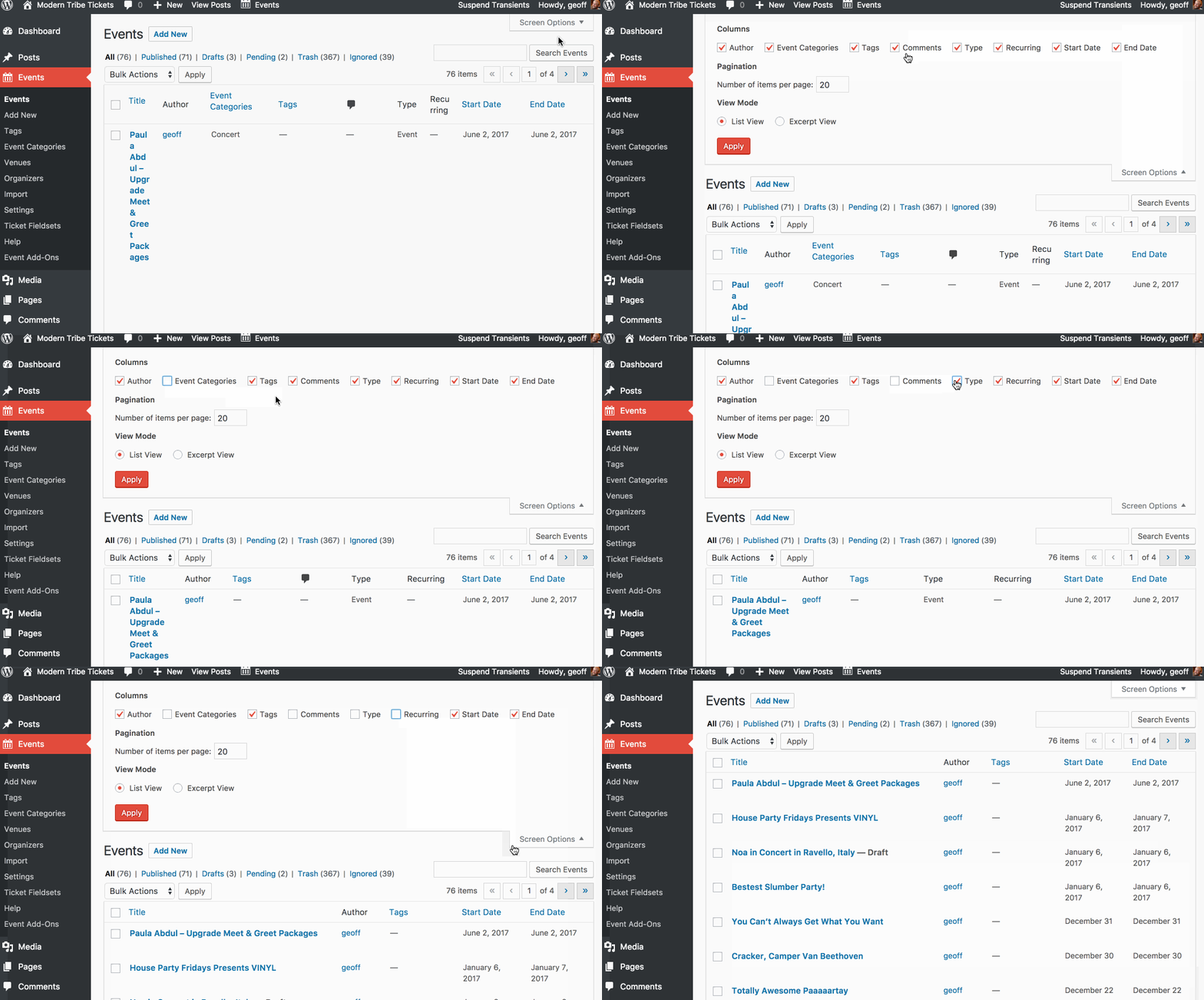
Similarly, you can use the Advanced Post Manager plugin and that will add even more features and options to the way your admin list view is managed.
Does this help answer your question? Please let me know. 🙂
Cheers!
GeoffMemberHello @evrim,
You bet! You can enable a list of attendees to display on the event they are registered for by selecting the following option when setting up tickets for an event in the event editor:
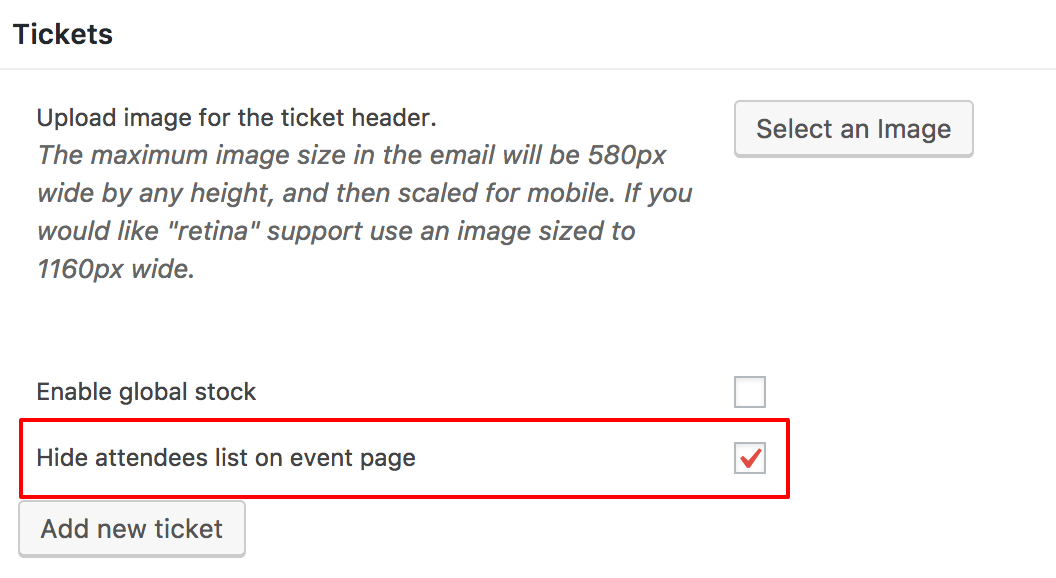
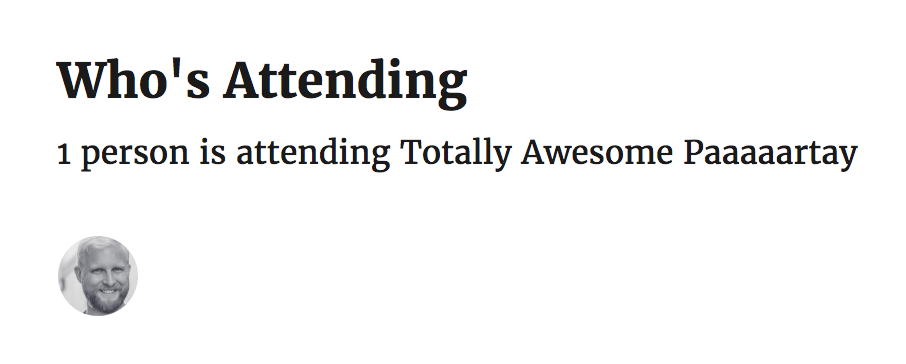
Uncheck the option highlighted above and that will enable attendee photos on the event like this:
Does this help answer your question? Please let me know. 🙂
Cheers!
GeoffMemberHa! Heck yeah, Matthew! The Extension Library is something we’ve been putting together under the hood around here for a little while now and all of us here on the team were so antsy to get it out. We believe it’s going to be a huge benefit to the community to have officially supported mini-plugins that make The Events Calendar and the rest of our plugins bend even further to your will. 🙂
It’s worth noting that the extensions themselves are a part of an open sourced repo on GitHub where we’ll gladly accept and review contributions from the community at large:
https://github.com/moderntribe/products-extensions
Cheers and happy new year!
Geoff
MemberRight on! I’m so glad to hear everything is working smoothly and I appreciate you following up to let us know. Definitely keep us posted if any other questions come up and we’d be happy to help. 🙂
Cheers and happy new year to you as well!
Geoff
MemberYou bet and it’s my pleasure! Glad to see you upgrade to the Ultimate Bundle and I really hope you enjoy using the plugins. Definitely let us know if you run into questions as you set things up and we’d be more than happy to help as best we can.
Cheers!
Geoff -
AuthorPosts