

Forum Replies Created
-
AuthorPosts
-
Geoff
MemberHey Brad,
Thanks for following up! Glad to hear that homepage feature will help out. 🙂
Events Calendar PRO does have a slew of shortcodes that might be handy for you to consider when creating additional page layouts that either display or tease the calendar. There are full calendar views available as well as options to embed the PRO widgets on any page or post. I’d definitely recommend checking those out.
Cheers!
GeoffFebruary 8, 2017 at 2:20 pm in reply to: Community Events Plugin: Can contributors specify Event Categories? #1231702MemberHi Jimmy,
Thanks for getting in touch!
Yes, indeed, Community Events does allow people to specify an Event Category when submitting events. The one thing to make sure of is that you already have Event Categories created in WordPress. The ones that are created will be the list of categories that are available to choose from. Here’s a screenshot of what that will look like once you have created categories:
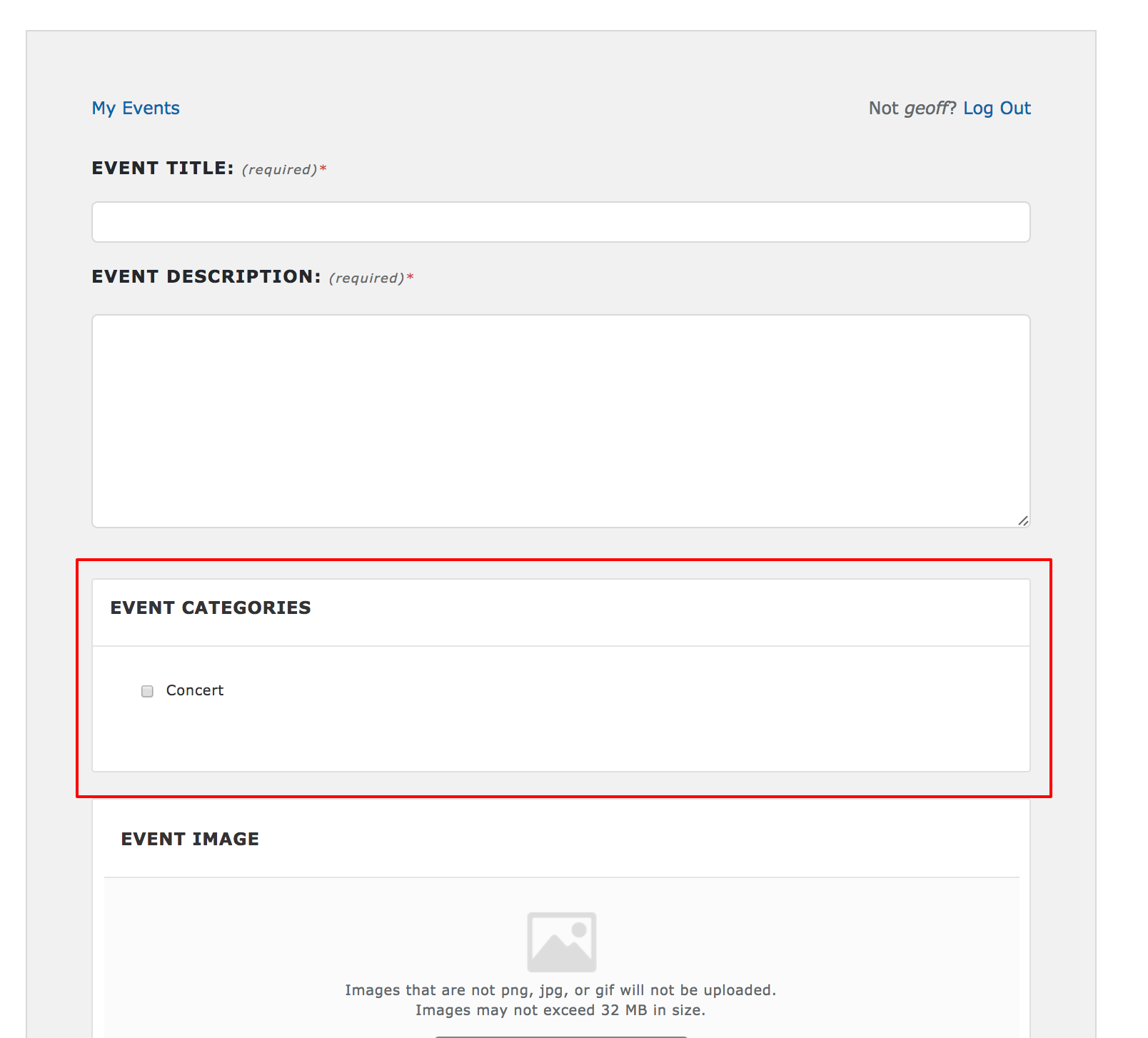
Does this help answer your question? Please let me know. 🙂
Thanks,
GeoffMemberHi Stefan,
You can hide the link to past events by adding something like this either to your theme’s style.css file or on the Appearance > Customize > Additional CSS screen:
.tribe-events-nav-previous {
display: none;
}
Does this help answer your question? Please let me know. 🙂
Cheers!
GeoffFebruary 8, 2017 at 2:09 pm in reply to: my events on the monthly calendar show up as dots instead of my event #1231691MemberHey there, Jannee, and thanks for getting in touch!
We’d be happy to help — but I do want to note that our pre-sales forum is used to answer questions about purchasing our premium plugins.
If you’re looking for technical support, it would be awesome if you could post your question to our <u>WordPress.org support forum</u>.
Or, if you already have an active license for one of premium plugins, will you please log into your account and post your topic to our premium support forum instead?
In the meantime, it sounds like your calendar is stuck in mobile view. One thing you might want to consider trying is heading to Events > Settings > Display and making sure that the Default Event Template is selected as the page template for the calendar.
Thanks so much!
GeoffMemberHey there and thanks for getting in touch!
We’d be happy to help — but I do want to note that our pre-sales forum is used to answer questions about purchasing our premium plugins.
If you’re looking for technical support, it would be awesome if you could post your question to our <u>WordPress.org support forum</u>.
Or, if you already have an active license for one of premium plugins, will you please log into your account and post your topic to our premium support forum instead?
In the meantime, you may want to consider checking out this extension for The Events Calendar ii it allows you to retain the Cost field in the Event editor which gives you the ability to set the price of the event independent from ticket prices.
Thanks so much!
GeoffMemberHi Brad,
Thanks for writing in!
You can set the calendar as your homepage in The Events Calendar by heading to Settings > Reading from the WordPress admin.
Does this help answer your question? Please let me know. 🙂
Cheers!
GeoffMemberHey Jason,
Thanks for getting in touch and welcome to the forums!
Category Colors is actually a plugin by another developer and, if I’m not mistaken, it is only compatible with Month View. You might want to reach out directly to the plugin author to see if there is any way to extend it over to other views as well.
Cheers!
GeoffMemberHey Patrick,
Happy to help you with this!
I think the best way to go about it is to refund your order (#1231463) for the renewal which will then allow you to purchase the Multisite License instead?
Would you like me to go ahead and initiate that for you? Please let me know and I’d be happy to do that right away.
Thanks!
GeoffMemberHi Luca,
Great questions! Moving to Event Aggregator will be pretty painless for you. It will not take away any of the events you have already imported and you can set it up to pull events in from multiple Facebook profiles and groups. You might need to set up the feeds you already have set up in Facebook events, but that is the only thing you need to consider.
Does this help answer your question? Please let me know. 🙂
Cheers!
GeoffMemberHi Katie,
Thanks for getting in touch!
Great question. I do want to note that we will soon be replacing the Facebook Events plugin with the new Event Aggregator service, which includes Facebook importing capabilities. It also allows you to pull in events from any Facebook profile or group, not just your own.
Another neat thing about Event Aggregator is that there is no installation required — it’s already included in The Events Calendar. Simply purchase a license, enter it on the Events > Settings > Licenses screen, then you’re good to start importing from the Events > Import screen.
Does this help answer your question? Please let me know. 🙂
Cheers!
GeoffMemberHi Pierre,
Thanks for writing in!
Yes, our plugins are exclusively compatible with WordPress. We built The Events Calendar and the add-ons for it specifically for WordPress and they work together wonderfully. 🙂
You can install The Events Calendar just like any other WordPress plugin through the WordPress Plugins > Add New screen.
If you purchase our premium add-ons for The Events Calendar, then you can upload the zipped files on that same screen, or via FTP, if you would prefer.
Here are step-by-step instructions for downloading and installing our plugins to WordPress:
Does this help answer your question? Please let me know. 🙂
Cheers!
GeoffMemberHi Jerry,
Thanks for checking! We have tested our plugins against WordPress 4.7.2 and they are indeed compatible.
That said, it is very possible you could still see differences, depending on your exact WP configuration. If it’s possible, I always like to recommend spinning up a test site you can use to stage all of your updates before immediately jumping into updates on a live site. It’s best practice and can save you a lot of time.
Does this help answer your question? Please let me know. 🙂
Cheers!
GeoffMemberHi Rebecca,
Thanks for reaching out and great question!
There is nothing to be aware of when upgrading to a Multisite License. That only changes your license permissions and will have no impact on your actual site. In other words, once you upgrade, there is nothing new to install or configure on the site.
Does this help answer your question? Please let me know. 🙂
Cheers!
GeoffPS: Our forum replies will only be sent to the email on record with the license. Sorry about that!
MemberThis reply is private.
February 8, 2017 at 7:16 am in reply to: Can I use my license key on an additional developer-subdomain? #1231282MemberYou bet! I’ll go ahead and close this thread but let us know if any other questions come up and we’d be happy to help. 🙂
Cheers!
Geoff -
AuthorPosts