

Forum Replies Created
-
AuthorPosts
-
Courtney
MemberHi Dawn
So sorry about that. Did you ever receive a notification that we received your request? Unfortunately, we discovered our form process was not delivering submissions. If you never heard word from us one way or another, please resubmit.
I’ll check with our refunds representative to see if she has record of your request.
Thanks
Courtney 🙂MemberHi Mike
You can certainly use any of the lesser quantity levels of licenses on a multisite. One caveat: you may not be able to get the license to activate, thus not receiving product updates. We are working on a solution for this, but as of yet do not have a timeframe for release. You can still install the plugin and perform manual updates (keep a watch on our email newsletters to know when updates ship).
Likewise, please remember to send us a manual copy/paste as a private response containing your System Info https://theeventscalendar.com/knowledgebase/sharing-sys-info/ when you need support.
You can start with as small as a personal license to cover just 1 domain and work your way up. Inside your account, you can select upgrade license to scale up as you are ready. If you are ready for 10 sites all at once, the Agency license level will cover up to 10 sites.
Is there anything else I can help you with?
Thanks
Courtney 🙂MemberHi there Hali
As Facebook continues to alter what it allows us to access, we will continue to pursue a path forward for Event Aggregator to import Facebook events. We will continue to keep https://theeventscalendar.com/knowledgebase/ea-fb-privacy-policy and https://theeventscalendar.com/event-aggregator-status/ updated as this unfolds.
We really would like to work with you on this. Would you be interested in a license for the remaining time for one of our other plugins instead of a refund?
If you interested in a refund, you can fill out the refund form https://theeventscalendar.com/knowledgebase/refund-policy/.
Please let me know if you have any other questions!
Thanks
Courtney 🙂MemberHey Jack
Actually, it is only our free The Events Calendar plugin that supports REST API at this time. We have plans to integrate our premium plugins soon, and The Events Calendar is our base plugin for most of our other premium plugins (it is required to have installed to use some of the others).
You can read more about our integration at https://theeventscalendar.com/knowledgebase/introduction-events-calendar-rest-api/.
Is there anything else I can help you with?
Thanks
Courtney 🙂MemberHi there
Thanks so much for reaching out!
Facebook recently announced a range of changes (https://newsroom.fb.com/news/2018/04/restricting-data-access) to their APIs (the protocols we use to ‘speak’ to their servers and retrieve event information) which are having an effect on a number of our users.
As part of this, a number of new restrictions were applied to their Events API, which is the specific protocol Event Aggregator uses in order to import events, organizers, and venues. These changes went live with little notice to providers such as ourselves. At this point, it does not seem possible to reliably import any events, even if you created and ‘own’ events on Facebook and have linked Event Aggregator to Facebook using those same credentials.
This is frustrating for you, and for developers like us. As Facebook continues to alter what it allows us to access, we will continue to pursue a path forward for Event Aggregator to import Facebook events. We will continue to keep https://theeventscalendar.com/knowledgebase/ea-fb-privacy-policy and https://theeventscalendar.com/event-aggregator-status/ updated as this unfolds.
Please let me know if you have any other questions!
Thanks
Courtney 🙂MemberHi there
Thanks so much for reaching out!
Would you be interested in a license for the remaining time for one of our other plugins instead of a refund?
If you interested in a refund, you can fill out the refund form https://theeventscalendar.com/knowledgebase/refund-policy/.
Please let me know if you have any other questions!
Thanks
Courtney 🙂MemberHey there
LaToya shared that she has refunded your request. Funds should reach your account within 5-10 business days. Closing out this thread as the refund request duplicates the details on https://theeventscalendar.com/support/forums/topic/refund-for-event-aggregator-please/
Thanks
Courtney 🙂MemberUnderstood Chris. We really want this functionality restored as well. If you haven’t received a confirmation message from us that we have your form submission within 2 days, please let me know.
Thanks
CourtneyMemberHi Chris
Thanks so much for reaching out!
Facebook recently announced a range of changes (https://newsroom.fb.com/news/2018/04/restricting-data-access) to their APIs (the protocols we use to ‘speak’ to their servers and retrieve event information) which are having an effect on a number of our users.
As part of this, a number of new restrictions were applied to their Events API, which is the specific protocol Event Aggregator uses in order to import events, organizers, and venues. These changes went live with little notice to providers such as ourselves. At this point, it does not seem possible to reliably import any events, even if you created and ‘own’ events on Facebook and have linked Event Aggregator to Facebook using those same credentials.
This is frustrating for you, and for developers like us. As Facebook continues to alter what it allows us to access, we will continue to pursue a path forward for Event Aggregator to import Facebook events. We will continue to keep https://theeventscalendar.com/knowledgebase/ea-fb-privacy-policy and https://theeventscalendar.com/event-aggregator-status/ updated as this unfolds.
We really would like to work with you on this. Would you be interested in a license for the remaining time for one of our other plugins instead of a refund?
If you interested in a refund, you can fill out the refund form https://theeventscalendar.com/knowledgebase/refund-policy/.
Please let me know if you have any other questions!
Thanks
Courtney 🙂MemberHey Rachel
We certainly do!
You can apply for our non-profit discount by completing the form at https://theeventscalendar.com/apply-for-npp.
⚠️Please Note: Licenses granted through this program do not include access to support.
If you need in-depth support,
please consider purchasing a regular license.
Is there anything else I can help you with?
Thanks
Courtney 🙂MemberHi Craig
You can add more than 1 image to Image Widget Plus. See my example on
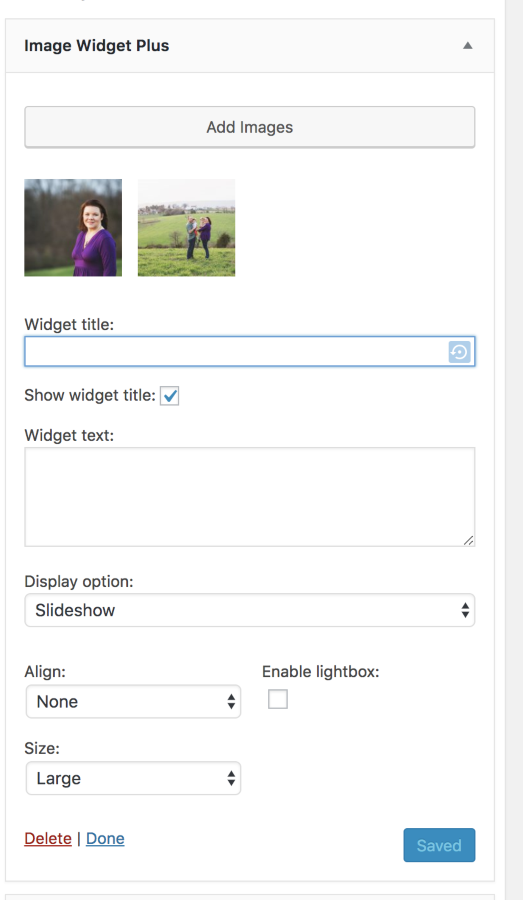
Maybe I’m not following exactly what error you are seeing. Can you clarify what you want to achieve?
We do offer 30 day refunds if you find the plugin does not meet your needs. It’s just a matter of submitting a refund request form at https://theeventscalendar.com/knowledgebase/refund-policy/.
I hope I can help you solve this first though.
Thanks
Courtney 🙂MemberHi James
Event Aggregator can only import or export events. It truly doesn’t synchronize events. If it has imported an event and the event is later deleted at the source, it must be manually deleted from the calendar too. Likewise, it doesn’t push data to another place. It does offer a file that you can export and take to another site to import.
Event Aggregator does not yet support embedding the calendar either.
However, we also have a new product: http://loxi.io that does support being able to embed the calendar on many sites and platforms all at once. Sign up for a free trial account there and see if meets your needs.
Is there anything else I can help you with?
Thanks
Courtney 🙂MemberGreat to hear Tam. I’ll close out this thread for now, but do let us know if we can help you in the future.
Thanks
Courtney 🙂MemberGreat to hear Charlie.
I’ll close out this thread for now. Let us know if you run into any other issues in the future.
Thanks
Courtney 🙂MemberHi there John
Thanks so much for reaching out!
Facebook recently announced a range of changes (https://newsroom.fb.com/news/2018/04/restricting-data-access) to their APIs (the protocols we use to ‘speak’ to their servers and retrieve event information) which are having an effect on a number of our users.
As part of this, a number of new restrictions were applied to their Events API, which is the specific protocol Event Aggregator uses in order to import events, organizers, and venues. These changes went live with little notice to providers such as ourselves. At this point, it does not seem possible to reliably import any events, even if you created and ‘own’ events on Facebook and have linked Event Aggregator to Facebook using those same credentials.
This is frustrating for you, and for developers like us. As Facebook continues to alter what it allows us to access, we will continue to pursue a path forward for Event Aggregator to import Facebook events. We will continue to keep https://theeventscalendar.com/knowledgebase/ea-fb-privacy-policy and https://theeventscalendar.com/event-aggregator-status/ updated as this unfolds.
Please let me know if you have any other questions!
Thanks
Courtney 🙂 -
AuthorPosts