

Forum Replies Created
-
AuthorPosts
-
Courtney
MemberHi Phillip
Thank you for the useful screenshots and helpful replies.
Please activate WooCommerce as well. Can you then send me a screenshot of the post/page/event area where the Add Tickets area should appear on the admin side?
It should appear after the body of a post/page/event like this:
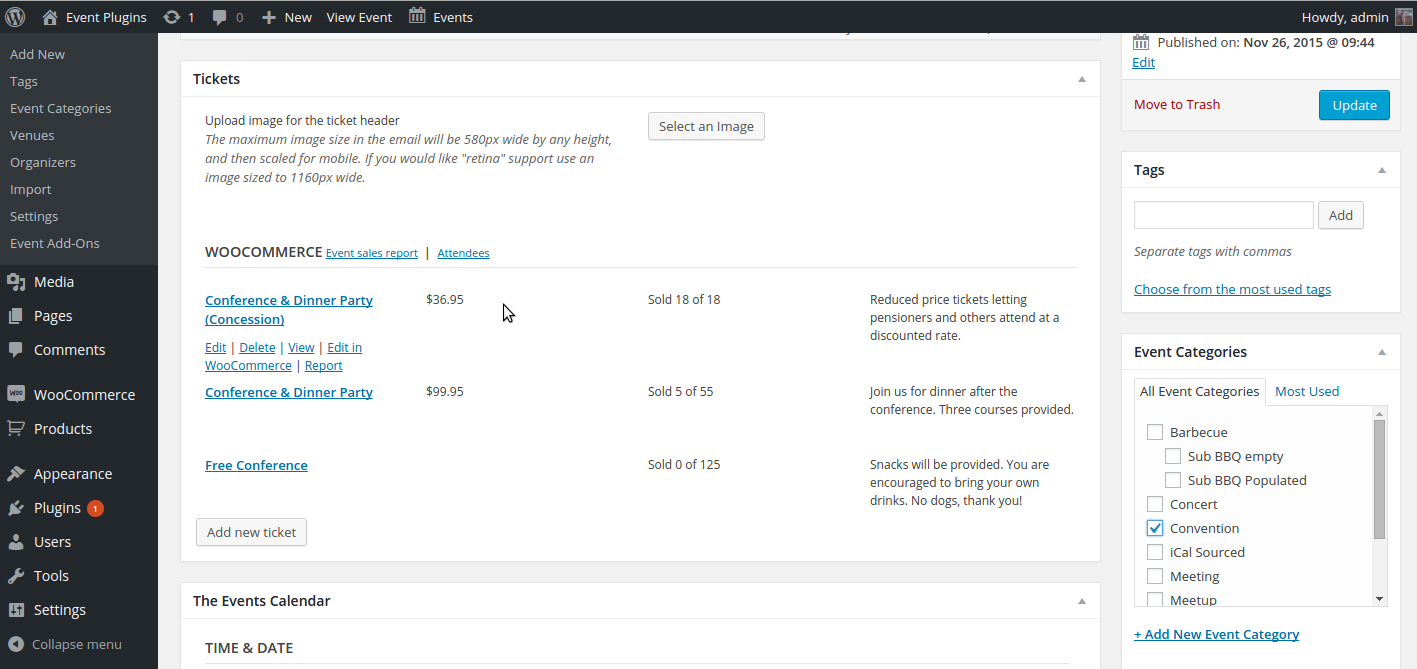
Thanks,
Courtney 🙂MemberThis reply is private.
MemberHello Kieran
Yes, if you are planning on the other licenses in your account being used on sites that are not with the same client, it would be more ideal for the client to have their own account for their support needs. Swapping the license should not impact existing data with our plugin on that domain.
Is there anything else I can help you with?
Thanks,
Courtney 🙂MemberHi Kate
This is a function of your WordPress settings. Here’s a quick guide to get that resolved for you: https://theeventscalendar.com/knowledgebase/changing-the-first-day-of-the-week/.
Let me know if that fixes it for you.
Thanks,
Courtney 🙂MemberHi Lauri
We’d be happy to help sort that out for you. Please email emailing support /at/ theeventscalendar /dot/ com.
Thanks
Courtney 🙂MemberHi Sherman
Sorry that is happening to you. When I reviewed your license, it was registered to your server’s IP address.
To resolve this, could you go to your License Activation settings here, de-activate the IP address listing, and then reactivate from withing your sites Event » Settings » Licenses area?
Let me know if that works for you.
Thanks,
Courtney 🙂MemberHello Amal
Unfortunately, our staging with licenses only applies to domains with these in the domain name:
.dev
.test
.local
.tribe
.stagingOr on a local install.
Would you be able to build out the site on the staging server without the license activated?
Thanks,
CourtneyMemberHello Jason
Sorry for our delay. We answer forum requests throughout the weekdays.
I’ve asked a few others on the team to also review what is happening on your site. We are stumped as we can’t see the shortcode even using Chrome inspector. Could you provide us with a screencast or a few screenshots of how you are adding the code into the links that you provided> .
I like Jing for a free tool to create screenshots/screencasts.
We’d like to get this worked out soon.
Thanks,
CourtneyMemberHello Byor
Unfortunately the mini-calendar shortcode doesn’t have a limit option. However, you could use [tribe_events_list limit=”10″] and change how many events are displayed. This will not have a mini-calendar, but will list upcoming events for you.
I’d still suggest testing this against your theme. On the front end, I tried to override your CSS code using Chrome dev tools and found the theme still didn’t work with the !important tags.
If you’d like to suggest the feature, we’d appreciate it https://tribe.uservoice.com/.
Is there anything else I can do to help you?
Thanks,
Courtney 🙂MemberHello Kevin
You can apply for our non-profit discount by completing the form at https://theeventscalendar.com/apply-for-npp.
⚠️ Please Note: Licenses granted through this program do not include access to support. If you need in-depth support, please consider purchasing a regular license.
Is there anything else I can help you with?
Thanks,
CourtneyMemberHi Stuart
Wow, I’m sorry that happened. That is odd. Please let me know if you notice this happen a second time. If so, then there’s another issue.
Are you able to work around this one instance?
Thanks,
Courtney 🙂April 3, 2017 at 6:29 am in reply to: I client runs an existing CRM can we integrate with Events calendar pro #1263348MemberHi Edgar
At this time, our only easy integration is to export RSS feeds into 3rd party systems.
Another way to achieve this is with the WP Rest API. However, we don’t have an exact timeframe for WP Rest API integration. In the meantime you could create your own custom endpoints for the Calendar with this great information here http://v2.wp-api.org/extending/adding/.
One of our existing feature requests could use your vote to make this happen faster: https://tribe.uservoice.com/forums/195723-feature-ideas/suggestions/15114291-wordpress-rest-api
I hope this helps.
Thanks,
Courtney 🙂MemberThis reply is private.
MemberHi Cathie
Yes, that upgrade can be pro-rated. If you don’t see that option available when you are reviewing the renewal area, you can email us at support /at/ theeventscalendar /dot/ com for further assistance.
Is there anything else I can help you with?
Thanks,
Courtney 🙂MemberHi Byor
Unfortunately, I don’t have a date yet. Our company retreat just wrapped up and our developers haven’t had a chance yet to look through the bug list. We will keep you posted when the fix is released.
Thanks,
Courtney 🙂 -
AuthorPosts