
Home › Forums › Ticket Products › Event Tickets Plus › Unable to access/create ticketing
- This topic has 7 replies, 2 voices, and was last updated 9 years, 5 months ago by
Phillip.
-
AuthorPosts
-
March 29, 2017 at 10:06 pm #1261854
Phillip
ParticipantHello,
Like Di March 28 2017, I purchased and installed Events Tickets and Events Tickets Plus on my site, activated it, but I still do not see the field to add tickets. There is no “tickets” in the settings pages under events as well.
Can you please let me know how I can solve this? I did attempt the fix that Courtney suggested.
I am running Woocommerce and have it configured as you instruct.
I’m also running The Conference theme Fudge 2.0 by Showthemes. If I disable it to check for conflict, will I lose all the build work I have done in that plugin?
Thank you.
========================
PLEASE LEAVE FOR SUPPORT
Reporting the same issue as: https://theeventscalendar.com/support/forums/topic/unable-to-access-functionality/March 30, 2017 at 2:22 pm #1262296Courtney
MemberHello Phillip
What is your domain name? I clicked the link provided in your profile, but received a HostGator landing page instead.
Have you installed Event Tickets along with Event Tickets Plus? In the log of your System Info, I didn’t see Event Tickets.
When you go to Events » Settings » Tickets, are you able to select post types that should have tickets?
Finally, did you notice any plugin or theme conflicts when Testing for Conflicts?
Thanks,
Courtney 🙂April 4, 2017 at 12:02 am #1263841ParticipantHello Courtney,
Really appreciate your assistance.
What is your domain name? I clicked the link provided in your profile, but received a HostGator landing page instead.
– Domain name is plc-conference.org.au I haven’t taken the site live in order for yo to be able to view it. Now I’m still in conflict test mode with twenty sixteen theme and all other plugins deactivated and I can’t see how to take the site live for you to view. If you still need to see, can you let me know how to or I can give you a login so you can take a look in the back end?
Have you installed Event Tickets along with Event Tickets Plus? In the log of your System Info, I didn’t see Event Tickets.
I have, (see attached screenshot) but if you don’t see it in my System Info, perhaps herein lies the problem?
When you go to Events » Settings » Tickets, are you able to select post types that should have tickets?
– yes I was able to do that in both the theme I had installed (Showthemes Fudge 2.0 Conference Theme) and in the Twentysixteen setting when conflict testing.; I selected all post types in both instances
Finally, did you notice any plugin or theme conflicts when Testing for Conflicts?
– I followed your testing for conflicts steps- switched to twenty sixteen theme, uninstalled all plugis except events tickets and events tickets plus, emptied my browser cache and refreshed- still limited functionality in events as per attached screenshot below. Your plugin/s complete functionality wasn’t restored after this process. I still can’t input (see attachment to see what I’m working with/limited to).
Thank you very much for your assistance it is greatly appreciated. I need to resolve this soon. 🙂
April 4, 2017 at 6:14 am #1264007MemberHi Phillip
Thank you for the useful screenshots and helpful replies.
Please activate WooCommerce as well. Can you then send me a screenshot of the post/page/event area where the Add Tickets area should appear on the admin side?
It should appear after the body of a post/page/event like this:
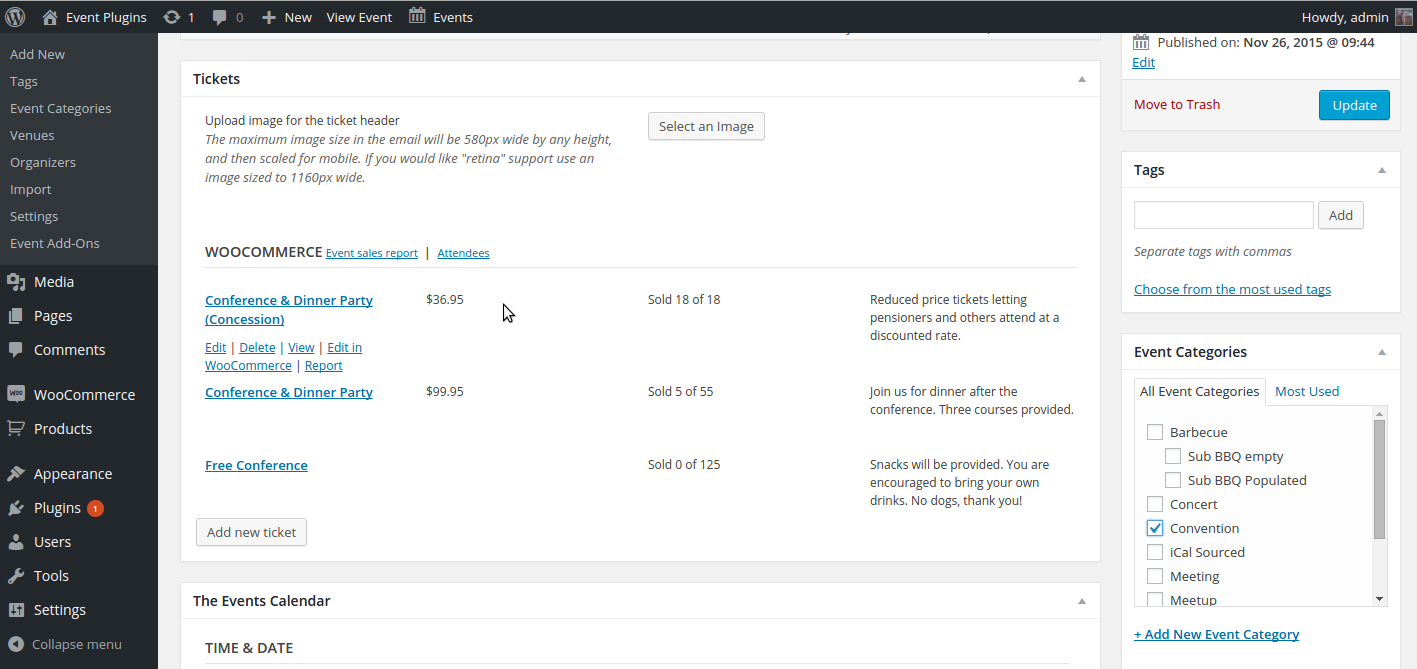
Thanks,
Courtney 🙂April 5, 2017 at 8:48 pm #1265577ParticipantHi Courtney,
You plugin isn’t working out with our conference theme plugin. I will no longer be using your events tickets and events tickets plus plugins. Thanks for your help all the same.
Kind regards,
PhillApril 6, 2017 at 2:51 pm #1266258MemberI’m sorry we weren’t able to meet your needs Phillip.
Thanks again,
CourtneyApril 28, 2017 at 9:35 am #1275892Support Droid
KeymasterHey there! This thread has been pretty quiet for the last three weeks, so we’re going to go ahead and close it to avoid confusion with other topics. If you’re still looking for help with this, please do open a new thread, reference this one and we’d be more than happy to continue the conversation over there.
Thanks so much!
The Events Calendar Support Team -
AuthorPosts
- The topic ‘Unable to access/create ticketing’ is closed to new replies.