

Forum Replies Created
-
AuthorPosts
-
Courtney
MemberHi Vibhaa
I will help you over on the other thread you started. https://theeventscalendar.com/support/forums/topic/need-support-on-link-to-event/
Thanks
Courtney 🙂MemberHi Mona
Filter Bar https://theeventscalendar.com/product/wordpress-events-filterbar/ is it’s own plugin. You can take a look at that page for more information about this product and the purchase process.
Is there anything else I can help you with?
Thanks
Courtney 🙂MemberHi Chen
Can you add the following code to your child theme, or in Appearance » Customize » Additional CSS?
.ticket-meta {color: #000 !important;}Let me know if this works for you.
Thanks
Courtney 🙂MemberHi Bruce
We don’t have a clear downgrade path.
I added a new PRO Personal-level license to your account that started today and expires on February 5, 2018.
Please visit https://theeventscalendar.com/license-keys/ and you can Renew from there.
Please let me know how this goes for you.
Thanks
Courtney 🙂MemberHi Kevin
So sorry about that. I do believe we sent emails about needing to set up renewals.
https://theeventscalendar.com/my-account/subscriptions/ is where you can go to ensure all your plugins are set up for renewal subscriptions in the future.
Is there anything else I can help you with?
Thanks
Courtney 🙂MemberHi Tiffany
Can you share your CSV file via Google Drive or Dropbox and post a private reply here? I’d like to test this out myself as well.
https://theeventscalendar.com/knowledgebase/csv-files-options-and-examples/ shows how to set up the files for importing. Did you compare your file with this?
I’ll be continuing to work with you through this process.
Thanks
Courtney 🙂MemberHi there
I’ll catch up with you on the other thread 🙂
Thanks
Courtney 🙂MemberHi Simon
You can certainly set a cut-off date for ticket sales. See how this would look in the back end:
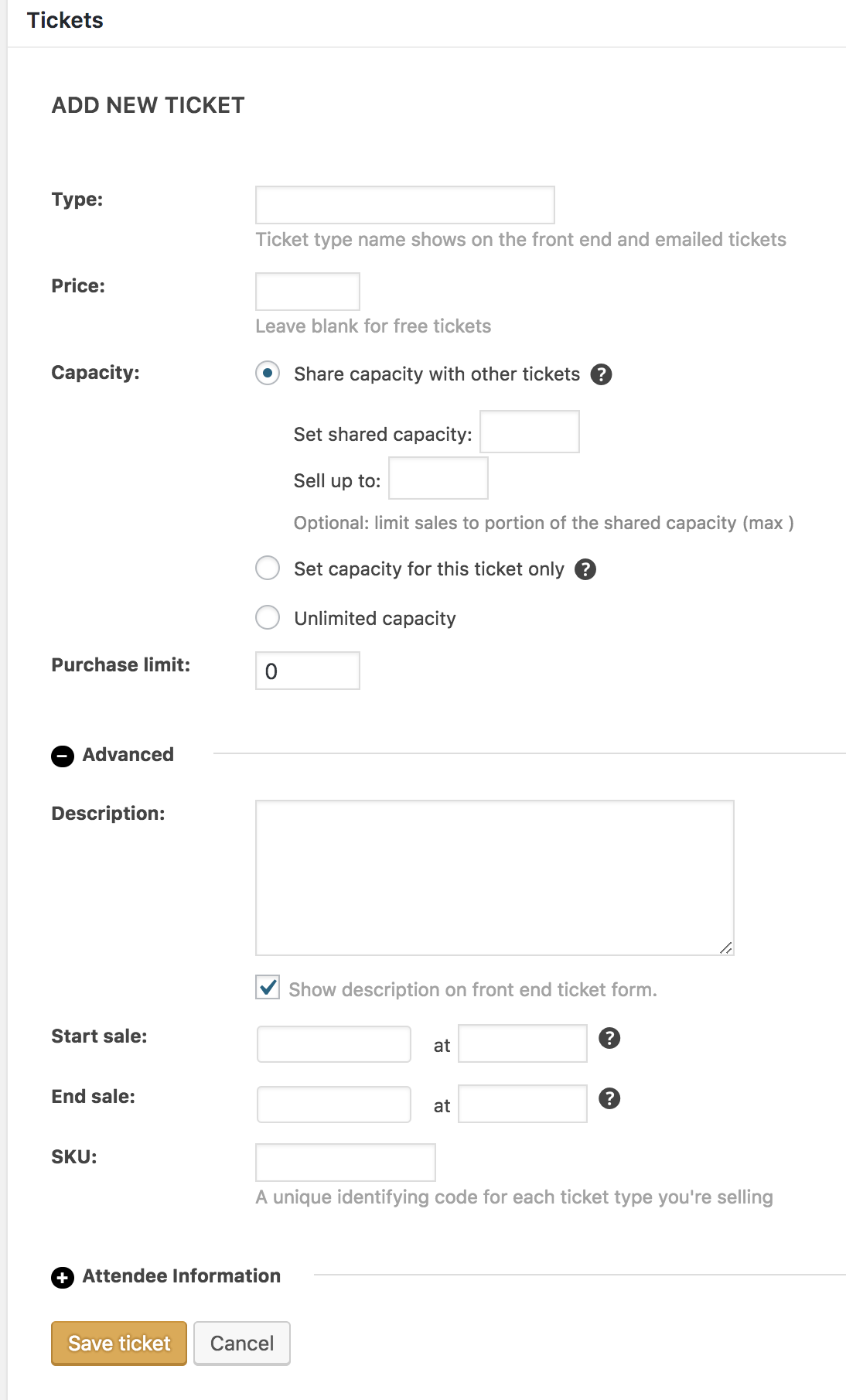
The tickets will not appear on the front end, even if the event is still in the future but tickets were set to no longer be on sale. If any event is in the past, the top of the event page will say “This event has passed”.
Is there anything else I can help you with?
Thanks
Courtney 🙂MemberHi Nicolas
I checked the individual events and they are discoverable as events with Google’s structured data testing tool. The events list is not. I believe this helps prevent duplicate issues in search results. Does that make sense?
Is there anything else I can help you with?
Thanks
Courtney 🙂January 29, 2018 at 1:25 pm in reply to: Facebook import not working after WordPress migration #1439220MemberHi Askan
Can you test again now? It can take a few hours after switching your domains for the Event Aggregator server to detect this and allow for new domain imports.
Thanks
Courtney 🙂MemberHi there Thirukumary
That is exactly the correct place to look. Is there anything else I can help you with?
Thanks
Courtney 🙂MemberHi Dan
Are you looking to create a csv file that you will import into your site? https://theeventscalendar.com/knowledgebase/csv-files-options-and-examples/ would have examples for that.
Is there anything else I can help you with?
Thanks
Courtney 🙂January 29, 2018 at 1:16 pm in reply to: Event submission form: Background color of dropdown menus to dark #1439204MemberHey again Oliver! 🙂
I’d be happy to take a look. Can you send me a link specifically to your events/community/add for the site? I tried the default link to get there and found the page not quite where I expected it.
Thanks
Courtney 🙂MemberHello
Can you start by going through our Testing for Conflicts Guide https://theeventscalendar.com/knowledgebase/testing-for-conflicts/? I am wondering if you might have a plugin or theme conflict.
We recommend conducting these tests on a staging server (https://theeventscalendar.com/knowledgebase/creating-using-wordpress-staging-site/).
Begin by deactivating all other plugins, using a theme such as Twenty Seventeen https://wordpress.org/themes/twentyseventeen/, and see if the issue still persists.
Also, double check for any other updates available (Dashboard » Updates).
Can you also please send us your System Info https://theeventscalendar.com/knowledgebase/sharing-sys-info/ to better assist you?
Please let me know if the issue still persists after these tests.
Thanks
Courtney 🙂January 29, 2018 at 12:45 pm in reply to: Changing any reference to "tickets" to something different "course" #1439168MemberHi Shane
I’d recommend checking out the plugin https://wordpress.org/plugins/say-what/. This is likely going to be a faster and easier solution for you than to go through the Themer’s Guide to manually override the changes.
Let me know if that works for you and how you make out with it.
Thanks
Courtney 🙂 -
AuthorPosts