

Forum Replies Created
-
AuthorPosts
-
Courtney
MemberHi there Andrew!
Thanks so much for getting in touch! I’m afraid that we’re not equipped to provide technical support for current plugin users here in our pre-sales forum.
We’re limited in helping with styling customizations, per our Scope of Support / Terms, but a few tips to help you carry this further include:
- Start by modifying what you can at Appearance » Customize » The Events Calendar.
- We generally don’t recommend that you change the theme or plugin’s CSS files directly, as they will be overwritten. To avoid this, follow the steps outlined in Themer’s Guide
- Use overriding CSS files, or add CSS to your site using Appearance » Customize » Additional CSS.
- Use !important before a semicolon to override every css rule. It’s a brute force method, but works for quick fixes.
- Please check out this Customizing WordPress #2 – Using Chrome Developers Tools YouTube video in addition to our Using Chrome Developer Tools tutorial on how to easily make changes using CSS.
We’d be more than happy to assist you at one of the following locations:
• If you’re using one or more of our free plugins such as The Events Calendar and Event Tickets, you can request assistance on the WordPress.org support forum for the affected product.
• If you’re a current license holder for one of our premium offerings, please log in to your account and submit a post to the appropriate forum for the affected product. Please include your System Info https://theeventscalendar.com/knowledgebase/sharing-sys-info/ so we can better help you.If you can, please take the time to confirm in your post that you’ve run through our Testing for Conflicts steps prior to contacting us–this will save us a step and help us to get your issue resolved that much quicker! 🙂
Thanks again, and we’ll see you in the forums!
Courtney 🙂MemberHi Sako
When you purchase our plugins, you are able to receive updates for one year and have access to our premium support forums for that time. After your license expires, updates and support will no longer be available.
The exception to this is with our plugin, Event Aggregator. Without a license, the service of importing events will not work.
Is there anything else I can help you with?
Thanks
Courtney 🙂MemberHi Diana
Yes, it is possible to override the names of Events. See https://theeventscalendar.com/extensions/change-labels-events-venues-organizers/ for an additional free extension to our plugin to help change that.
Is there anything else I can help you with?
Thanks
Courtney 🙂MemberSure thing Tara
Enjoy wclanc 🙂 I think the family will be able to handle me attending regional WordCamps again by summer.
Thanks
Courtney 🙂MemberOh Jack, so sorry about that. You can reach out to your theme developers and WooCommerce support to work on resolving that. Please keep us posted.
Thanks
Courtney 🙂MemberHi Jennifer
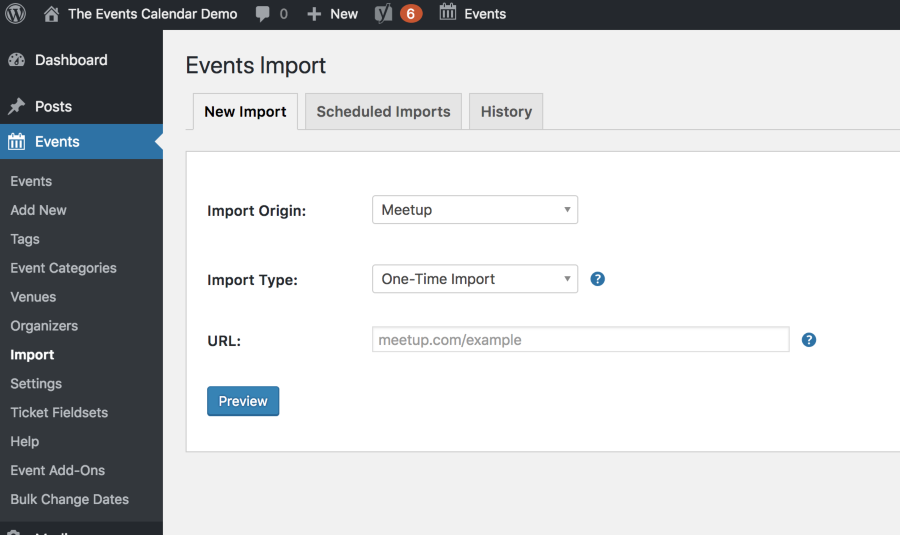
To import an event from a Meetup, you’d just need to paste in the Meetup group link:
Event Aggregator can import the following types of events:
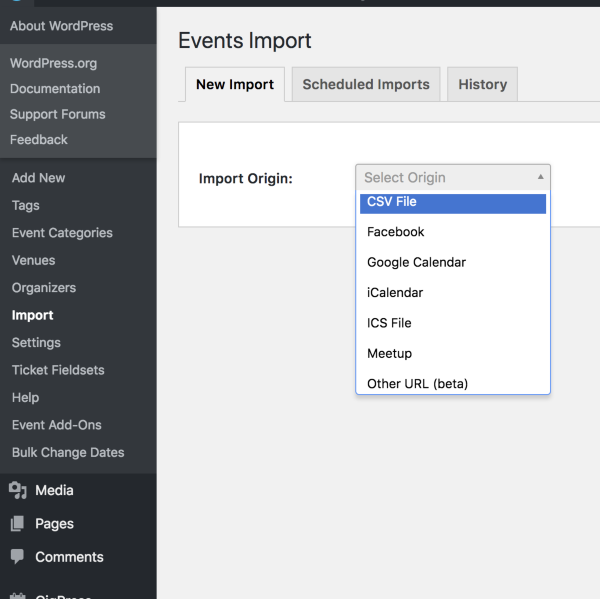
Other URL at this time is limited to sites using The Events Calendar.
If you purchase the Eventbrite Tickets https://theeventscalendar.com/product/wordpress-eventbrite-tickets plugin, it will add an import option for Eventbrite. It is not included in the Event Aggregator options, but is its own plugin. It does allow you to process payments on Eventbrite.
Does that help to clarify?
Thanks
Courtney 🙂MemberHey Tara
I believe you are seeing both because both have been entered as locations, even in the past. The trick is finding a past event. When you select Virginia, and then “Past Events”, you can see which event & venues need to be modified: http://tinychefs.staging.wpengine.com/events/list/?tribe_paged=1&tribe_event_display=past&tribe_state%5B%5D=6346.
Change those and the Filter Bar should work itself out.
Thanks
Courtney 🙂PS – I won’t be making WordCamp Lancaster this weekend. Still a bit too much with 2 under 2.
MemberHey Jack
Yes, in order for Event Tickets Plus to work, you’ll need an e-commerce plugin. We currently support WooCommerce or Easy Digital Downloads. Read more about each option’s features and payment gateways.
Is there anything else I can help you with?
Thanks
Courtney 🙂MemberSure thing Jim. Glad you’re on your way now. I’ll close out this thread.
Thanks
Courtney 🙂February 26, 2018 at 12:24 pm in reply to: License attributed to development site – how do I move to new site #1464127MemberThanks Hilary. Glad you’ve got it all sorted out. I’ll close out this thread for now.
Thanks
Courtney 🙂February 26, 2018 at 12:23 pm in reply to: How Do We Test Filter Bar Add-on for Staging Website URL? #1464126MemberHi Chad
At this time, our staging factors in only addresses ending in:
.dev
.test
.local
.tribe
.stagingIf you think that is something you would like to see changed, I encourage you to visit our User Voice Page and either upvote an existing request or make a new request there.
You can suggest it it http://tribe.uservoice.com.
Since your site doesn’t match the criteria, you can still use the plugin. You will need to manually run updates, the license may not register (or you could register it there while building and later Move Your License Key https://theeventscalendar.com/knowledgebase/moving-your-license-keys/. If you need to contact support during that time, please manually send in your System Info https://theeventscalendar.com/knowledgebase/sharing-sys-info/.
Is there anything else I can help you with?
Thanks
Courtney 🙂MemberHi Alex
Hi
I’m sorry the Photo View’s sort order is causing you confusion or poor user experience. Others have had similar feedback in the past.
The Photo View uses jQuery Isotope to output the items in a Pinterest-type grid but not in a rigid row-column type grid.
You can view our Demo Site’s Photo View to compare its sorting to how your site is working.
We aren’t able to really modify the quantity of columns.
If you’d like to see the sorting script improved, feel free to suggest it as an enhancement at our plugins’ UserVoice page.
This allows others who are interested in that feature to easily voice their support. We frequently review suggestions there to find out which ones are popular, then we implement as many of them as we can.
If you’re wanting Photo View’s sorting or grid/layout customized for your site, I’d guess any customization would need to be done via JavaScript, not CSS. If you need some coding help, you may want to ask your developer or reference our list of known customizers.
Thanks
Courtney 🙂MemberWe’d be happy to help sort that out for you.
Please send an email to support [at] theeventscalendar [.] com.
Thanks
Courtney 🙂MemberHey there
It looks like you submitted over here as well: https://theeventscalendar.com/support/forums/topic/change-calendar-months-view/
I’ll close this thread out and we will help you on the other.
.
Thanks
Courtney :MemberHi Jennifer
- No, RSS is not set up to parse dates in a way that works for events. We support .ics & iCal imports (standard calendar importing), Facebook public events, Google Calendar, other sites using The Events Calendar, Meetup, and platforms that can integrate with the REST API.
-
http://waukesha.chambermaster.com/events is not using The Events Calendar on their site. If you could get an export option from that calendar that meets the criteria in #1, that could work. However, I don’t see that option visible at this time. Reaching out to the web developer there may provide answers.
-
yes, you do not need to be the Meetup organizer to use a Meetup group’s calendar.
-
Eventbrite Tickets is a separate plugin from Event Aggregator. It adds the ability to import Eventbrite tickets and sell tickets from your site that process through Eventbrite.
Facebook events: you can just copy the link to the page hosting the event into Event Aggregator. It will handle importing public events, even if you are not the coordinator.
Is there anything else I can help you with?
Thanks
Courtney 🙂 -
AuthorPosts