

Forum Replies Created
-
AuthorPosts
-
March 5, 2018 at 4:01 am in reply to: Facebook import not working after WordPress migration #1469853
Courtney
MemberHi there
I’m going to reach out to see where the developer is on this.
I do see that I extended your license to expire in 2019. Can you check My Account » Licenses https://theeventscalendar.com/license-keys/ for that extended license>
Thanks
Courtney 🙂MemberHey there Talei
At this exact moment, our Event Tickets plugin is the way to just handle RSVPs.
Event Tickets Plus with an e-commerce plugin is how we’ve handled all ticket sales. We currently support WooCommerce or Easy Digital Downloads. Read more about each option’s features and payment gateways. To use Event Tickets Plus, you’d still need Event Tickets also installed. Just don’t add an RSVP to the event and you’d be all set.
However, we’ve got some exciting things coming out very soon. We just added a lot of new features to the free plugin, Event Tickets. The main big feature includes the ability to directly connect to Paypal. If you plan to sell tickets only with Paypal, hold on for just a week yet. We’ll have that release ready soon.
Thanks
Courtney 🙂MemberHi Joy
After you create your ticket and hit save, a settings button will display. Select that, then upload your image.
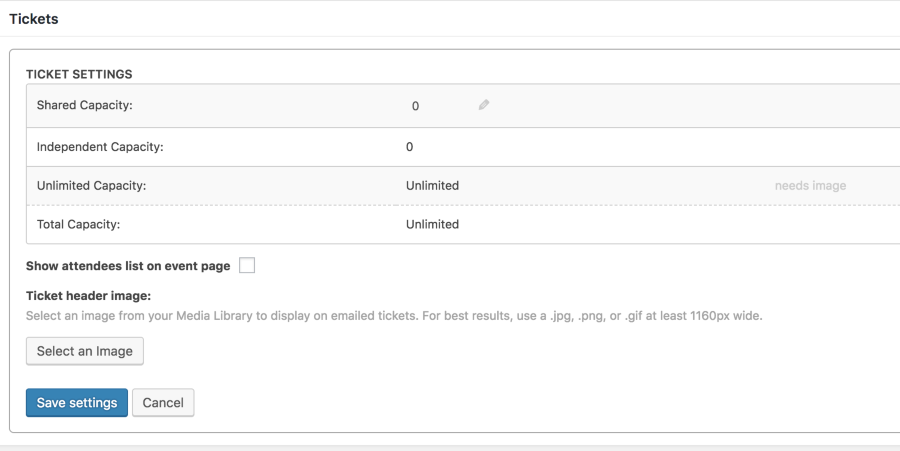
Let me know if this works for you.
Thanks
Courtney 🙂MemberHi Jason
Can you upload and activate your plugin on the new site? This should apply the license key automatically. Let me know if this resolves the issue.
Thanks
Courtney 🙂March 4, 2018 at 12:10 pm in reply to: Can the calendar be used as a stand alone application? #1469497MemberHi Mary Ann
At this time, The Events Calendar requires being installed on your own WordPress powered website.
However, we are just about to launch a calendar tool that is platform agnostic. Check it out: http://m.tri.be/19qc It should meet your needs.
Thanks
Courtney 🙂MemberHi Jane
Glad it’s resolved. I’ll close this out.
Thanks
Courtney 🙂MemberHi there!
Thanks so much for getting in touch! I’m afraid that we’re not equipped to provide technical support for current plugin users here in our pre-sales forum. We’d be more than happy to assist you at one of the following locations:
• If you’re using one or more of our free plugins such as The Events Calendar and Event Tickets, you can request assistance on the WordPress.org support forum for the affected product.
• If you’re a current license holder for one of our premium offerings, please log in to your account and submit a post to the appropriate forum for the affected product. Please include your System Info https://theeventscalendar.com/knowledgebase/sharing-sys-info/ so we can better help you.If you can, please take the time to confirm in your post that you’ve run through our Testing for Conflicts steps prior to contacting us–this will save us a step and help us to get your issue resolved that much quicker! 🙂
Thanks again, and we’ll see you in the forums!
MemberHi Boris
There are 2 factors here. The photo view shortcode does not work with the limit parameter. If you think that is something you would like as a feature I encourage you to visit our User Voice Page and either upvote an existing request or make a new request there.
You can suggest it it http://tribe.uservoice.com.
The second issue to watch with all shortcodes for smartquotes.
[tribe_events view=”photo”]
vs
[tribe_events view="photo"]
So sorry that it won’t work quite as you’ve envisioned.
Thanks
Courtney 🙂MemberHi there Suzi!
Thanks so much for getting in touch! I’m afraid that we’re not equipped to provide technical support for current plugin users here in our pre-sales forum. We’d be more than happy to assist you at one of the following locations:
• If you’re using one or more of our free plugins such as The Events Calendar and Event Tickets, you can request assistance on the WordPress.org support forum for the affected product.
• If you’re a current license holder for one of our premium offerings, please log in to your account and submit a post to the appropriate forum for the affected product. Please include your System Info https://theeventscalendar.com/knowledgebase/sharing-sys-info/ so we can better help you.If you can, please take the time to confirm in your post that you’ve run through our Testing for Conflicts steps prior to contacting us–this will save us a step and help us to get your issue resolved that much quicker! 🙂
Thanks again, and we’ll see you in the forums!
MemberHi Kelsey
I do believe that is the reason. Can you walk through the steps on Moving Your License Key https://theeventscalendar.com/knowledgebase/moving-your-license-keys/?
Let me know if that helps.
Thanks
Courtney 🙂MemberHi Susan
I can’t be certain without accessing your site, but I believe this might be part of your theme. On https://wpshindig.com/event/santa-cruz-wordpress-fans/2018-03-13/, you can see the same ticket field displays as expected.
Does this happen when using the Twenty Seventeen https://wordpress.org/themes/twentyseventeen/ theme? Do you have a way that I can view this event on your staging site?
Thanks
Courtney 🙂March 2, 2018 at 11:08 am in reply to: You are using The Events Calendar PRO but your license key is out of installs. #1468563MemberHi Glen
To keep using the plugins on a staging site:
In Using One License for Live and Dev Sites https://theeventscalendar.com/knowledgebase/using-one-license-live-dev-sites/, we do specify which domain structures that we currently support for staging sites.
If your site doesn’t match the criteria, you can still use the plugin. You will need to manually run updates, the license may not register (or you could register it there while building and later Move Your License Key https://theeventscalendar.com/knowledgebase/moving-your-license-keys/. If you need to contact support during that time, please manually send in your System Info.
To move the licenses to a live site: Move Your License Key https://theeventscalendar.com/knowledgebase/moving-your-license-keys/
Is there anything else I can help you with?
Thanks
Courtney 🙂March 1, 2018 at 7:07 am in reply to: Non profit application, no response from January and February applications #1467061MemberHi Michelle
I’ll reach out to our non-profit accounts rep about this. Please send an email to support [at] theeventscalendar [.] com about this as well.
Thanks
Courtney 🙂MemberHi Bart
When you go to Events » Settings » Display » Default view, do you have your calendar set to “Month View”?
Let me know if this works for you.
Thanks
Courtney 🙂MemberHi there!
Thanks so much for getting in touch! I’m afraid that we’re not equipped to provide technical support for current plugin users here in our pre-sales forum. We’d be more than happy to assist you at one of the following locations:
• If you’re using one or more of our free plugins such as The Events Calendar and Event Tickets, you can request assistance on the WordPress.org support forum for the affected product.
• If you’re a current license holder for one of our premium offerings, please log in to your account and submit a post to the appropriate forum for the affected product. Please include your System Info https://theeventscalendar.com/knowledgebase/sharing-sys-info/ so we can better help you.If you can, please take the time to confirm in your post that you’ve run through our Testing for Conflicts steps prior to contacting us–this will save us a step and help us to get your issue resolved that much quicker! 🙂
Thanks again, and we’ll see you in the forums!
Courtney 🙂 -
AuthorPosts