

Forum Replies Created
-
AuthorPosts
-
Courtney
MemberHi Timothy
When you go to Events » Settings » Display » Default View, you can specify which view you’d like users on desktop and mobile to see.
Is there anything else I can help you with?
Thanks
Courtney 🙂MemberHi there
https://theeventscalendar.com/knowledgebase/altering-or-removing-titles-on-calendar-views/ might be the solution.
I see you’ve placed this question in the Events Calendar Pro help desk but have a license for Event Aggregator. Are you using Events Calendar Pro?
Thanks
Courtney 🙂MemberHi Amandeep
I have marked this thread now as a private thread. How can I help?
Thanks
Courtney 🙂MemberHi there Mat
Thanks so much for getting in touch! We do offer Calendar View Shortcodes https://theeventscalendar.com/knowledgebase/embedding-calendar-views-tribe_events-shortcode/ and Widget Shortcodes https://theeventscalendar.com/knowledgebase/pro-widget-shortcodes/ for Events Calendar Pro https://theeventscalendar.com/product/wordpress-events-calendar-pro/.
We have a few other shortcodes for things such as single events https://theeventscalendar.com/knowledgebase/embedding-single-events-tribe_event_inline-shortcode/
Since you are not logged in, I am unable to see if Events Calendar Pro is part of your account already.
If you’re a current license holder for one of our premium offerings, please log in to your account and submit a post to the appropriate forum for the affected product. Please include your System Info https://theeventscalendar.com/knowledgebase/sharing-sys-info/ so we can better help you.
If you can, please take the time to confirm in your post that you’ve run through our Testing for Conflicts steps prior to contacting us–this will save us a step and help us to get your issue resolved that much quicker! 🙂
Thanks
Courtney 🙂MemberHi Nathan
To achieve a specific formatting, you can override what appears here by using WordPress excerpts. https://lorelleteaches.com/2012/10/15/how-to-set-and-manage-excerpts-in-wordpress/ is a good starting guide on this.
I’d suggest writing your post, then going to the “text” (not visual) tab in the post editor. Copy/paste the HTML code displayed that you’d like to use as your excerpt. Save, publish, and view the list mode of your calendar.
Let me know if that works for you.
Thanks
Courtney 🙂MemberHi Timothy
Filter Bar is a separate purchase from Events Calendar Pro.
Is there anything else I can help you with?
Thanks
Courtney 🙂MemberHi Jean
At this time, The Events Calendar (free) nor Events Calendar Pro can do that. If you think that is something you would like as a feature I encourage you to visit our User Voice Page and either upvote an existing request or make a new request there.
You can suggest it it http://tribe.uservoice.com.
Is there anything else I can help you with?
Thanks
Courtney 🙂MemberHi Anne
So sorry about that. When you visit My Account » Licenses https://theeventscalendar.com/license-keys/, do you see the plugin license there?
Thanks
Courtney 🙂MemberHi Ricky
The best way to achieve this would be to have 1 event (using The Events Calendar) and several tickets for that event. You can create as many tickets as you’d like per event.
Is there anything else I can help you with?
Thanks
Courtney 🙂March 5, 2018 at 11:01 am in reply to: Does Keyword search in the filter bar search Organizer and Venue? #1470314MemberHi Javier
So sorry for the delayed response. I think it only searches title and description, just like the default WordPress search.
Is there anything else I can assist with?
Thanks
Courtney 🙂MemberHi John
Checking back. I believe this might be the extent of what we can do. I do so appreciate your patience as we tried to work through this. I believe it’s a bit of an endless loop on calendars.
If there’s anything else I can do, please let me know.
Thanks
Courtney 🙂MemberGreat Angela
Do you need any further help?
Thanks
Courtney 🙂MemberGreat Angela
Do you need any further help?
Thanks
Courtney 🙂MemberHey Jennifer
With the Eventbrite plugin, you can import events. Then in the event editor, you can turn off tickets and place the Eventbrite Event URL in our “website address” field. This will still link people to the original Eventbrite listing without running tickets from your site.
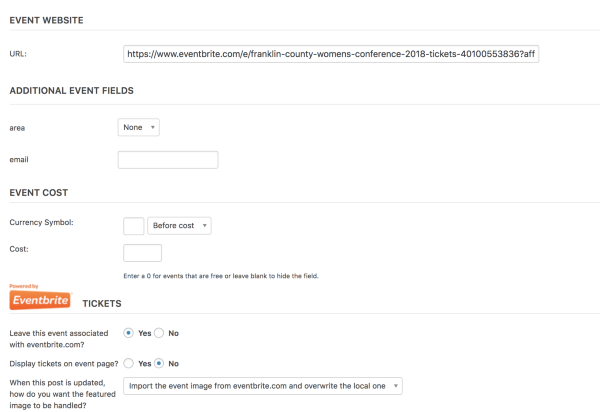
Would that work for you?
Thanks
Courtney 🙂MemberAwesome. Thanks for the update Bart. I’ll close this thread out now.
Courtney 🙂 -
AuthorPosts