

Forum Replies Created
-
AuthorPosts
-
September 29, 2016 at 7:54 am in reply to: Additional fieldset is not shown in customer email. #1170373
Brook
ParticipantHowdy Yu Cheng,
Andras also had a few questions for me when he saw you were getting a fatal, because I wrote the miniature plugin. He was wondering if I knew why you were facing this error. After looking into it I can totally see why you might be getting that error, even though it’s working for the rest of us. I just wrote an updated version of this. Would you mind deactivating and deleting the one on your system, then installing this new one? I believe it will fix the error in question.
The new plugin: Event Tickets: Additional Email Options
Sorry for the hassle. Did that help?
Cheers!
– Brook
ParticipantHowdy Neil,
Thanks for posting back here. That noreply email is sent from our forums, it is just notifying you of a new forum reply.
Eventbrite is getting an update as well in 4.3. Since Evenbrite is specifically for syncing events, it even creates them on the separate Eventbrite website, it is not going to be integrated into our aggregator. It will continue to exist as a separate plugin. But its import features are getting updates alongside Event Aggregator. 4.3 will see a few of those folded in, and a future update will see the rest.
So yes, we will continue to have a solution for you. It sounds like you will want two licenses going forward: Event Aggregator and Eventbrite. You can purchase Eventbrite today if you need. If you’d like to beta test EA for free let me know and I can hook you up with that. The beta will work until 4.3 is officially released.
Cheers!
– Brook
ParticipantHowdy Jeffrey,
That’s a good question, I am glad you asked it. Right now your timezone will not shift. This makes sense for the UTC timezone, but might not make sense for location ones. We’re going to have to talk about this and review our metrics. We will try to determine how many users will expect it to behave as you did. It might be a behavior we can change in the future to make it more intuitive for the average person.
In the mean time you can split the series starting November 6th and adjust the timezone for future occurrences. If we do end up changing the behavior, then anyone expecting it to behave as it currently does will have to split the series instead of you.
Does that all make sense? Will that work for you? Please let me know.
Cheers!
– Brook
September 23, 2016 at 10:06 am in reply to: Remove “Upcoming Events”? It’s not needed as I’ve put in a custom #1168040ParticipantMan these forums keep giving you and I trouble. The HTML did get mangled again, even though I double checked it. I just corrected it above, but I also shared it on pastebin just in case: http://pastebin.com/N3BawFBa
Cheers!
– Brook
September 21, 2016 at 9:42 am in reply to: Changing view removes all but 1 filter selection #1167012ParticipantYou are most welcome! We love detailed bug reports like this, especially when the problem is demonstrated on our own demo site. It was very helpful.
We will let you know when a fix is ready is for this, so that you can keep an eye out for the updated version.
– Brook
September 21, 2016 at 9:39 am in reply to: Attendee Info not showing up in Tickets Email after update to Version 4.2.7 #1167008ParticipantExcellent! I am happy that plugin worked for now. Thanks again for letting us know this was not working right.
-Brook
ParticipantHowdy Chloe,
I must say that I’m a bit disappointed here. Understand that I asked a lot of pre sales questions regarding reccuring events and under no circumstances I was told clearly that I would encounter such problems, which I did, the hard way.
I am very sorry it was not communicated pre sale. We truly do our utmost to communicate everything there. We would greatly prefer a sale not to happen than a dissatisfied client.
I’m sure even though the tech behind it is quite complex, and that no easy fix exist at that point, that you understand my point of view : it’s just common sense to expect this simple feature for recurring event. For my part I don’t understand why Modern tribe released such a feature if it was not fully functional.
Absolutely, this is a feature we’ve known there would be demand for since even before we built the ticket plugin. As you clearly understand though, it is a complex feature to build.
If we had waited to release our ticketing plugins until every feature was built, it would still not be released. It is common wisdom in the software development world, and sometimes other worlds, to not wait until every possible thing is ready until you start using it. As an example 10 years ago they started building a hospital near me. When a wing was ready they would move in, while still building the other wings. They have not stopped construction ever since, as the hospital has kept growing and increasing services. If they had waited all this time before using the parts that were ready countless patients wouldn’t have been served. In our case if we had waited tens of thousands of users wouldn’t have had a ticketing plugin the past number of years. Currently our recurring tickets do work for a number of usecases, primarily course style events where a sole ticket grants access to the entire thing. While we are adding more usecases, we’re happy that we’re serving the needs of a sizable number in the mean time.
Just to give you a peek behind the scenes, we have spent countless hours to date structuring the plugin to support recurring tickets. Right now we are working on improving the UI for recurring events. We are redesigning and testing it to make sure it’s intuitive to new users. After that is released we will have both the improved UI and foundation we need for the final stretch of adding recurring tickets. The improved UI has nearly passed the design phase, and will likely be released in 4.4 (4.3 is already in public beta so no more changes can be made). The rest will come after that.
I feel bad that we evidently did not communicate everything you wanted to know in presales. I just extended your licenses a few months as our way of saying sorry.
Please let me know if you have any more questions. Thanks Chloe!
– Brook
ParticipantHowdy Ben,
I would love to help you with this.
Ordinarily what you would see for a cancelled attendee is this:
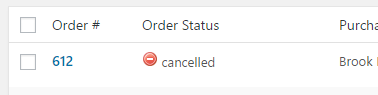
However it looks like you do not have the “Order Status” column visible in the Manage Attendees page. If you go to the Manage Attendees page, in the upper right is the “Screen Options” drop down. Click on this, check “Order Status” as one of the viewable columns, and hit save. Now you will see cancelled next to those tickets.
Alternatively if you wish to outright removeany record of the cancelled Attendee, you could delete the cancelled orders from this same page.
Does that all make sense? Will that work for you? Please let me know.
Cheers!
– Brook
ParticipantHowdy Kieran,
I am sorry we forgot to get back to you on that last topic. Your topic was accidentally associated with an erroneous bug report that had nothing to do with your question. I’m not sure if Andras misunderstood your question, or if perhaps he had meant to log your idea as a separate feature request.
Right now our cancellation/refund process is basically behaving as intended. It is true we do not automatically add stock back nor do we remove the attendee from the attendee page (though we do mark the ticket as “refunded” on the attendee page if you set the Woo Order status to refunded). This is because there are a number of scenarios where you want neither of those things to happen. You must do these things manually.
We are hoping to streamline this process at some point in the future. In the mean time I just wrote a KB article, that will be published soon, which outlined the proper steps for refunding an order. Here is a preview copy of it:
This article covers the steps involved with refunding or cancelling an order containing tickets. There are a few reasons for cancelling an order, and each one can have a different impact on the attendee list and stock count.
Refunding the order is handled by your ecommerce platform. This step does not apply RSVPs since they are free. You should refer to your platforms documentation for how to refund or cancel an order.
- WooCommerce: How to refund
- Easy Digital Downloads: How do I process refunds?
- Shopp: Order manager
- WP eCommerce: Documentation
Once an order has been refunded or cancelled you will need to decide a couple more things.
- Do you want the available stock for the refunded ticket to increase? If you are running a venue with a fixed number of seats, it is often preferable to allow someone else to purchase the now vacant seat. To do this go to the Edit Event page, select the ticket(s) that you refunded, and increment the available stock by the number you refunded.
- Do you want the purchaser to still be able to checkin with the ticket? If you go to the Manage Attendees page the ticket will still be listed with all the rest, but it will have the status “Refunded” associated with it. This user can still be checked in manually by your personnel. Sometimes people wish to outright remove the ticket from the attendees list though and completely eliminate the possibility of checking in that ticket. To remove the ticket select the ticket, select Delete from the Bulk Actions menu, and click Apply.
And you’re done!
So to answer your original question of ‘what’s the best way to cancel tickets?’, the above would be it. In the future we will likely add some kind of prompt or something when an order gets cancelled, or refunded, to make the optional steps obvious. Until then though everything is manual.
Does that all make sense?
Cheers!
– Brook
ParticipantThanks for getting back Oliver. Happy to know you found a solution.
Cheers!
-Brook
ParticipantHowdy Beni,
I would love to help you with this.
It sounds like you nailed the problem with isolating it down to HTTPs. I just tried an oembed from your site with the HTTPS URL and it is working great for me. However, my server is configured to be able to fetch HTTPS URLs. A lot of web servers out there are not, and for them trying to fetch and HTTPS URL just won’t work.
Your available options here are either to use the HTTP URL, or contact your website host and ask them to setup the server so that WordPress can fetch HTTPS content. Many website servers have purposefully disabled HTTPS in their configs though. I can only guess at their reason, it would save some money in setup and CPU time. So you might not have a lot of luck getting your host to configure the server properly for WordPress. Your best option is probably to use the HTTP url.
Does that all make sense? Will that work for you? Please let me know.
Cheers!
– Brook
September 19, 2016 at 11:41 am in reply to: Display event timezones in format other than UTC #1166005ParticipantHowdy Temsha,
I would love to help you with this.
Edit your event, and click in the timezone drop down. Instead of selecting a UTC timezone select the city. For instance Chicago is currently in CDT, so selecting that will show CDT on the front end.
Does that all make sense? Will that work for you? Please let me know.
Cheers!
– Brook
September 19, 2016 at 8:36 am in reply to: Calendar View – add ellipses to end of description on tooltip #1165895ParticipantHowdy Jennifer,
It would be my pleasure to assist with this.
Actually by default you should be seeing that ellipsis, along with a continue reading link:
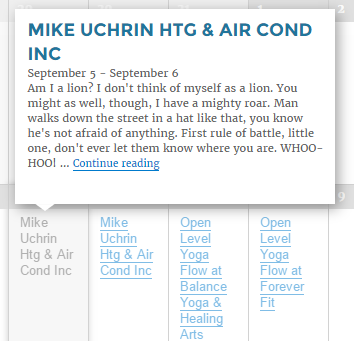
If you are not seeing this there are a couple of possibilities:
- You have specified an excerpt for this event. If you edit the event, usually down near the bottom of the edit page is an excerpt box. This overrides any content that appears in the posts excerpts such as on this page, and if it does not end with an ellipsis neither will this.
- There is a conflict, perhaps your theme. In order to proceed we will need to test if a “conflict” is happening, and if so narrow it down so we can find a fix for it. This guide walks you through how to test for a conflict, and then identify what is conflicting.
Does that all make sense? Can you try those steps?
Cheers!
– Brook
September 19, 2016 at 8:14 am in reply to: Attendee Info not showing up in Tickets Email after update to Version 4.2.7 #1165869ParticipantHowdy Paul,
I am sorry this is giving you issues. I am sad to see it looks like that bug resurfaced in our latest version. Fortunately I have a fix for now, while we wait for this to get patched. Download, install, and activate this mini plugin: tribe-snippet-tickets-email-options-2016-08-30
Now go to WP-Admin > Events > Settings > Tickets and you will see the option to “Add Attendee Meta Info” to the tickets email. Check that box, hit save, and you’re done. The info is back.
Sorry for the inconvenience. We will notify you when a fix is about to be released for this. After updating to the fixed version uncheck that box or deactivate the plugin, to avoid getting duplicate info.
Does that all make sense? Will that work for you? Please let me know.
Cheers!
– Brook
September 19, 2016 at 7:44 am in reply to: Changing view removes all but 1 filter selection #1165842ParticipantHowdy Jesse,
Thanks for the detailed bug report! That is not something we’d noticed yet. I am logging the issue right now so it will get fixed in a future release, and I’ll note that you are the one who discovered it. I don’t have an ETA on that just yet. To be up front it might be a few months, our metrics have shown people rarely switch views after they have started viewing the calendar so it is unlikely many folks will happen across this, thus it will naturally be a lower priority than bugs which impact more people.
Thanks again. I just extended your licenses a couple months as our way saying thanks. Please let me know if you have any questions. Cheers!
– Brook
-
AuthorPosts