

Forum Replies Created
-
AuthorPosts
-
Brook
ParticipantHowdy Chloe,
I would love to clarify whats happening there.
You know how when you add a ticket to a recurring event you get the notification that recurring events do not fully support tickets? This is why. With a recurring event all recurrences share the same ticket. This means Woo commerce has no way of knowing which recurrence a customer was viewing when they purchased the ticket, so the date can not be shown.
Obviously if this was an easy problem to fix we would have fixed it rather than adding that notification that they don’t work together. But unfortunately it’s a very complicated problem. We are working on adding this functionality in a future release. Right now there are two workarounds available:
- Break each recurrence from the series and add tickets directly to this event.
- Or, add a unique ticket for each ticket date. You know how you can add multiple tickets to an event? So you could add “Ticket name — 9/19/16” as the first ticket, then “Ticket name — some other date” as the next one, and so forth.
I wish there were better solutions right now. Please let me know if you have any questions. Cheers!
– Brook
September 18, 2016 at 6:42 pm in reply to: Re-occurring cal import. Does it only add new submissions? #1165701ParticipantHowdy Bryon,
I would love to assist here.
Its not actually re adding the events, right?
That is correct. The calendar will only import new events, once that were not in the iCal file the last time it checked. It will also check to see if any of the other events have made changes, maybe the time was changed, in which case it will update that even on your site. No events will get deleted and unchanged events will be left alone.
Does that all make sense? Will that work for you? Please let me know.
Cheers!
– Brook
September 18, 2016 at 6:40 pm in reply to: Importing existing events into The Events Calendar #1165700ParticipantHowdy Mark,
It would be my pleasure to assist with this.
There are a number of ways to do this. The two most common would be:
- CSV — since CSV is such a flexible format this is a very common way to import events. Export them from your site using whatever tools you have available, convert them to CSV and import.
- iCal — many calendars offer the ability export the data as an iCal. Using the iCal Importer our calendar can directly import this data.
There are other options too, but they get increasingly complex and typically do not cover any use case that a CSV file would not. But it’s just easier to import as CSV. Depending on how your custom post type is setup this WordPress plugin might make it easier to export.
Does that all make sense? Will that work for you? Please let me know.
Cheers!
– Brook
ParticipantHowdy Paul,
I would love to help you with this.
Did you know we actually have an extension you can download that does this for you? If you download, install and activate this plugin you will see the option “Carbon Copy the Organizer email when an order for tickets/RSVPs is approved, sharing the full tickets details.” in WP-Admin > Events > Settings > Tickets.
Plugin: tribe-snippet-email-organizer
The best way to do what you are doing is no via $_POST, but to do what that snippet does. It attaches it self to a relevant action, in this case ‘event_tickets_rsvp_tickets_generated’, and then uses the $order_id variable that action passes to retrieve the event and any of its details such as the venue. But perhaps just installing the plugin will be enough?
Did that help?
Cheers!
– Brook
ParticipantHowdy Neil,
It would be my pleasure to assist with this.
You might be interested in our blog post, which dives into a few details:
https://theeventscalendar.com/a-look-at-whats-coming-in-our-4-3-release/
The cliff notes version is that it:
- Adds the ability to import from Meetup.com
- Scales better when importing lots of events
- Brings all of the functionality from iCal Importer to importing Facebook Events
- Has a much improved system for regularly importing events, and setting certain events to be ignored from future imports
And a lot more. It’s a brand new plugin for us, but it’s based on the iCal Importer. Our goal was to combine all of our importer that we could into one new service. Also of import is that the heavy lifting, what caused a lot low cost servers to be unable to mass import events, is now handled by the TheEventsCalendar.com server and then privately forwarded on to your site. No even details are kept on our server so it’s as private as can be.
It will be available in October. If everything goes according to plan very early in October. Likely priced around the same price as other large plugins such as Events Calendar Pro and Filter Bar.
Does that answer your questions? Does it does like what you’re looking for?
Cheers!
– Brook
ParticipantThanks for getting back Math. Happy you found a solution.
To anyone wondering something similar, enabled “Pretty Permalinks” is the answer.
Cheers!
– Brook
ParticipantHowdy Ben,
I would love to help you find a solution for this.
Have you ever adjusted the “Hold Stock” setting before? According to WooCommerce enabling this will cause the default 10080 minute to be enacted. Then Woo will show that error message. More info here.
To adjust the error message you will need to either change your WooCommerce settings or modify WooCommerce itself. You could for example lower the wait period in WooCommerce, or just disable Hold Stock entirely if this is not your desired behavior.
Does that all make sense? Will that work for you? Please let me know.
Cheers!
– Brook
ParticipantHowdy Johan,
I am sorry to hear your permalinks need to be flushed each update. That is likely the result of a third party plugin. The Events Calendar by itself should never the rewrites flushed, but some third party plugins might do strange things when the update, such as flushing the rules before the rest of the plugins have loaded. At that time any plugin which has not loaded but has it’s own permalinks will suffer glitches, ours included.
You could try flushing permalinks on plugin update. From what I have read the action “activated_plugin” should fire when a plugin does a regular update, so in theory this line of code would flush the permalinks each time a plugin is updated:
add_action( 'activated_plugin', 'flush_rewrite_rules' );
I can not really test out that theory since none of our tests sites have the conflict yours does. If the above is not helping for some reason you might try this:
add_action( 'init', 'flush_rewrite_rules', 100 );
That will flush the permalinks on each page load. This will make your site run a bit slower, but you never face this issue again.
Does that all make sense? Will that work for you? Please let me know.
Cheers!
– Brook
ParticipantHowdy Elad,
That is not yet a feature of the The Events Calendar . We are monitoring this feature suggestion for that. It is very probably a feature we will implement at some point. Please throw your vote there as well, the votes help us prioritize when on the schedule to put this.
Does that answer you question?
Cheers!
– Brook
ParticipantSplendid news! Thanks for getting back Brian.
- Brook
ParticipantYou are very very welcome. Thank you for getting back.
Cheers!
– Brook
ParticipantHowdy Brian,
I would love to help you with this.
I bet the lack of results you are seeing is because your database is using a different prefix than the default one.
To make this even easier, and remove the need to worry about prefixes, I just wrote this cleanup tool: tribe-extension-recurring-cleanup-v0-1-0 It is a plugin you can download install on your website. Once activated you will see a new tool in WP Admin > Tools > Available Tools. It will show you a list of all of your current recurrences, sorted by those which have the most recurrences. It will also show you the ID for each.Follow the steps outlined in the tool to then delete all recurrences for that event. Here is an example of what the tool looks like:
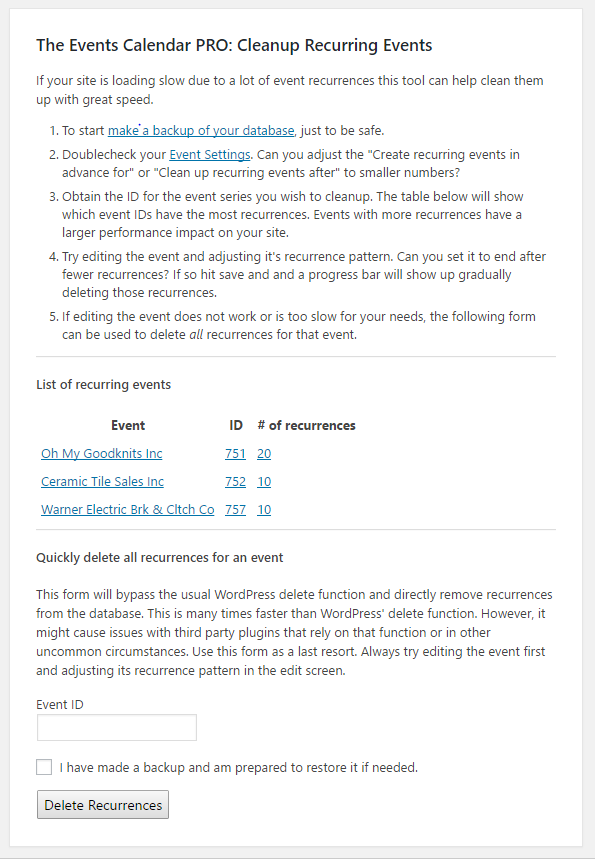
Does that all make sense? Did that tool work for you? Please let me know.
Cheers!
– Brook
September 15, 2016 at 8:49 am in reply to: Permalink structure reflecting category name (event, venue, organiser) #1164609ParticipantI am truly sorry you are disappointed Akal. Perhaps it might help if I elaborated a little bit.
Right now, the event permalink is like : mysite.com/event/event-name
And I can also find the event under :
mysite.com/event/category/category-name/event-name
and venue under : mysite.com/venue/category/category-name/venue-name (but there is an auto redirection, sadly…)I wouldn’t keep 2 different slugs for the same element :
mysite.com/event/event-name/
and
mysite.com/event/category/category-name/event-name/
(idem for venue and organiser)First I would like to point out that we do follow the WordPress norm here. In fact our URLs are added by WordPress itself. But there are some common misunderstandings out there about how WordPress works. When you add a post type to WordPress it generates a post type archive URL for you, in our case it generates: /event/. WordPress will then add any posts you make directly under that URL: /event/slug . We’re not even throwing “it in an “/event/” catch-all”. WordPress is and it does with very good reason.
WordPress also has archive and taxonomy views. For instance by default WordPress has the /tag/ and /category/ archive views. So if you make a blog post on your site with a tag and a category that post will appear in three places: /tag/tag-name/, /category/cat-name/ and on your blog page which might be something like /blog/. For events there are more taxonomy types: Venues, Organizers, plus tags and categories. So yes any event you add with one of those taxonomy types will appear on each taxonomy archive page. That’s up to five places. WordPress puts them there, and it does so for a few reasons but one of them is that it can help SEO spidering. If we were to remove an event listing from this page we would be violating the WordPress norm, and that is something we’re not going to purposefully do.
this is bad regarding to my SEO strategy (I’m not here to debate about best SEO practices).
I totally understand that. There are many conflicting schools of thought on SEO and the debates will never stop. But I should mention that our plugin has been vetted by countless SEO experts over the years, including a number working for Fortune 500 websites. We have worked directly with these, in many cases building their websites for them and applying their SEO feedback to the core plugin so as to benefit everyone of our users. We even have a large number of our own SEO experts on staff, and have spent a number of years now modifying our plugin and testing the results to maximize SEO. It might not be perfect, but it’s pretty close. Probably as close as you can ever get.
By the way, the /category/ slug of WP can be easily hidden from url with Yoast SEO so let’s dream and hope that maybe, the Tribe team could do something similar for dozen of people that asked for since many years now…
What I was saying specifically was “it needs to be in the URL for WordPress to work in all scenarios“. The all scenarios is key here. There is a reason why WordPress adds /category/ by default, it removes the possibility of naming conflicts. Some plugins remove this and in so doing have introduced a bug which breaks WordPress at times. And even with a lot of hacky workarounds trying to minimize the impact of that bug they still are not able to eliminate it entirely. The elegant and complete solution, which many experts will argue is still perfect SEO, is the default WordPress /category/.
It’s not about what I would like, but what it should be.
I apologize, I did not realize at the outset that you were asking us to change our default structure for all users. Honestly that is something we are probably never going to do, unless our panel of SEO experts tells us there is some room for improvement. We have nearly half a million users of The Events Calendar, and so we have to weigh very seriously things such as SEO. While we do see occasional requests, as you said “dozens”, we simply can not alter this behavior at the behest of so few unless our SEO experts agreed. We actively track this feature request alongside a few others, but it simply does not seem to make sense for our other users.
The only request that really does make sense is to make our post structure as editable as WordPress in WP Admin > Settings > Permalinks. We would still use the same defaults, and you still would not be able to remove things WordPress inserts such as /category/, but even without removing you could add to the base structure if you were so inclined. However this feature will require a truly enormous amount of dev work. And given that we only have a few handfuls of people requesting it, we are far shy of the amount needed to pay for the many thousands of dollars it will take to build it right.
Since you marked this resolved I suppose I will close this request now. I wish I had good news for you and could say that’s something we’d love to build. If we had an infinite amount of time and money we definitely would build every feature request and make everyone happy. But unfortunately the reality is the above. And hopefully now that I’ve explained things better you can understand our reasoning here.
Cheers!
– Brook
ParticipantThis reply is private.
ParticipantThis reply is private.
-
AuthorPosts