

Forum Replies Created
-
AuthorPosts
-
Brook
ParticipantHowdy again Deven,
Based on your description this sounds possible, but to be up front our calendar is not geared towards this usage.
Our addon Community Events allows users to add their own events to the main calendar — which is typically visible to everyone. However it allows you to set the status of new events, they can be set to “Pending Approval” which means they will not be visible to anyone except the user unless you click Publish. So the users would have private calendars, and your main calendar would only contain events that you have expressly published to it.
However, this will not be as slick as a system truly designed for private calendars. Especially because the user’s events would not actually be visible to themselves except in the “My Events” section of the site, which does contain our various calendar views such as Week, Month, and so forth. It is simply a list of all the events they’ve added:
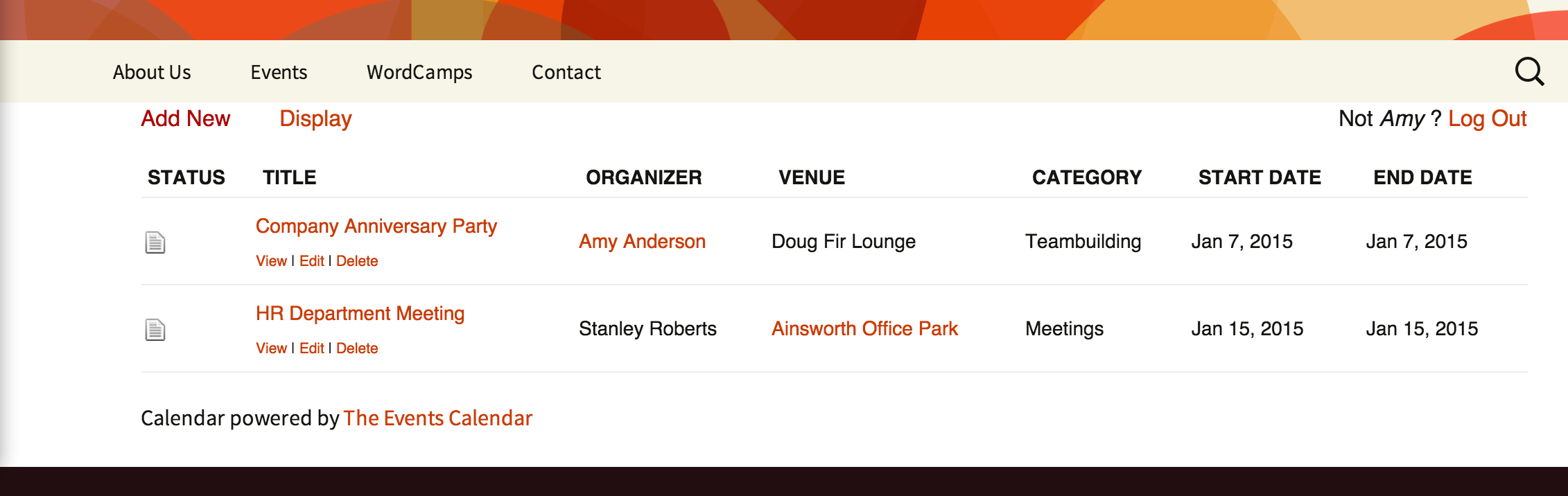
Does that clarify what’s happening? Does it answer all your questions?
Cheers!
– Brook
ParticipantHowdy Deven,
I would love to help clarify this. We expressly allow you to have a live server and one or more testing servers. The calendar works fine without a license, it just does not get automatic updates. So, input the license on whichever server you would use WordPress’ update feature on. For some people this is the live server, for others they test everything before deploying to the live server. In that case it often makes sense to input the license on your testing server, so you do not have to do manual plugin updates when testing new versions.
Either way works fine. And you can always easily transfer your license from a live server to a testing one via your account admin here.
Does that all make sense? Will that work for you?
Cheers!
– Brook
October 11, 2016 at 8:39 am in reply to: Add/Edit Event Interface – Editor and more not loading #1174908ParticipantHowdy Shannon,
It would be my pleasure to assist with this.
This looks very much like a conflicting plugin or theme. In order to proceed we should test if a “conflict” is happening, and if so narrow it down so we can find a fix for it. This guide walks you through how to test for a conflict, and then identify what is conflicting. Once we know what is conflicting it becomes possible to research possible fixes. Sometimes it’s as simple as changing a setting.
What does that test tell us?
Cheers!
– Brook
ParticipantHowdy Simon,
Thank you so much for getting back and sharing your solution. That looks perfect, I am sure others will find it helpful.
Please let us know if you ever need anything else. Cheers!
– Brook
October 5, 2016 at 9:31 am in reply to: Event dates reset when setting edited events to return to pending status #1172743ParticipantI am happy to hear it! Thanks for helping us spot that issue.
Cheers!
– Brook
ParticipantYou’re not an idiot at all, we’re actually working to make this more intuitive. Our calendar allows you to delete events imported via iCal. Of course outside of initial testing, typically when you delete an event you do not want it to appear again the next time you import that file. So the calendar keeps a memory of all “deleted” events and stops them from being reimported.
Our next version of iCal importer/Event Aggregator makes this behavior more intuitive. Instead of a Delete button you will see a button to hide the event and prevent it from getting reimported. From there you can always choose to unhide the event, or even truly delete if you want it to get reimported.
I am happy you got this working. Please do stick around the forums, we’d love to help if you have any more questions. I am going to archive this topic since it’s resolved. We always try to keep our topics focused on one issue. But you can open as many topics as you want, so please feel free to open a new one if something else crops up.
Cheers!
– Brook
ParticipantYou are very welcome. Please feel free to open a followup topic if you have any questions like this in the future.
Cheers!
– Brook
ParticipantI just realized after posting that you are on an older version of our plugins, from before JSON LD was introduced. The second step would not apply to you unless you updated.
I totally understand the desire to stay on a version of the plugins you have tested thoroughly. But it does inhibit the amount of support we can provide.
Like many large pieces of software performance is a seesaw battle. You add new features, performance goes down. You optimize, it goes back up. Rinse and repeat. This means the latest version of our plugins is not always the fastest, though on average it trend towards getting more optimized. 3.10 introduced some nice performance improvements in a few views. If memory serves 3.11 had a negative impact on some of those, and they were subsequently addressed in 4.0. We’re stretching my memory a bit here.
If I were in your shoes I would test out the latest version of our plugins with JSON LD disabled, per the above. I would not be surprised if it is our fastest version to date with the prescribed configuration. And keep an eye on the release notes of future versions. We have been reexamining the intricate details of WP’ builtin query caching to make the most of it. One thing we have noticed is that a few of our post meta queries could hit the cache instead, if we do a get_post() request for that ID early in the page load and query by the ID again. This will involve a huge restructuring of our code, but that is something we already have a working prototype of. Once that prototype is ready for primetime both our Month view and especially our Minical widget will see a lovely performance boost. For month view this will speed up the page load, or if you have cache enabled it will speed up the rebuild. For the minical it will just drastically cut back on the number of queries it makes.
Cheers!
– Brook
ParticipantHowdy cmchwp,
I would love to help you with this.
That is a very fair question. The answer is yes, there is more we can do. We do periodic performance audits, usually after big feature releases. I just finished one a little while back, and logged the takeaways for us to address. The performance improvements are not ready yet, but when they are they will be released as an update to the plugin.
In the mean time there are two things you can do to improve performance now:
- Enable Month View Cache in WP-Admin > Events > Settings > Display. No matter what we do, if our plugin continues to follow WordPress “best practice” Month view will still need to do a sizable number of queries when you have 3k events it’s trying to display. This is the unfortunate nature of the WP API here. However if we cache the HTML on this page, it will only have to do all of those queries once when an event is added/updated, rather than each page load.
- The biggest performance improvement we have coming down the pipes is caching JSON LD alongside the rest of month view. Unfortunately when we added that feature in 4.1 none of our code reviewers thought to cache it, since it appears in the header of the page. This means that enabling Month View Cache right now is effectively useless, all the queries it usually saves the calendar from doing are done anyways, just for a different purpose. If you pop the following snippet into your site, either into a plugin or a functions.php file, it will disable JSON LD in Month view. With that in place you should notice page load speeds drop dramatically after the page is cached.
https://gist.github.com/elimn/9ce1c3e64d060b758e22627b815455ae
Does that all make sense? Do you have any more questions?
Cheers!
– Brook
October 4, 2016 at 6:40 am in reply to: Event dates reset when setting edited events to return to pending status #1172229ParticipantHowdy Karly!
I can see what you mean, I am getting the same issue. This updated version of that snippet is fixing it for me, what about you?
https://gist.github.com/elimn/f463ba3c9151cc7e17405c1ee8a39c1c
Cheers!
– Brook
ParticipantYou are very welcome! I can understand the concern over a button like “disconnect now”. One thing we try to make abundantly clear is that nothing bad happens when a site does not have a license. Your events data will not be altered or lost, you are not restricted from accessing any part of the plugins, nor anything like this. The only thing that does happen is you can not automatically update the plugin in WP Admin > Plugins. You can still manually update the plugin, assuming you have a valid license and thus can download the new version from our site here. But automatic updates are not possible. Because of this some people actually prefer to have their staging server licensed/receiving automatic updates, as they have disabled automatic updates on production.
I will pass your feedback on to our website design team. Thanks!
– Brook
ParticipantHowdy Raymond,
Welcome to the forums! I am sorry you are experiencing trouble right out of the gate. I would love to help you figure out what’s happening.
Thanks for sharing your system information, this was very helpful. I see that WordPress does not have a timezone set. If WordPress does not know what timezone you are in it will assume you are in the international default timezone, GMT. Any date on your entire site will appear in that timezone, including events (unless you setup your calendar to span multiple timezones). So I believe what is happening is that you are importing events from a timezone other than GMT, when they get imported they get converted to GMT, which will change the times and sometimes the dates.
If you go to WP-Admin > Settings > General, scroll down to Timezone and select the appropriate one. Now try importing that iCal file again. Did that fix the times and dates?
Cheers!
– Brook
ParticipantHowdy Thomas,
I would love to assist here.
I realized—my bad—that I had my single-site licenses (PRO + FB add-on) on both staging and prod.
That is not your bad at all! We encourage people to have staging servers whenever possible. If we had a surefire way of detecting when a licenses is registered to a staging server and a live one, we would try to automate this so you did not have to hassle with it.
You mentioned that you removed the licenses from Production and added it again. That is usually not even necessary. As the KB article outlines the primary two things you need to do are:
- Remove the license from staging, just to be safe.
- Disconnect the license, by visiting My Account > Licenses in the upper right of this page and clicking “Disconnect Now”.
The second step there is by far the most important. Once disconnected the license will be available for activation on any other server, including production and staging. Whichever one connects first with your license key will take over the license and activate it. So if staging has no license, or production connects first, then the production server will now be the licensed entity.
Did clicking “Disconnect Now” a second time do the trick?
Cheers!
– Brook
ParticipantHowdy Kim,
It would be my pleasure to help clarify this up.
First of all, the reason you can not post in Events Calendar Pro is because your only license is a non-profit one. As you know we have given the license away for free, and in the agreement you made the license is unsupported. We can not provide support beyond the WordPress.org: The Events Calendar forums.
But that’s probably not going to inhibit you here! The reason I say that is the questions you are asking would best be answered by whoever makes your breadcrumb. Typically it is your theme or a third party plugin. WordPress itself does not show or contain breadcrumbs like the one you mentioned, because the information WordPress contains is not hierarchical. Unfortunately this means anything which does try to provide a breadcrumb, such as a plugin or theme, will often face problems. Fortunately because they so often face problems they are usually very accustomed to helping people sort them out!
In your case you are trying to adding a “WordPress Custom Post Type Archive Page” to the breadcrumb. The calendar page is just such a page, and so any advice they can give you for integrating a run of the mill WordPress archive page will apply. If I were you I would mention that it works better when you use the Event Template, because that might clue them in on why the theme’s Page template is behaving unexpectedly.
We would love to help you further as much as we can. If you do end up wanting access to the premium forums and the support there in, you might consider purchasing a supported license for Events Calendar Pro and we can dive into more detail.
Please let me know if you have any questions. Cheers!
– Brook
ParticipantHowdy Carly,
I would love to help you with this.
I just wrote a quick extension that does this. If you download and install this like a regular plugin, then activate it, you will notice the filters are open by default when you load the page:
The Events Calendar Extension: Open Horizontal Filterbar
You might be interested in adding something like this to your CSS as well:
.tribe_events_filter_item { min-width: 155px; }Because with all of the filters open together, you might notice them overlapping a bit. This will add some space between them.
Also, is there a way that I can put this filter bar on the homepage, but when they click search it actually shows the results on the normal events page?
Yes, because there is always a way! But if the question was: how hard would it be to do this? Then my answer would be “very hard”. Basically you or your developer will need to rewrite how the Filter Bar works, by making it submit things to a different page than the current one. That actually will be pretty easy since the filters submit as URL $_GET variables. The difficult part will be writing the JavaScript you need to make the filters work on a different page. The JavaScript all expects the Filter Bar to be loaded on the same page, so you would need to write your own versions of these scripts and load those instead. If you have a PHP developer on hire, then I would budget a minimum of 2-3 hours to get this working right. It could easily take a significant chunk more.
Does that all make sense? Will that work for you? Please let me know.
Cheers!
– Brook
-
AuthorPosts