

Forum Replies Created
-
AuthorPosts
-
March 14, 2016 at 7:55 am in reply to: Importing Events from a specific region without FB-Page access possible #1088446
Brian
MemberHi,
Thanks for the interest in our plugins. I can answer your questions.
You can import from any public Facebook Page that does not have restrictions such as age or country.
You do not need to be any admin of the Facebook Page to import from it.
Let me know if you have any follow up questions.
Thanks
MemberI am glad to see you were able to figure it out.
I am going to go ahead and close this ticket. If you have a similar issue or another in the future, please do not hesitate to create a new ticket.
Thanks!
MemberHi,
Thanks for the interest in our plugins. I can answer your questions.
What you are looking for is not possible with our recurrence and ticket systems.
It could be possible, but would involve a significant customization and that is beyond the support we can provide.
Let me know if you have any follow up questions.
Thanks
March 14, 2016 at 7:47 am in reply to: Events Calendar Pro License on Multisite (only 1 sub-site) #1088438MemberHi,
Thanks for using our plugins. I can help out here.
Pro should still be working on a single site even with that message.
Is it still active for you and all the Pro features working? The license key is not needed for the plugin to work only for automatic updates.
The plugin will also work on one mutltisite site and you do not need a multisite license, but the message might remain.
Let me know.
Thanks
MemberI am glad to see you were able to figure it out.
I am going to go ahead and close this ticket. If you have a similar issue or another in the future, please do not hesitate to create a new ticket.
Thanks!
MemberHi,
Thanks for that.
That makes sense on the Will Call side, however, we do not have a way to send tickets to an admin to print through in WooCommerce so that might be the biggest issue as well as a designation for pick up of tickets.
I cannot think of anyway around that without getting into a customization.
It looks like the customization would involve setting up a Will Call Option and then once selected the tickets are emailed to a staffer instead of the person ordering so that a ticket package could be setup.
Cheers
MemberI am glad to see you were able to figure it out.
I am going to go ahead and close this ticket. If you have a similar issue or another in the future, please do not hesitate to create a new ticket.
Thanks!
MemberHi,
Thanks for posting here. I can certainly help you here, but we can help you better if you create your own topic in the forum, where we can interact with you one on one. Additionally I am limit in support due to travel and may not be able to respond in a timely manner.
Thanks
MemberHi,
Thanks for the link.
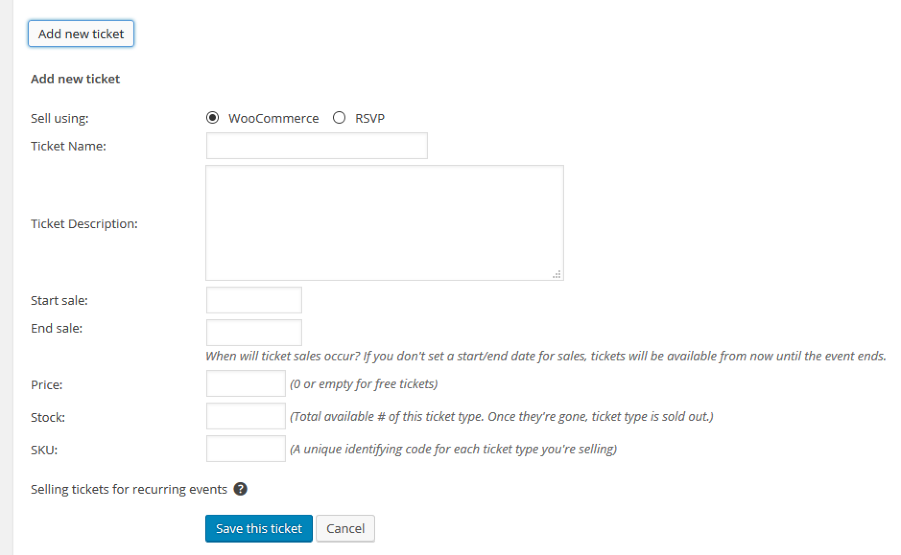
What about the ticket settings for the ticket or tickets not showing from this image here:
 Member
Hi John, You either need to downgrade The Events Calendar to 4.0.5 or upgrade Pro to 4.0.7 to resolve this.
MemberHi,
I took another look at your site and it appears the script error is gone and the Organizer and rest of the javascript on the page is working.
Did you change anything to fix this?
MemberGreat, glad it helps, I am going to go ahead and close this ticket, but if you need help on this or something else please post a new ticket.
Thanks!
March 14, 2016 at 7:19 am in reply to: Events page (set to 'calendar' URL) is picking up template from 'events' page #1088409MemberI am glad to see you were able to figure it out.
Nothing has changed recently here, it might be something to bring up with the theme developer.
I am going to go ahead and close this ticket. If you have a similar issue or another in the future, please do not hesitate to create a new ticket.
Thanks!
MemberHi,
I checked out the page and it is a script error causing the issue.
Per our policy I cannot access the admin to do testing there.
So, can you please follow our testing for conflicts guide:
And see if that can narrow down the cause of this.
Thanks
MemberHi,
Sorry for the issues you are having. I can help troubleshoot this with you.
I tested this out on my test site and the information exported correctly for me.
I got all these fields with the latest version:
Order
Name
Email
Ticket Type
Ticket Number
Security Code
Check inI noticed in your product list you have this:
The Events Calendar: WooCommerce Tickets, Events tickets plus.
You should either have The Events Calendar: WooCommerce Tickets active
or you should have
Event Tickets and Event Tickets Plus active.
You should not have both active.
Also, do you have any custom coding that would change the Attendees list?
Let me know.
Thanks
-
AuthorPosts