

Forum Replies Created
-
AuthorPosts
-
Brian
MemberHi Rolf,
I looked up your application and we responded to you on the 19th of March.
Did you not get the email? If not please email us at [email protected] and we can resend the information from there.
Thanks
MemberThere is nothing in those files that helps as nothing there changes the post order.
When you only ran the Events Calendar and Twenty-Thirteen did you created a new event and did is display in the wrong order?
What happens when you add regular posts to the home page what order do they display in?
Also, when adding that coding I referenced before did you try adding it and did it change the order? I understand it is incorrect, but just trying to see if anything will change the order.
Let me know.
Thanks
MemberHello Again.
All I can say is that this on our roadmap and we are looking to add it, but have no timeline. We cannot release any more information then that until we are ready to release this as we do not want to have someone rely on a release date and us miss it.
Thanks
March 25, 2015 at 11:45 am in reply to: Change Colour of Event Title on Calendar Based on Category #950865MemberI am glad to see you were able to figure it out.
I am going to go ahead and close this ticket. If you have a similar issue or another in the future, please do not hesitate to create a new ticket.
Thanks!
March 25, 2015 at 11:45 am in reply to: List View – Next and Previous Events Links not working #950864MemberHi,
Sorry for the issues. I can help troubleshoot this with you.
I see what you mean about the links.
I looked at your site and see your theme is loading jQuery v1.10.2
Can you disable that and load the latest version of jQuery from WordPress and see if that helps.
Let me know.
Thanks
MemberHi,
Thanks for the interest in our plugins. The date is a required field as all the functions are built around finding events by date.
Let me know if you have any follow up questions.
Thanks
MemberHello,
I can help hide the cost on that page.
Try this:
.tribe-events-list .tribe-events-event-cost {

    display:none;

}
Add that css to your theme’s stylesheet or through a plugin such as Simple Custom CSS.
Let me know if that helps.
Thanks
MemberHi,
Thanks for using our plugins. I can help you get started on this.
Here is the css you want to modify to change the look of the Month/Date Stamp
.tribe-mini-calendar-event .list-date {

    background: #666;

    float: left;

    margin: 10px 5% 10px 0;

    padding: 3px;

    width: 15%;

}
.tribe-mini-calendar-event .list-date .list-dayname {
background: #fff;
color: #666;
font-size: 9px;
padding: 3px;
text-transform: uppercase;
}.tribe-mini-calendar-event .list-date .list-daynumber {
color: #fff;
font-size: 15px;
}Add that css to your theme’s stylesheet or through a plugin such as Simple Custom CSS.
Then make the modifications there to achieve the look you would like.
Thanks
MemberHi,
Thanks for the interest in our plugins.
Our ticketing plugins do not support custom fields as you describe, however, we have a beta next month for those plugins that does support it. If you are interested in testing it out please email us at [email protected]
Our demo theme does not come bundled. Are you referring to http://wpshindig.com/events/?
Here is a link to download.
Add that css to your theme’s stylesheet or through a plugin such as Simple Custom CSS.
Let me know if that helps.
Thanks
March 25, 2015 at 11:28 am in reply to: Public form to allow community to import Facebook events #950854MemberHi,
Thanks for the interest in Facebook Events.
That is an interesting Idea, but it is not something we support in our Facebook Plugin. It could be possible to build something to do that, but it is beyond the support we can provide to help out on that.
We also do not support importing recurring events, but do have any automatic importer that you can include a page id in and every time a new event is added to that page it will import it.
Let me know if you have any follow up questions.
Thanks
MemberHi Lisa,
Thanks for the interest in our plugins.
See my answers below:
1) Is there a way to track attendees by just entering the total number at the event? Background: We often don’t require registration for events, but like to track the number of attendees.
We have an attendee list per event that you can view in the backend that shows all tickets. Here is what our attendees list looks like:
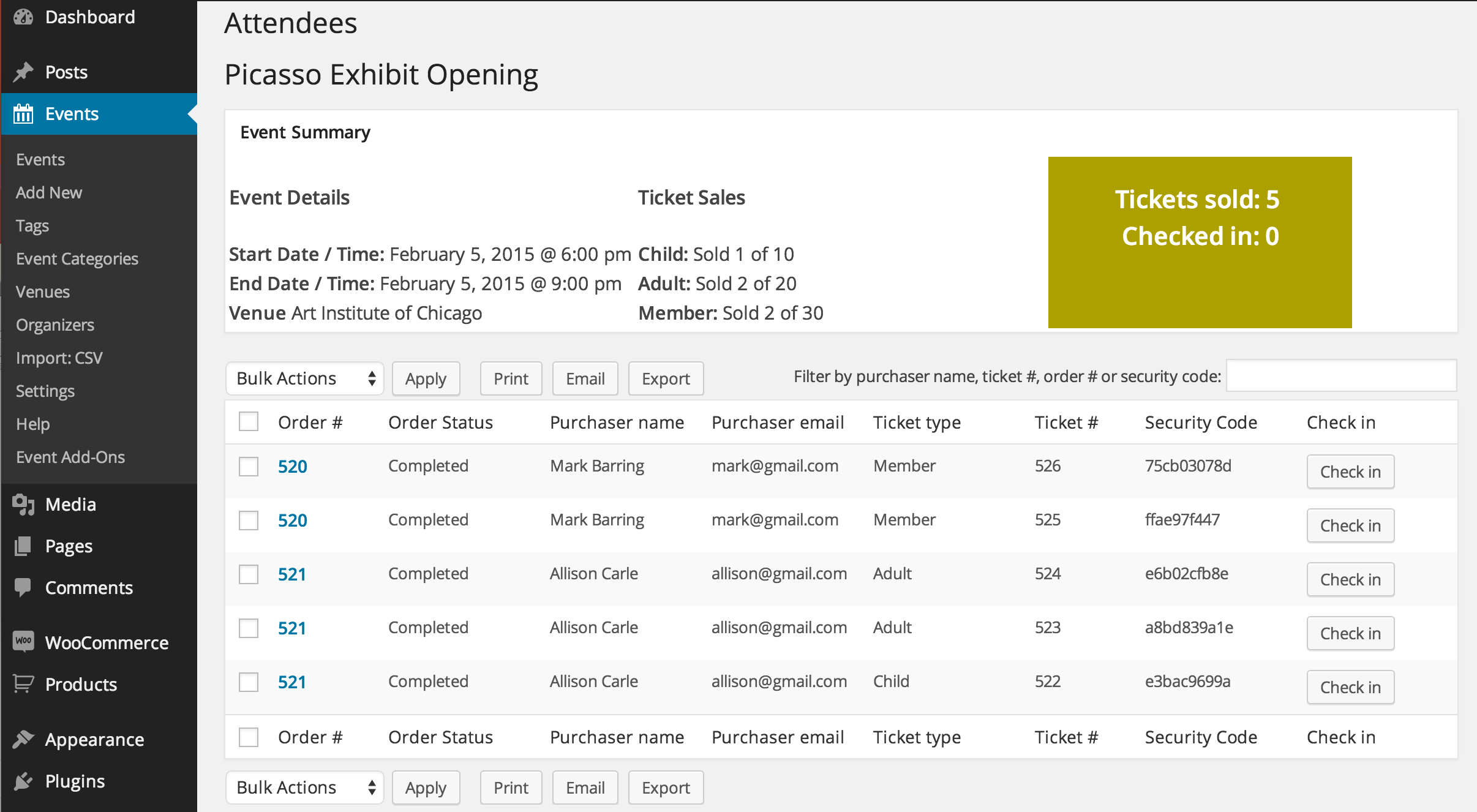
2) Similar to attendee tracking, is there a way to track volunteer hours? I thought I might be able to use the custom additional fields and hid them so they only show for logged in staff, but perhaps there is a better way.
We do not have any features to support this directly, you maybe to customize something, but that is beyond the support we can provide.
3) Is there a way to block scheduling events on certain days. For example, the library is closed New Years Day. The software we currently use will let us mark that as a holiday for all location and then it prevents recurring events from getting scheduled on those days. (not a deal breaker)
That is not a feature we have.
4) For venues, we have multiple locations with in the same building. Does it make the most sense to make each of these a separate venue? Or is there some other way we could differentiate Main Library, Children’s Story Area from Main Library, Meeting Room.
We do not support multiple locations for a venue so each one would be seperate.
Let me know if you have any follow up questions.
Thanks
MemberGreat, glad it helps, I am going to go ahead and close this ticket, but if you need help on this or something else please post a new ticket.
Thanks!
MemberGreat, glad it helps, I am going to go ahead and close this ticket, but if you need help on this or something else please post a new ticket.
Thanks!
MemberHi Zoe,
I apologize, but I need to make one more request for testing. Can you provide a export of your database and can you please provide a link to download.
I am going to use that to recreate your site and the error and dig into this until I can finish the solution.
Sorry again for this taking so long, but I am the team are working on it.
Thanks
Hi purejuice, sorry for the issue. Your issue is a little different then this as saving permalinks is not working here. It sounds like there is a plugin or some custom coding that is flushing permalinks and that is causing the issue. If you would like help on this please create a new thread in the forum and we can give you our full attention.
Thanks
March 25, 2015 at 5:09 am in reply to: Ticket stock increasing as people purchase tickets – solution? #950725MemberOk what you found out is inline of what I have seen happen before including how the stock is not being reduced.
Do you have any products and are they having this issue?
Are the Paypal Payments going through for the ticket orders on the ones skipping Processing?
Also, can you change the Hold Stock to disabled by leaving blank and does that help?
Here is a screenshot for refrence: http://cl.ly/NeKF
Let me know and we can go from here.
Thanks
-
AuthorPosts