

Forum Replies Created
-
AuthorPosts
-
Brian
MemberHi,
Sorry for the issues on this.
I can help resolve this. The function giving the fatal error, tribe_events_single_event_meta() was deprecated 14 months ago in 3.6 and removed in 3.11.
To fix this you need to update your custom template single-events.php in your theme.
You want to replace:
echo tribe_events_single_event_meta();with this function:
tribe_get_template_part( 'modules/meta' );Let me know if that resolves the issue for you.
Thanks
MemberHi,
I wonder if you site is blocked some how?
Here is what I get with the link so it is working in some cases:
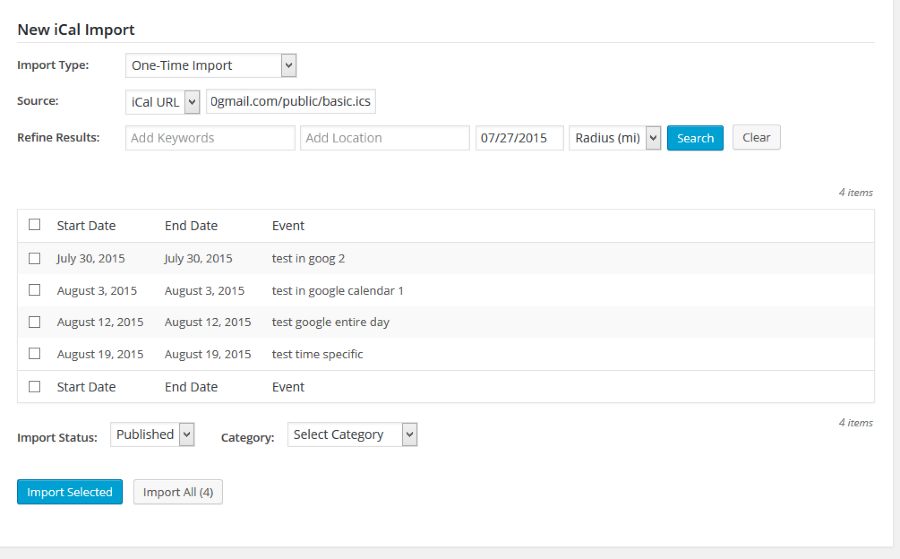
If you visit the link your provided directly does it create a ics file for you to download?
As a next step can you try the testing for conflicts guide:
And see if that can find the source of this.
Thanks
MemberGreat, glad to see you found the issue and fixed it in your child theme.
I do not have any coding that scrolls to the top on clicking the filter reset.
You could use some jquery and on click of of this link id: tribe_events_filters_reset you could have it scroll to the top of the page.
Cheers
MemberGreat glad it helps.
I am going to close this ticket, but if you need anything else related to this topic or another please post a new topic on the forum and we can help you out.
Thanks
MemberYou’re Welcome.
Since this is marked resolved I am going to close this ticket, but if you need anything else related to this topic or another please post a new topic on the forum and we can help you out.
Thanks
MemberGreat glad it helps and thanks for sharing the coding.
I am going to close this ticket, but if you need anything else related to this topic or another please post a new topic on the forum and we can help you out.
Thanks
MemberHi Gonzalo,
I can try to help out here.
You are trying to modify the new organizer class that enabled multiple organizers.
That class is found in this file:
the-events-calendar\src\Tribe\Admin\Organizer_Chooser_Meta_Box.php
You are trying to query Organizers or Venues only if they have a custom field correct?
If so let me know and I can take a look and see if I see a way to do it.
Thanks
MemberHi,
Thanks for using our plugins. I can help out here.
We have no feature to hide event times on the tickets from the admin.
You could follow our themer’s guide and edit the ticket email template:
https://theeventscalendar.com/knowledgebase/themers-guide/
Follow that guide to edit this template:
the-events-calendar\src\views\tickets\email.php
There you could remove the times of the event so it will not show.
Let me know if you have any follow up questions.
Thanks
MemberHi,
Sorry for the issues here. I can troubleshoot these with you.
I attempted to recreate the issue on my website. I created a new recurring event set to weekly for 4 weeks and it worked for me.
I then went in and edited the first instance of that event and did not see any issues there either. So it does not look like an obvious bug, but lets get to the bottom of this.
A Couple questions:
Do you have WP Cron disabled on your site?
And what is the recurrence pattern you are using? (weekly? and it ends when?)
Also please provide your system information as outlined in this article in a private reply:
https://theeventscalendar.com/knowledgebase/sharing-sys-info/
Let me know.
Thanks
And Hi R,
Thanks for posting here. I can certainly help you here, but we can help you better if you create your own topic in the forum, where we can interact with you one on one. Also, we encourage you to post on your own topic because every time we post it will email the author of the topic.
In the new topic please outline the exact steps you take and provide as much detail as you can on what happens so we can help out.
Thanks
MemberHi,
Thanks for using our plugins. I can help out here.
With 3.11 we introduced the ability to add multiple organizers to an event.
We have updated coding in this file:
the-events-calendar\src\views\modules\meta\organizer.php
Using this coding might work for you:
<?php $organizer_ids = tribe_get_organizer_ids();

		foreach ( $organizer_ids as $organizer ) {

			if ( ! $organizer ) {

				continue;

			}
?>
<span class="org">
<?php echo tribe_get_organizer( $organizer ) ?>
</span >
<?php
} ?>
Let me know if that works for you.
Thanks
MemberHi Justin,
Sorry for the issues you are having. I can help out here.
I was looking into this myself and tried with recurring event in Google Calendar.
I actually only see the first instance of that recurring in the import list and cannot get anything else to show there.
I am not sure exactly what is wrong, but I am looking into.
Can you share your ical link as a private reply so I can use it for testing?
Let me know.
Thanks
July 27, 2015 at 11:35 am in reply to: Cannot remove Google Cal and iCal links on Events Details template #990642MemberHi,
Thanks for using our plugins. I can help here.
We changed the class names in 3.10 and that would cause this to not work.
I updated the snippet for 3.11 and it worked for me. Please use this snippet instead:
https://gist.github.com/jesseeproductions/59788e9e999ebebeb315
Let me know if that works for you.
Cheers
MemberHi,
Thanks for using our plugins. I can help out here.
Do you have any custom templates in your theme for the widget?
With 3.10 and 3.11 we had to make some changes and if you do not update those custom templates the Events will not show.
In the list-widget.php template you can add these to the top and that might fix the issue instead having to redo custom work:
$events_label_plural = tribe_get_event_label_plural();$posts = tribe_get_list_widget_events();
Let me know how that works out.
Cheers
MemberI am glad to see you were able to figure it out.
I am going to go ahead and close this ticket. If you have a similar issue or another in the future, please do not hesitate to create a new ticket.
Thanks!
MemberHi,
Sorry for the issues you are having.
Although we try to be compatible with as many themes as possible there is going to be issues with themes that do not follow the WordPress standards outlined by their codex themes of Twenty Fourteen, etc…
In this case the Bridge Theme uses Ajax to load pages and when it does it does not load the scripts and stylesheets of that page. So in the case of the Events Calendar it looks so bad because the theme did not load the scripts or stylesheets after the ajax call.
Are you able to turn off Ajax loading in the theme? That should resolve the issue.
The 2nd option is to load the Events stylesheets and scripts on every page so when it loads content by ajax it works.
I can try to provide some coding for the 2nd option to do that, but do not know anything about the theme itself so limited in suggesting changes there.
Let me know about the 2nd options.
Thanks
-
AuthorPosts