
Home › Forums › Calendar Products › Event Aggregator › ical importer for google calendar
- This topic has 15 replies, 2 voices, and was last updated 11 years, 2 months ago by
Brian.
-
AuthorPosts
-
July 23, 2015 at 6:00 pm #989753
Arthur
ParticipantI have made my calendar public, but I can’t import the ICS file or have it reoccur.
Here’s the link
https://www.google.com/calendar/ical/stmarytoronto%40gmail.com/public/basic.icsJuly 24, 2015 at 8:00 am #989913MemberHi,
Sorry for the issues you are having. I can help out.
I tested out that link myself and was able to import and setup recurring for daily and it worked for me.
What was your recurrence setting and did you get any errors?
Let me know and we can go from here.
Thanks
July 25, 2015 at 12:00 pm #990279ParticipantThanks for the response,
Events > Import > Import: ical
Import type: Recurring: Daily (could be anything)
Source: ical URL https://www.google.com/calendar/ical/stmarytoronto%40gmail.com/public/basic.ics
Refine results: blank blank (todays date or any date) Radius (mi)Clicking search, results in:
No ical found at this url-
This reply was modified 11 years, 2 months ago by
July 27, 2015 at 5:27 am #990433MemberHi,
Ok so I see one test event in that ical url:
July 24, 2015 test evet
Since it is the past now if you leave the import date as today it will not show.
Can you try adding an event at least a week in advance and see if it works then.
Let me know.
Thanks
July 27, 2015 at 1:37 pm #990707Participantdidn’t work…
I added a few different types if that would make a difference.
July 28, 2015 at 7:31 am #991028MemberHi,
I wonder if you site is blocked some how?
Here is what I get with the link so it is working in some cases:
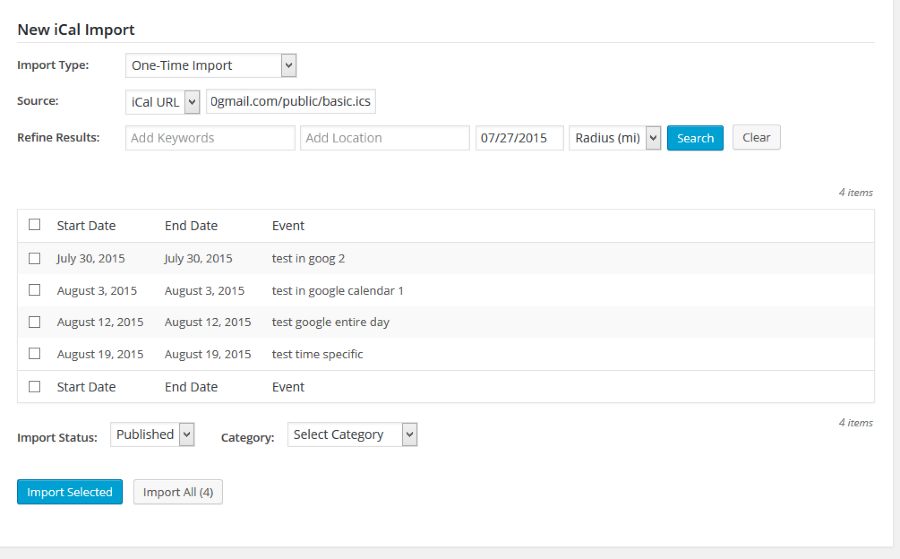
If you visit the link your provided directly does it create a ics file for you to download?
As a next step can you try the testing for conflicts guide:
And see if that can find the source of this.
Thanks
July 28, 2015 at 9:19 am #991101ParticipantChanging to twenty-thirteen didnt solve it, neither did disabling all other plugins. Instead of clearing the cache from firefox I opened incognito mode in chrome and it didnt work.
Finally I uploaded the ics file to the Media Library, after being able to download it through my browser, and that didnt work either….
July 28, 2015 at 10:43 am #991124MemberHow strange.
I wonder why it does not work on your site at all.
Do you know what PHP version you are using and who is your host?
Can you see if it is just a bad install and delete the plugin and upload a fresh copy from theeventscalendar.com?
Let me know.
July 28, 2015 at 4:01 pm #991224ParticipantI uninstalled by deactivating and deleting through the plugin page, and deleted all files. Downloaded the regular version through the autodownload, and the pro and the import manually downloaded and uploaded and activated.
Not working
PHP Version 5.3.29
My host is netfirms.com
Here’s a small section of the phpinfo
System Linux boscustweb1901.eigbox.net 3.14.27 #1 SMP Wed Dec 17 21:04:05 EST 2014 x86_64
Build Date Jun 18 2015 16:50:25
Configure Command ‘./configure’ ‘–prefix=/usr/local/lib/php-5.3.29-amd64’ ‘–disable-ipv6’ ‘–without-apache’ ‘–with-mysql=/usr’ ‘–with-mysqli’ ‘–with-gd’ ‘–with-jpeg-dir=/usr’ ‘–with-png-dir=/usr’ ‘–with-tiff-dir=/usr’ ‘–disable-debug’ ‘–enable-discard-path’ ‘–enable-inline-optimization’ ‘–enable-mbstring’ ‘–enable-mbstr-enc-trans’ ‘–enable-memory-limit’ ‘–with-regex=system’ ‘–with-zlib’ ‘–enable-ftp’ ‘–enable-sockets’ ‘–enable-magic-quotes’ ‘–with-gettext’ ‘–enable-wddx’ ‘–with-gdbm’ ‘–with-db4’ ‘–with-freetype-dir=/usr’ ‘–with-curl=/usr’ ‘–with-mhash’ ‘–with-xsl’ ‘–enable-calendar’ ‘–with-mcve’ ‘–with-dom’ ‘–with-iconv’ ‘–with-xmlrpc’ ‘–with-mcrypt’ ‘–with-bzip2’ ‘–with-ming=/usr’ ‘–with-pspell’ ‘–with-openssl’ ‘–with-ttf’ ‘–with-freetype-dir=/usr’ ‘–enable-gd-native-ttf’ ‘–with-imap’ ‘–with-kerberos’ ‘–with-imap-ssl’ ‘–enable-bcmath’ ‘–enable-exif’ ‘–with-pdo-mysql’ ‘–disable-force-cgi-redirect’ ‘–enable-zip’
Server API CGI/FastCGI
Virtual Directory Support disabled
Configuration File (php.ini) Path /usr/local/lib/php-5.3.29-amd64/lib
Loaded Configuration File /usr/local/lib/php-5.3.29-amd64/lib/php.ini
Scan this dir for additional .ini files (none)
Additional .ini files parsed (none)
PHP API 20090626
PHP Extension 20090626
Zend Extension 220090626
Zend Extension Build API220090626,NTS
PHP Extension Build API20090626,NTS
Debug Build no
Thread Safety disabled
Zend Memory Manager enabled
Zend Multibyte Support disabled
IPv6 Support disabled
Registered PHP Streams https, ftps, compress.zlib, php, file, glob, data, http, ftp, phar, zip
Registered Stream Socket Transports tcp, udp, unix, udg, ssl, sslv3, tls
Registered Stream Filters zlib.*, convert.iconv.*, mcrypt.*, mdecrypt.*, string.rot13, string.toupper, string.tolower, string.strip_tags, convert.*, consumed, dechunkI am sooooooooooooooo frustrated with this not working. At what point do we decide to give up and give me a refund? I’m required to have this or another event plugin working with gmail. I just want a solution at this point, but it doesn’t look like anything can be done.
July 29, 2015 at 5:46 am #991338MemberHi,
Sorry for the frustration. With a new product it is hard to tell one what servers it may not work even though we did all the QA for it.
I talked around with the team we may have the source of the issue.
The iCal importer requires a pecl extension timezonedb
http://pecl.php.net/package/timezonedb
If that is missing in your hosting setup it will cause the importer to fail.
Can you please check with your host and see if that is installed and if not to please have them install it.
Refund
Also, you can request a refund anytime within 30 days of purchase following our policy outlined here:And we can take care of it. Thanks
July 29, 2015 at 7:26 am #991397ParticipantI appreciate your efforts and I understand the trouble a new product may brings,
If “timezonedb” should be in the output of phpinfo(), its not so I’m assuming that the extension is not installed.
I’ll ask the host if they can install, but from past experiences I know they dont.
Thanks also for the 30day guarantee
July 29, 2015 at 7:36 am #991410MemberHi,
Sorry again for the issues. Hopefully adding that extension will solve it.
Let us know what you find out.
Thanks
August 3, 2015 at 2:53 pm #992896ParticipantSo I changed hosts, and the plugin is kind of working now.
I was able to import the feed once, but I don’t see it automatically pulling it in. Is this because I need the pecl extension timezonedb installed??
August 4, 2015 at 7:39 am #993106MemberHi,
Glad it is partially working.
So One Time Imports work? But not the recurring?
I am not sure if that is the timezonedb extension, if the one time import works then that extension should be there.
What is your recurring setting? And you are using the link provided before correct?
Let me know and I will test out myself.
Thanks
August 4, 2015 at 4:08 pm #993262ParticipantHa! It’s working today! I have no idea when it did but I’ll let you know if it stops working.
For the record, I am now using arvixe.com as my host now. Netfirms, my old host, couldn’t provide the support I needed for the extension. I believe with arvixe it worked right out of the box so to speak, because my ticket to have timezonedb extension installed is still open.
-
This reply was modified 11 years, 2 months ago by
-
AuthorPosts
- The topic ‘ical importer for google calendar’ is closed to new replies.