

Forum Replies Created
-
AuthorPosts
-
Brian
MemberHi,
Thanks for the interest in our non profit program. I can answer your questions.
We are only offering The Events Calendar Pro through the program.
You can read about all the details here:
https://theeventscalendar.com/knowledgebase/do-you-offer-discounts-for-non-profit-organizations/
Cheers
MemberCliff is out for today so I am going to wrap this up and glad he could help provide a work around!
I am going to close this ticket to new replies, but the issue is still open and we will update this ticket once we release a fix.
If you have any new questions or issues please create a new ticket and reference this one.
Thanks
MemberHi,
Thanks for using our plugins. I can help out here.
Our site was down for a bit, but is back up and you should be able to active the license now.
Please note the plugin does not need an active license to work.
As for the Export in iCal it is just done by views such as month,list, etc If you would like to get more events try this snippet:
https://gist.github.com/jesseeproductions/2b1af6527b7029eaea6e
Cheers
MemberHi,
Sorry for the issues you are having. I can help troubleshoot this with you.
I am not seeing the issue on my test site so it could be a conflict.
Can you please follow our testing for conflicts guide:
And see if that can narrow down the cause of this.
Thanks
MemberHi,
Thanks for using the Events Calendar.
Here on the pre-sales forum, I’m afraid we do not provide technical support. I would ask that you take any technical support questions across to our wordpress.org forum – our staff scan it periodically and other community members may also be able to help out.
Thanks again!
January 26, 2016 at 8:25 am in reply to: Filter on State or Province field of Venue address #1062562MemberClosed we will help you at your other ticket:
MemberHi,
Thanks for using our plugins. I can help out here.
We do not have a feature to show only today’s events, but you could use the Event List Widget and this snippet:
/*
* The Events Calendar - Limit the upcoming widget to just event running today
*/
add_filter( 'tribe_events_list_widget_query_args', 'tribe_modify_list_widget_args', 10, 1 );
function tribe_modify_list_widget_args ( $args ) {
$start_date_init = date ( 'Y-m-d' );
$start_date_end = $start_date_init . ' 23:59:59';
$args['meta_query'][] = array('key' => '_EventStartDate','type' => 'DATETIME','compare' => '>=','value' => $start_date_init);
$args['meta_query'][] = array('key' => '_EventStartDate','type' => 'DATETIME','compare' => '<=','value' => $start_date_end);
return $args;
}Add that coding to your child theme’s functions.php (or parent them) and let me know if that works.
Thanks
MemberThanks for the link.
I got this css to hide that button:
#tribe-community-events .events-community.my-events .row-actions .button:nth-of-type(2) {

    display:none;

}
Add that css to your theme’s stylesheet or through a plugin such as Simple Custom CSS.
Let me know if that helps.
Thanks
MemberIt is safe to override the files in your child theme (or parent)
That is going to be the best way to go here.
Thanks
MemberHi,
Sorry for the issues you are having. I can help troubleshoot this with you.
Many times the issue is saving before a valid message is shown, so the key saves, but it is not saving that it is valid.
Can you please confirm you are following all these steps:
Visit License Tab
Enter License Key
You get a Green License Valid Message
After you get the message you are then clicking “Save Changes”
Then you get a “License key(s) updated.” message near the top of the page.Also you can can always download the latest version from your account here on theeventscalendar.com and use this guide for manual updates:
Let me know if it is not working after following those steps and we can do some troubleshooting steps next.
Thanks
January 26, 2016 at 8:09 am in reply to: Disable tickets email en removing "You'll receive your tickets in another email" #1062548MemberHi,
Thanks for using our plugins. I can help out here.
I have created a new snippet to help out here.
Add this to your child theme’s functions.php:
https://gist.github.com/jesseeproductions/9ff8863230e5a05b9303
That will disable both the ticket emails and the message in the WooCommerce Emails.
Let me know how that works out.
Thanks
MemberHi,
Thanks for using the Events Calendar.
Here on the pre-sales forum, I’m afraid we do not provide support. I would ask that you take any support questions across to our wordpress.org forum – our staff scan it periodically and other community members may also be able to help out.
Thanks again!
January 26, 2016 at 6:26 am in reply to: Tickets Not Displaying – Using Event Tickets Plus + WooCommerce #1062477MemberHi Sam,
Thanks for using the Events Calendar.
Here on the pre-sales forum, I’m afraid we do not provide technical support. I would ask that you login and take your technical support questions to our premium forums for that plugin and we can help you out there:
https://theeventscalendar.com/support/forums/
Before posting please look up the ticket that is not showing and provide all the information from the fields in this screenshot:
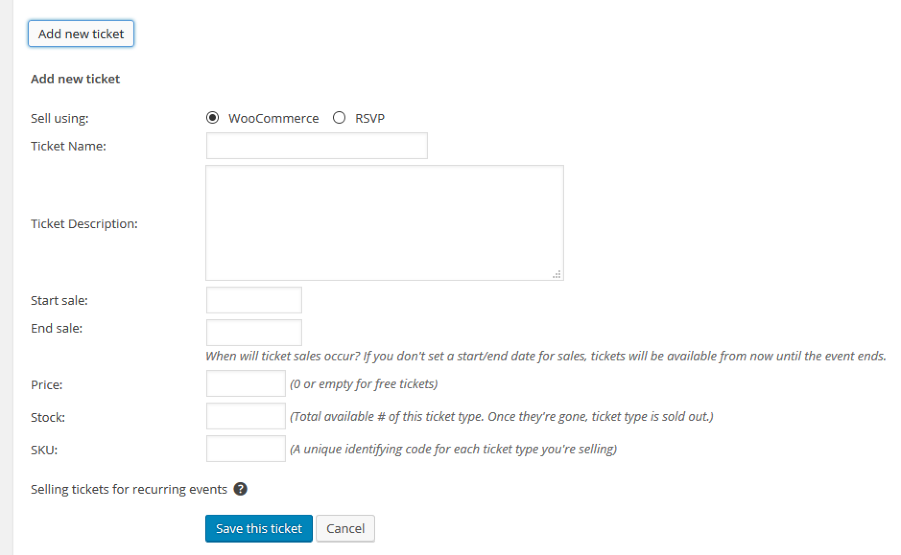
Please note if you have a start and end sales date and today is not between those dates the ticket will not show.
Please create your own ticket with that information and we can help you out today.
Thanks
January 25, 2016 at 4:46 pm in reply to: Should event tickets also show up on WooCommerce "Shop" page? #1062143MemberHi,
Thanks for using our plugins. I can help out here.
By default we set the Catalog Display to hide in the shop page.
It is possible to change that setting per ticket(product).
Or you can use this snippet to change all future tickets to be visible:
https://gist.github.com/jesseeproductions/5768685acc4cd48cdd81
Add that to your theme’s functions.php to do that.
Let me know if you have any follow up questions.
Thanks
MemberHi,
Sorry for the issues you are having. I can help out with this.
Try this instead:
hide_weekends=”true”
I got that to work for me.
Let me know.
Thanks
-
AuthorPosts