

Forum Replies Created
-
AuthorPosts
-
Barry
MemberHappy to hear you’re all set! I’ll go ahead and close this topic, but please don’t hesitate to post new ones if we might be able to help with any other questions 🙂
August 13, 2018 at 8:17 am in reply to: Import Origin on new Import not displaying all Origins from which to select #1596122MemberHi Andrew – are you still experiencing this and if you visit the Events ‣ Help screen and scroll down to the Event Aggregator System Status section, does it show that the site is successfully connected to Event Aggregator?
Thanks!
August 13, 2018 at 7:44 am in reply to: Fatal error when submitting page using tribe_events shortcode in 4.4.30 #1596085MemberExcellent, thanks for bearing with us 🙂
I’ll go ahead and close this topic, but please don’t hesitate to create new ones as needed should you require help with anything else.
MemberCan you share an example of the sort of URLs you are using? (Just keen to see the general structure so I can better replicate this problem.)
MemberGlad to hear it!
If you’re happy to share, were there any specific steps you took to resolve this that might help others?
MemberHappy we could help 🙂
I’ll go ahead and close this topic, but of course if we can assist with anything else please just create a new topic and we’ll be happy to help.
Last but not least, if you have a moment to spare and would be happy to leave a review for The Events Calendar on our WordPress.org page, we’d love to hear from you. Thanks again!
August 13, 2018 at 7:28 am in reply to: Events Imported via Aggregator Aren't Properly Navigable #1596074MemberOK, we’ll take a look (though, as is generally the case with third party themes and plugins, we can’t make any guarantees here – but of course I understand Divi is pretty popular) 🙂
Before I go ahead, can you confirm which version of Divi you are using?
Thanks!
August 10, 2018 at 12:57 pm in reply to: Events Imported via Aggregator Aren't Properly Navigable #1595094MemberHi Mark,
Thanks for posting: I’m sorry to hear you’ve hit up against difficulties.
I’m not sure this is related to the fact that the events were imported from another site, though: if I try to replicate the same thing on a clean WordPress site and import across from https://www.lindahall.org/events/ there are no problems with pagination.
On that basis, it probably makes a lot of sense to run through basic troubleshooting first of all:
theeventscalendar.com/knowledgebase/testing-for-conflicts
In essence: deactivate all plugins except for The Events Calendar and switch to a default, unmodified theme such as Twenty Seventeen – then check to see if this remains an issue.
If that solves the problem, then by reactivating those components one at a time we can hopefully detect what is triggering it.
You can of course make use of a staging site to avoid disruption on your live site when exploring these possibilities:
theeventscalendar.com/knowledgebase/creating-using-wordpress-staging-site
Do let me know how it goes!
MemberHi Bridget,
Sorry to hear that.
When I look at your calendar it looks like the problem is resolved and the calendar grid no longer extends beyond the limits of the page. Is there any other area you are having trouble with?
I need to revert to the old Events Calendar and Pro
plugin versions. Can you instruct how to do this? If I delete the current
plugins and install the older ones, will my data remain? Please advise,If you wish to, you can certainly do so … I’d still love to understand what problems remain (so I can ensure we take any necessary steps on our end – sticking with older versions of our plugins generally isn’t a particularly good or secure long term strategy).
However, it’s certainly possible and you shouldn’t lose any data (but please back-up first of all!).
theeventscalendar.com/knowledgebase/downgrading-plugin-past-version
The above article outlines the necessary steps.
MemberAmanda,
I have to say I think it’s a little unfair to suggest you received no support, however I’m glad you resolved things.
If your tech made any discoveries such as bugs in The Events Calendar we should know about, please feel free to share a summary and we’ll be happy to fix things up (of course, if they were all local conflicts there is no particular need to do so).
Thanks again and if we can help with anything else, do let us know.
MemberVery welcome 🙂
MemberI’m so sorry to hear that.
#tribe-events-content-wrapper .tribe-events-calendar {
    table-layout: auto !important;
}
Can you try navigating within the admin environment to Appearance ‣ Customize ‣ Additional CSS and then add the above snippet of code?
Beyond that, I’d recommend reaching out to the author of your theme. It looks like they include rules targeting our calendar, which is great, but it seems they may require an update.
I hope that helps but do let me know if you have further questions about this 🙂
MemberSorry to hear it – that definitely shouldn’t happen!
I do notice you are a few (minor) versions behind, in relation to your copies of Event Tickets and Event Tickets Plus. Can you update those? Similarly, WooCommerce appears to be a little out of date.
Can you tell me a little more about your tickets – are they set to use shared capacity or does one/both have a fixed, non-shared capacity? You can check on this by editing each ticket – you should see something similar to this:
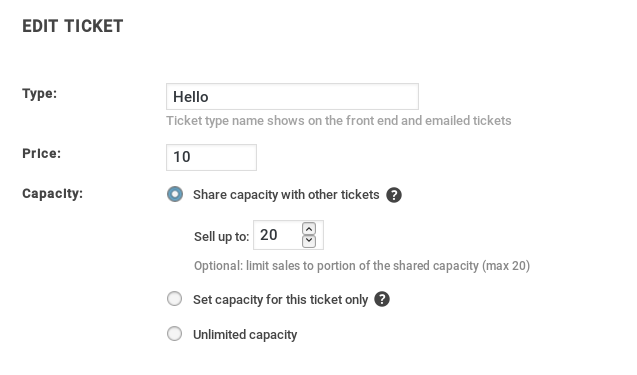
Thanks!
August 7, 2018 at 5:22 am in reply to: show the names of the attendees, ordered by each type of ticket #1591743MemberHi Gorka,
Thanks for your interest in our plugins!
This is certainly possible – though I’ll be clear it doesn’t happen “out of the box” and so would require some custom development work to realize it (which is something we can’t assist with).
However, our plugins are flexible and are built with customization in mind so, so long as you have some dev skills – or have access to someone who does – you should certainly be able to build this out 🙂
I hope that answers your question, but do let me know if I can clarify anything.
MemberGlad that helped and thanks for your patience in the meantime – we’ll update you as soon as a fix is ready.
-
AuthorPosts