

Forum Replies Created
-
AuthorPosts
-
November 14, 2017 at 7:11 am in reply to: Keep getting warnings/nags about renewing license, when it's renewed #1382440
Barry
MemberSorry for the confusion! Previously, you had two expired license keys:
- One for Event Aggregator
- One for Facebook Events
Event Aggregator is of course an active and functional service and I incorrectly assumed that was the only one which would trigger renewal emails (as Facebook Events itself is no longer sold or supported) … so I initially removed only the first of those license keys — but both have now been deleted.
Does that clarify things?
MemberOK, well good to hear it’s not a bug on our side but rather is an artefact of that other plugin and the way it imports data.
In terms of automatically saving the events post-import, you could try writing a script (and saving it as a custom plugin) that listens for events being created outside of The Events Calendar’s framework and then makes a call to tribe_update_event(), something like this:
function trigger_tribe_update_event( $id ) {
	static $processed = array();

	if ( in_array( $id, $processed ) ) {
		return;
	}

	$processed[] = $id;
	tribe_update_event( $id, array() );
}

add_action( 'save_post_tribe_events', 'trigger_tribe_update_event' );
Please note that:
- This will trigger a number of notice/warning level errors (that can be ignored) so do turn off the display of errors before using it
- It will make WordPress/The Events Calendar do a lot of extra work that wouldn’t normally happen, so consider removing it/commenting it out when it is not needed
- I’m making some assumptions about how your other plugin works here and so I’m afraid I can not offer any guarantees about this working – but it’s worth a shot and could be a good starting point for you
Good luck and thanks for the update!
November 13, 2017 at 5:22 pm in reply to: Keep getting warnings/nags about renewing license, when it's renewed #1382053MemberHi Steve,
I’m sorry about that: you do have one other expired license (but it is for a plugin that we’ve discontinued, so I did not expect it to trigger further emails).
I’ve now removed that also, so hopefully this will be an end to the problems and I’ll be sure to highlight this further issue with the team.
Thanks again for your continued support 🙂
November 13, 2017 at 5:17 pm in reply to: Event tickets sold number is including deleted tickets #1382052MemberOK, well thank you all for your feedback – let me share this with the team and we’ll see what we can do to make some improvements 🙂
MemberRight now when I inspect the source of your page it looks like there is a typo:
#tribe-events-content tribe-events-schedule > h2 {
    display: block;important
}
This should probably be (note the placement of the closing semi-colon and also the bang/exclamation mark – sorry for not being clearer about that earlier):
#tribe-events-content .tribe-events-schedule > h2 { display: block !important; }MemberI’m afraid there is no direct support for videos at this time, so if that’s pivotal it may be best to look at other options, I’m afraid.
MemberHi Ken,
I’d bet that is possible — but I’m afraid this level of custom development is beyond the scope of support we can provide here.
- If you have any more specific questions do feel free to ask and if there is guidance we can offer – even if it is just to point you in the right direction – we’ll be happy to do so
- Remember there are lots of skilled developer/designers out there who may also be able to help with more involved tasks like this one 🙂
MemberI’m afraid I’m not 🙁
- Perhaps you could upload the image to your site, or a file/image sharing site and drop the URL in here?
- If you are trying to share code, perhaps you could instead share it on a service such as Gist and again drop the URL in here?
MemberAbsolutely, Keith.
You can assign categories and in fact change almost any detail of the imported event. Event Aggregator also comes with a set of options to control how future updates are handled in such cases (ie, whether to always overwrite local changes or to preserve local changes – it’s very flexible) 🙂
I hope that helps but let me know if I can clarify anything else!
MemberI don’t see a screenshot, unfortunately (if you replied by email I’m afraid they won’t come through automatically, you would need to log in to the forum and upload them directly).
MemberHi there Casey,
Event Aggregator can indeed import images from both Facebook and other The Events Calendar sites. So long as the source events have featured images, it should just happen with no extra work.
What about other types of feeds? I’ve searched thoroughly but can’t find a definitive answer.
Presently, we don’t automatically import featured images for iCal feeds (this includes Google Calendar). However, this is something that may change in the future.
I hope that helps!
MemberI’m sorry to hear that.
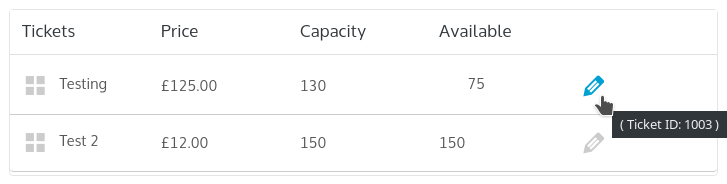
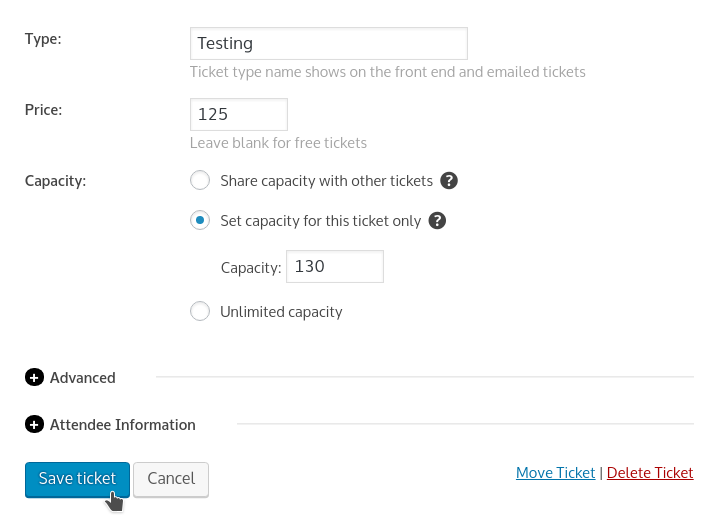
I can not edit the tickets that I have created in the event. If I press the Edit button, the event is updated. But I can’t edit the ticket.
Let’s start by exploring this issue.
In my case, I can edit and successfully update tickets – whether they were tickets created before or after upgrading to the new versions of our plugins seems not to make a difference.
Your note about pressing the edit button and the event updating is also interesting as that shouldn’t happen (assuming I’m understanding you correctly, of course). Just to ensure I’m understanding you correctly, do the following screenshots accurately reflect the controls you are talking about?
Thanks!
MemberCan you confirm where you added it, exactly? I’m not seeing it in place though I could easily be missing it (please also note that if you stripped it back out then it makes it hard for me to see where it is being added in the context of your site … and so adding it back so we can troubleshoot further would be appreciated).
Other things you can try:
- Adding the snippet to a custom tribe-events.css stylesheet
- Adding !important after display: block;
November 10, 2017 at 6:30 am in reply to: Event tickets sold number is including deleted tickets #1379824MemberOK – good feedback!
In relation to the ticket editor (the ticket settings that appear within the event editor itself, that is, rather than the attendee screen) does our latest release help with your concerns at all?
MemberExcellent, glad it worked.
I’ll go ahead and close out this topic but if we can help with anything else please don’t hesitate to post a new topic and one of the team will be only too happy to assist 🙂
-
AuthorPosts