

Forum Replies Created
-
AuthorPosts
-
September 29, 2016 at 2:49 am in reply to: Removing category from List Views BUT NOT from users My Events view #1170265
Andras
KeymasterHey jussibr,
No worries, let’s see how we can work this out.
I tweak the code a tiny bit so that the modified query is NOT run when you are looking at the My Events page.
Check if it helps.
https://gist.github.com/andrasguseo/60a26cd98acd4d6b077d25207f19e734
I didn’t understand correctly “still visible on the site when accessed directly by the category link”. Is that good like that or you want to hide them there as well?
Cheers,
AndrasSeptember 29, 2016 at 2:40 am in reply to: How do I get the year to show after the month and day on listings? #1170264KeymasterHey Sarah,
I updated the code to show only the city. Here it is again.
https://gist.github.com/andrasguseo/533ec767245651d024782f4df95e8189
As for the widgets, do you want to show the city in both the Events Calendar widget and the Events List widget?
Thanks and cheers,
AndrasSeptember 29, 2016 at 2:28 am in reply to: Show city instead of state/province in event preview + single event description #1170260KeymasterHi Manuela,
Here is the file for the list view. Create a single-event.php file to the following folder, and copy the below snippet in the file:
wp-content/themes/{your-theme}/tribe-events/list/single-event.php
https://gist.github.com/andrasguseo/36ee590a9c321a782a20bf5219d1cdc9
For the single event view, create a venue.php file to the following folder and copy the below snippet there:
wp-content/themes/{your-theme}/tribe-events/modules/meta/venue.php
https://gist.github.com/andrasguseo/2d85f4ae41ccf40ecd74e8906caf3a0e
Let me know how this works out.
Cheers,
AndrasKeymasterHallo Nina,
Thanks for reaching out and I’m sorry you are having an issue with the recurring events.
While I investigate that a bit further, I would kindly like to ask you to run a test for conflicting plugins and theme. Here is a handy guide that walks you through that.
That helps us eliminate any issues arising from plugin conflicts or badly coded plugins. Let me know the results.
Thanks and cheers,
AndrasSeptember 28, 2016 at 2:02 pm in reply to: Additional fieldset is not shown in customer email. #1170046KeymasterHey Yu Cheng,
Thanks for reaching out! I’m sorry you are having an issue, let me try to help you out.
The attendee information should be included in the email by default. Unfortunately a bug crawled in and it’s preventing that. We already have a bug ticket on file for that. I will add this thread to it to give it more push. It is high priority so hopefully a fix will come with the next Maintenance Release.
Until the fix arrives this little snippet / plugin should help you fix that problem:
Let me know if this helps and how it works out.
Cheers,
AndrasSeptember 28, 2016 at 1:47 pm in reply to: iCal importer not working: Your search returned no results. #1170042KeymasterHello Dahls,
Hey, thanks for going pro and welcome to the forums! I will help with your issue, I’m sorry you bumped into it.
Let me give you some background to what’s happening here.
When you delete (and remove from trash) imported events, they will still remain in the database, only they will be hidden. This will prevent them from importing again. It is done like this, because some people set up recurring imports for a feed, but there might be some events which they don’t want to import from there. This prevents that re-import.
Once you remove those hidden items from the database, you will be able to import everything again.
Now, on how to remove them: here you can find a plugin that will help you out:
https://github.com/andrasguseo/tdm-purge-tec/archive/master.zip
Just upload to your wordpress site as a plugin (Plugins > Add new > Upload Plugin) and activate it. It will add a link to the admin bar. Clicking on that purges the database of “deleted” events.
Try how this works out for you and let me know.
Cheers,
AndrasSeptember 28, 2016 at 1:23 pm in reply to: Events not shown in Frontend / in Backend shown 5 times per Event #1170034KeymasterGrüsse Lars
Vielen Dank für die Benutzung unserer Plugins und wilkommen im Forum. Ich probiers mal dir auf Deutsch zu helfen. (Entschuldigung im Voraus für die Fehler. 🙂 )
Das Problem mit dem Import ist höchstwahrscheinlich ein Bug der uns schon bekannt ist. Könntest du das import Link mit mir mitteilen so dass ich es möglicherweise auch Testen kann?
Deine Events wurden doch importiert. Du kannst die am 24. September sehen. In die List View musst du einmal in die Vergangenheit gehen. Oder klikk hier:
MfG
Andras
KeymasterHello globaleadership,
Thanks for reaching out!
At the moment there are no extra settings in our plugins concerning 404 errors. The knowledgebase article you referenced is the resource we would point you to.
The other thing would be is to totally exclude those pages from SEO with the help of a plugin or customization.
I hope this answers your question. Let me know if I can help you with anything else.
Cheers,
AndrasKeymasterHello Tiffany,
Thanks for using our plugins and welcome to the forums!
I’m really sorry you bumped into that issue (your opening post). This bug has been flagged to us about a week ago, so we already know about it. The internal bugticket is already filed and it is on highest priority, so it is very likely that a fix for this will come in our next maintenance release.
I will add this thread to the bugticket as well to give it more push.
I also tested the first link and I was able to send an RSVP with attendee info and was able to put a Ticket to the cart without any issues. Did you find a fix meanwhile or did you change anything?
Also, is there anything else you need help with?
Cheers,
AndrasSeptember 28, 2016 at 12:42 pm in reply to: Finding individuals in a group registration and between multiple events #1170001KeymasterHey Patrick,
Thanks for using our plugins and welcome to the forums! Let me try to help you with your questions.
When looking at the list of people who registered, the back end lists the ticket purchaser for ALL of the people in the group, not the information of the other people in the group. The names of the registrants whose details were entered when registering actually don’t appear anywhere in the system.
Yes, the default behavior is to list the purchasers as that is the most common scenario. Not everyone has Attendee Information and surely not every one of those has Name going with it. There can also be cases when someone is collecting a whole bunch of attendee info. I’m sure you understand it would be extremely complex to develop a system, that straight away shows the Names of each group member in the table.
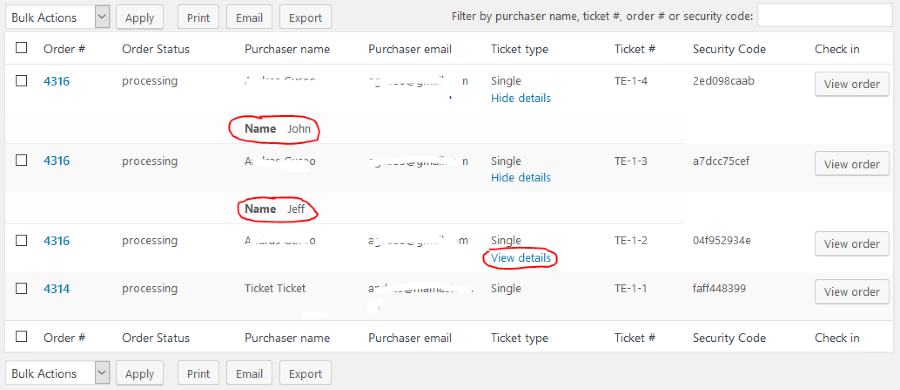
However, the system actually shows the collected attendee information. When you list your events and hover over your specific event, click on Attendees. This will take you to the attendee list. There in the Ticket type column of the table you should see View details under each ticket. If you click on that, it will show you the attendee information that was collected. (In the below screenshot example I collected only a name and bought 3 tickets with one purchase, filling out the three names. You can see 2 of those open.)
Also, I don’t see a way to search for a ticket buyer from ALL events.
For this I believe this article should provide you with an answer:
Let me know if this helps.
Cheers,
AndrasKeymasterHey Zachry,
I am glad to see you were able to figure it out.
I am going to go ahead and close this ticket. If you have a similar issue or another in the future, please do not hesitate to create a new ticket.
Cheers,
AndrasPS: If you like our plugin, we would be happy to receive a review in the wordpress.org repository. Thanks!
https://wordpress.org/support/view/plugin-reviews/the-events-calendarKeymasterThis reply is private.
KeymasterThis reply is private.
September 28, 2016 at 7:11 am in reply to: How do I get the year to show after the month and day on listings? #1169773KeymasterHey Sarah,
I took the assumption that you want to add the venue info to photo view.
Further assumption based on the other site is that you want to show the city and the venue name separated by a comma. To achieve this, paste this snippet in your theme’s functions.php file:
https://gist.github.com/andrasguseo/533ec767245651d024782f4df95e8189
If you want to display different venue info, then it should be pretty easy to further customize. On this page you can find further functions that get you information about your venue:
Hope this helps, let me know how it works out.
Cheers,
AndrasSeptember 28, 2016 at 3:34 am in reply to: Show city instead of state/province in event preview + single event description #1169695KeymasterHi Manuela,
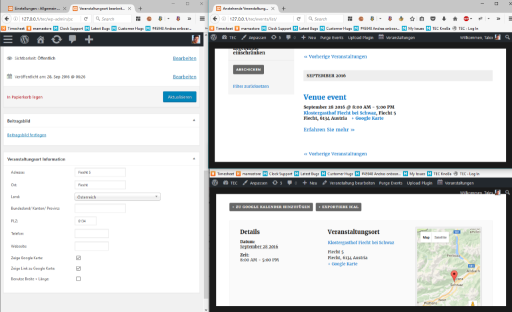
Let’s try the easier solution first. If you don’t fill out the Bundesland / Kanton / Provinz for the venue, then it will not show up. Like on this screenshot.
Left shows how the venue is set up for the event. Top right is the list view. Bottom right is the single event view.
Let me know if this helps. If you want to get into a bit of customization, we can, I just thought this might be easier.
Cheers,
Andras -
AuthorPosts