
Home › Forums › Ticket Products › Event Tickets Plus › Finding individuals in a group registration and between multiple events
- This topic has 3 replies, 4 voices, and was last updated 10 years ago by
Patrick.
-
AuthorPosts
-
September 27, 2016 at 2:24 pm #1169512
Patrick
ParticipantWhen looking at the list of people who registered, the back end lists the ticket purchaser for ALL of the people in the group, not the information of the other people in the group. The names of the registrants whose details were entered when registering actually don’t appear anywhere in the system.
We have to edit attendees all the time especially those in groups and we can’t find a way to do that is this system.
Also, I don’t see a way to search for a ticket buyer from ALL events. You can go into an individual event and search within the purchasers for that event to find someone, but it doesn’t look like it’s possible to search through all ticket purchasers for all events.
September 28, 2016 at 12:42 pm #1170001Andras
KeymasterHey Patrick,
Thanks for using our plugins and welcome to the forums! Let me try to help you with your questions.
When looking at the list of people who registered, the back end lists the ticket purchaser for ALL of the people in the group, not the information of the other people in the group. The names of the registrants whose details were entered when registering actually don’t appear anywhere in the system.
Yes, the default behavior is to list the purchasers as that is the most common scenario. Not everyone has Attendee Information and surely not every one of those has Name going with it. There can also be cases when someone is collecting a whole bunch of attendee info. I’m sure you understand it would be extremely complex to develop a system, that straight away shows the Names of each group member in the table.
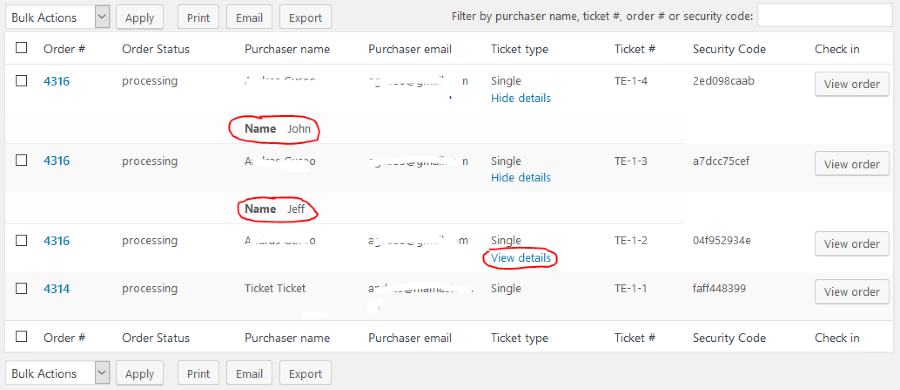
However, the system actually shows the collected attendee information. When you list your events and hover over your specific event, click on Attendees. This will take you to the attendee list. There in the Ticket type column of the table you should see View details under each ticket. If you click on that, it will show you the attendee information that was collected. (In the below screenshot example I collected only a name and bought 3 tickets with one purchase, filling out the three names. You can see 2 of those open.)
Also, I don’t see a way to search for a ticket buyer from ALL events.
For this I believe this article should provide you with an answer:
Let me know if this helps.
Cheers,
AndrasOctober 20, 2016 at 9:35 am #1179882Support Droid
KeymasterHey there! This thread has been pretty quiet for the last three weeks, so we’re going to go ahead and close it to avoid confusion with other topics. If you’re still looking for help with this, please do open a new thread, reference this one and we’d be more than happy to continue the conversation over there.
Thanks so much!
The Events Calendar Support Team -
AuthorPosts
- The topic ‘Finding individuals in a group registration and between multiple events’ is closed to new replies.