

Forum Replies Created
-
AuthorPosts
-
November 14, 2016 at 6:57 am in reply to: iCal Imported everything an hour early Starting on November 6th (Daylight Saving #1191802
Andras
KeymasterHi templesinai,
Thanks for sharing this. Please give me some time to check this out.
Thanks for your patience!
Andras
KeymasterThanks for sharing all that information.
If I understand correctly, you managed to remove all orders and tickets, and there is somehow 1 remaining, right?
If that is the case then the system seems to be working properly. We will just need to find that one lonely ticket / RSVP stuck there.
You will need to check around in your backend if you can find it. First I recommend to find out the id of the ticket (post). Here’s how you can do that:
- Open your developer tools (or Firebug extension) with F12
- Click on the inspect button, then click on the frame of the ticket
- in the html code you should be able to find the ID of the ticket
Here’s a short screencast for this:
Once you have the ID, check around in your back-end again if you find something and let me know.
Cheers,
AndrasKeymasterPekka, WOW!!!
A big thank you for sharing this. This will be super useful for some people I’m sure. I personally love it! The with the SKU names it is fairly easy to create any order I want.
Much appreciated! Thank again!
Have a great weekend!
Cheers,
AndrasKeymasterHello Sally,
Thanks for getting in touch with us! I’m really sorry you are experiencing an issue with Event Aggregator.
To be able to help you with this could you please share with me the feed / file that you are trying to import? This way we can look at it and test it to see what the issue could be.
Looking forward!
Thanks and have a great weekend,
AndrasKeymasterHi Stephen,
Thanks for using our plugins and welcome to the forums! Excellent question there!
It should be possible, yes. This is approx. what you will need to do:
1. Get the link to your calendar. It should look something like this: http://www.domain.com/events/?ical=1
You can get it if you go to a list or month view and scroll to the bottom. There should be a button saying “Export listed / month’s events”. Right click on that and Copy link location.2. Open your Outlook and go to the calendar
3. On the Home ribbon go to Open calendar > From Internet (https://cloudup.com/cqdiI12nphS)
4. In the popup dialog paste in the link of your calendar that you copied before. Click OK a couple of times and you are done.
In order to refresh the calendar you will need to do a Send / Receive all folders.
Does this help? Let me know.
Cheers,
AndrasNovember 11, 2016 at 1:56 pm in reply to: Adding additional ticket options with price adjustment #1191174KeymasterHello Tom,
Thanks for using our plugins and welcome to the forums! That’s a great question.
On the event page itself the extra options will not show up. What you can do here is set up several tickets with different options and price points. I understand this can be quite cumbersome, so it might not be a good solution in some cases.
What you can also try is using the ticket’s WooCommerce page for the sale, where the WooCommerce plugins should already kick in.
Here’s what you need to be able to sell the tickets on their WooC pages:
Please let me know if this answers your question.
Thanks and cheers,
AndrasKeymasterHello Steve,
Thanks for going Pro and welcome to the forums!
Good question you have there!
There is a file upload field on the front-end of Community Events where you can upload an image for the event. For security reasons only .png, .jpg and .gif are allowed. Anything else could lead to security vulnerabilities, so that is not a feature in our plugins, and it is not in the planning for the future at the moment.
I cannot confirm that it would be possible with ACF, but it might be possible. You will need to give that a try. 🙂
Does this help?
Cheers,
AndrasKeymasterHello clarksburgbaptist,
Thanks for reaching out and sorry about your issue with DST. I can imagine that is causing a lot of headache. Let me try to help you with that.
To get a full picture of the situation I will need to ask you a couple of questions.
The daylight savings change has all my events showing up on the calendar an hour later than what they are scheduled for in the backend.
Did you do any changes to your website when DST was over? What were these changes?
I’ve tried opening the events and resaving them – but no luck there.
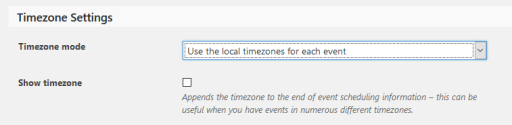
What are the timezone settings for your Events Calendar? You can find this under Events > Settings > General tab > Timezone settings (at the bottom). Please send me a screenshot, it should look like this:
I also upgraded to latest version of the plugin and it now has my events out of order.
In your system information I still see versions 4.2.7. Can you please confirm that indeed you are using the latest versions, which is 4.3.2?
What do you mean exactly when you say “has my events out of order”? Is it only the timing or also something else? Was this “out of order” the result of the DST change, the change you made on your site or the upgrade of the plugins?
For the past three time changes I’ve had to manually change the event times, but for a premium plugin this shouldn’t be necessary.
Indeed it shouldn’t be and usually it is not. When there was a time change before (past three times) did you change any setting on your website to reflect the change? Or you didn’t touch anything and the times of the events just changed?
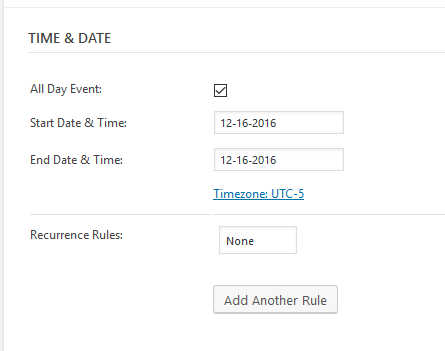
Also could you please send me a screenshot of the date & time settings of an event that you are experiencing a problem with? Should look something like this:
Looking forward to your answers!
Cheers,
AndrasKeymasterHey Greggor,
I can but if I see correctly it has been already snagged by one of my esteemed colleagues. He will take good care of that thread, I can assure you.
Since you marked it resolved I am going to close this ticket, but if you need anything else related to this topic or another please post a new topic in the forum and we will help you out.
Cheers,
AndrasPS: If you like our plugin, and you didn’t yet do so 🙂 we would be happy to receive a review in the wordpress.org repository. Thanks!
https://wordpress.org/support/view/plugin-reviews/the-events-calendarPS2: We’d be also grateful if you would give us feedback on your satisfaction with support. Just click on one of the classy looking emojis below. 🙂 If you can spare a few words, that’s even better. Doublethanks!
November 11, 2016 at 8:44 am in reply to: iCal Importer imports ical recurring all on the same date #1191014KeymasterDear Carla,
I’m sorry that there are still some problems. This is a really frustrating issue. We had a duplication issue before and it was supposedly fixed. But apparently there are still cases when it comes back.
I tested the feed that you sent way back and I can confirm that events are being duplicated / overwrite doesn’t work. I will open a bug ticket with high priority on this so a fix can be developed.
2. Adds an extra day to last day of repeating events
This issue has recently been reported to us. We already have ticketed it and is waiting for a developer to be assigned to the case. (Note for me: #67492)
I sincerely apologize again for the long thread and the issues you are having.
I do hope and wish that a fix for both issues comes soon, so you can have a properly working calendar on your intranet site.
I believe this is all we can do at the moment. I am going mark this ticket as “waiting for a fix”. The issue is still open and we will update this ticket once we release a fix, so you will be informed.
If you have any new questions or issues please create a new ticket and reference this one.
I wish you a great weekend!
Cheers,
Andras
November 11, 2016 at 8:01 am in reply to: "The URL provided did not have events in the proper format. #1190893KeymasterHi Leeron,
Thanks for using our plugins and welcome to the forums!
I’m sorry you are having an issue with the import. I will test it and will get back to you.
Meanwhile could you tell me how the .ics file is generated / created? With what application?
Thanks and cheers,
AndrasKeymasterEntschuldigung, was meinst du mit 40.000? Ich verstehe nicht.
Dieses UPDATE macht keine neue inserts in den Datenbank nur macht ein uptade auf existierende einträge. Sollte nicht lange dauern.
Dieses query wirkt in dem Datenbank und hat keinen Einfluss auf Event Aggregator limits.
Order war das was anderes? Bitte erkläre mir mit mehr Details. Danke.
Wenn du denkst dass dies ein gutes Feature wäre für Event Aggregator dann bitte besuche unsere UserVoice Seite und dort einen Vorschlag machen.
Andras
November 11, 2016 at 2:31 am in reply to: iCal Imported everything an hour early Starting on November 6th (Daylight Saving #1190795KeymasterHello,
Sorry to hear about that. It might be that our server was having a peak.
Did you try again a bit later, did you still have the error?
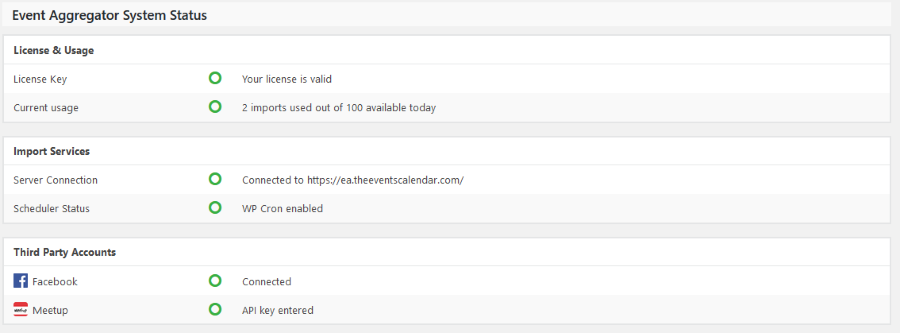
Could you send me a screenshot of the Event Aggregator status? You can find it under Events > Help at the bottom, and looks like this:
Thanks,
Andras
KeymasterIf you are still having the issue, please share with me your system information.
https://theeventscalendar.com/knowledgebase/sharing-sys-info/
Thanks,
Andras
KeymasterHi again,
I checked this and after a page refresh for me the numbers were fine. Also when I clicked on the ‘View your tickets’ and refreshed the page, the deleted ticket disappeared.
This is what I did:
- I went to the attendee list of the event
- Deleted the ticket I wanted removed
- Went to the event page and I hit refresh – numbers OK
- Went to ‘view your tickets’ and I hit refresh – ticket disappeared
Can you check if this works for you?
Thanks and cheers,
Andras -
AuthorPosts