

Forum Replies Created
-
AuthorPosts
-
Andras
KeymasterHey Chris,
I’m happy to hear an update fixed the issue.
Since this is marked resolved I am going to close this ticket, but if you need anything else related to this topic or another please post a new one in the forum and we will be happy to help you out.
Cheers,
AndrasPS: If you like our plugins, and you didn’t yet do so 🙂 we would be happy to receive a review in the wordpress.org repository. Thanks!
https://wordpress.org/support/plugin/the-events-calendar/reviews/PS2: We’d be also grateful if you would give us feedback on your satisfaction with support. Just click on one of the classy looking emojis below. 🙂 If you can spare a few words, that’s even better. Doublethanks!
KeymasterHey Jon,
If there would be only one category name in the description field and nothing else, then it could be doable with a snippet.
It would be possible to write a bit of code that ‘listens’ for an event being created (by Event Aggregator) via the
tribe_aggregator_before_insert_eventfilter hook – this also lets them manipulate the event data before it is written to the database. So you could potentially use that as a springboard.Does this help?
Andras
February 1, 2017 at 8:58 am in reply to: Venues are duplicated after importing events from live site #1227619KeymasterHello Josh,
Thanks for the file (you can remove it if you want). I imported it but didn’t see the issue yet after checking several events.
Do you have this with all events or only some? If only some then can you point those out for me so I can check?
Do you maybe have a dev site or can you set one up where you can check the import again?
Thanks!
AndrasFebruary 1, 2017 at 8:52 am in reply to: Broken Events Calendar plugin with the Listify Theme #1227613KeymasterHi Othmane,
Happy to hear your site and calendar works again! Awesome.
Since the issue is resolved I am going to close this ticket, but if you need anything else related to this topic or another please post a new one in the forum and we will be happy to help you out.
Cheers,
AndrasPS: If you like our plugins, and you didn’t yet do so 🙂 we would be happy to receive a review in the wordpress.org repository. Thanks!
https://wordpress.org/support/plugin/the-events-calendar/reviews/PS2: We’d be also grateful if you would give us feedback on your satisfaction with support. Just click on one of the classy looking emojis below. 🙂 If you can spare a few words, that’s even better. Doublethanks!
February 1, 2017 at 8:45 am in reply to: Remove sitelink, comments and wordpress embed from single posts #1227605KeymasterHmmm…. yeah, the embeds come in an iFrame, and if the content in the iframe comes from a different domain, then it doesn’t work. But even if, then it is tricky.
I’m sorry I cannot help you more with this. Maybe this page will help you get started though:
http://stackoverflow.com/questions/217776/how-to-apply-css-to-iframe
Cheers and good luck!
AndrasKeymasterHey Mat,
Super stoked to hear you managed the find a fix for this. Awesome job!
Since this is marked resolved I am going to close this ticket, but if you need anything else related to this topic or another please post a new one in the forum and we will be happy to help you out.
Cheers,
AndrasPS: If you like our plugins, and you didn’t yet do so 🙂 we would be happy to receive a review in the wordpress.org repository. Thanks!
https://wordpress.org/support/plugin/the-events-calendar/reviews/PS2: We’d be also grateful if you would give us feedback on your satisfaction with support. Just click on one of the classy looking emojis below. 🙂 If you can spare a few words, that’s even better. Doublethanks!
KeymasterHey Cliffy,
Thanks for the clarification on that.
(It was possible to remove them before as well, by setting the dropdown to none I believe. But I agree it was not intuitive, that is why we changed that.)
Looking at the screenshot I see one issue there, namely the recurrence rule doesn’t say whether it is day, month or week.
As for the exceptions, if I’m not mistaken these are all stored in one entry (one entry per recurring event) in the wp_postmeta table, so this shouldn’t create the 400.000 records in the database.
The exclusion rules seem to be like exclude weekly on the same day.
So much about analyzing the issue.
Did you start seeing these issues after a plugin update? Before that all was working fine?
In this case one option would be rolling back to a previous version, removing there these exceptions. Then updating the plugins and creating any exceptions you might need.
The other option would be simply deleting all events, remove them from trash and re-create them.
Let me know.
Cheers,
AndrasKeymasterHello Dan,
Thanks for reporting back on this.
I have tried to import the feed of February 2017 to my Outlook. It did import 1) with lots of error messages and 2) to the months of June and July.
Could you please check if maybe the same happens to you as well, to confirm?
It looks like we have a bug on our hands. I will create an internal bugticket so this issue can be addressed as soon as possible. I’m sorry for this inconvenience.
Cheers,
AndrasKeymasterGrüss Dich Norbert
One of my team mates was kind enough to look at this and did an extension for this functionality.
You can download it from here: https://theeventscalendar.com/content/uploads/2017/01/tribe-ext-default-event-times.zip
And upload it to your site as any plugin and activate it.
Afterwards you will see the settings under Events > Settings > General tab and will look like this:
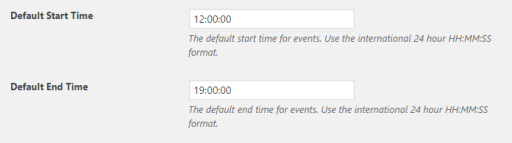
Test it and let me know if this does the work for you.
Cheers,
AndrasJanuary 31, 2017 at 1:26 pm in reply to: Getting these Notices after a successful payment to a "virtual" normal product #1227123KeymasterHello Shadi,
Thanks for reaching out with that issue. I have checked our internal tickets and didn’t find anything that would be connected to that.
We will investigate this and to help us in that I have a couple of questions.
Do I understand correctly that this appears on the front-end, so users would see this after payment?
What is the payment gateway used? Does it come with all, or only a certain one?
This only happens with virtual tickets?
Could you share the error log with me?
And it would be great to have that staging site as well, if you manage.
Looking forward to solving this with you.
Cheers,
AndrasKeymasterHello Six,
Thanks for using our plugins and welcome to the forums!
By default, when you go to list view it starts listing the events as of the current day.
I checked your site and it seems that you don’t have any events for today and in the future, that is why you get a blank list. If you click on Previous Events, then you will start seeing events that happened in the past.
This is the normal behavior of the plugin. I hope this clarifies.
If you would still like to change the default start date for list view, that will require some customization work. We are limited in supporting that but I should be able to get you started on it.
Cheers,
AndrasKeymasterHello Doris,
Thanks for reaching out with your question.
By default the next or previous event in time should load when you click on those links. Are you having an issue with it?
If yes, I would be happy to help you sort this out. Please give me more details on the issue and share with me your system information as well.
Thanks!
Andras
KeymasterCan you check if despite the error messages, do the events get imported into outlook?
Thanks,
AndrasKeymasterHello Dan,
Thanks for going Pro and welcome to the forums! I’m really sorry about the importing issue.
I would like to do some tests, would it be possible to share that .ics file with me that you are trying to import?
I will then look into it, if this is a bug or not.
Thanks,
AndrasJanuary 31, 2017 at 4:04 am in reply to: Remove sitelink, comments and wordpress embed from single posts #1226729KeymasterHi Luke,
Thanks for going Pro and welcome to the forums! Great question you have there.
The oEmbed function is a core WordPress function, so not really related to our plugins. You might find some info on WordPress.org on how to properly remove those links.
I can share with you a simple CSS solution that should do the trick. Just add this to your theme’s style.css file:
.wp-embed-footer {

  display: none;

}
Check and let me know if this helps.
Cheers,
Andras
-
AuthorPosts