

Forum Replies Created
-
AuthorPosts
-
April 22, 2017 at 11:54 am in reply to: Exclude Events Category from all queries (but not for admins) #1273133
Trisha
MemberHello, Diego!
Thank you for using The Events Calendar and thank you so much for your kindness in sharing this with the community!
Have a great weekend!
Cheers,
TrishaMemberHello, Franz!
Thank you for using The Events Calendar! I can help with this ?
The best way to do this is to override the template for that block of code.
Make a copy of the related-events.php template. It’s located at ‘events-pro/src/views/related-events.php‘
From there follow the specific instructions in the Themer’s Guide for your particular template. You can find the Themer’s Guide here: https://theeventscalendar.com/knowledgebase/themers-guide/
There are also instructions at the very top of the file you’re moving.
Once you have the file moved you can replace the code for the default image on Line 31 of the template file.
Does this help answer your question? Let me know how it goes!
Cheers,
TrishaMemberHello, Elke!
Thank you for using The Events Calendar! I can help with this ?
You can add additional fields by going to ‘Events > Settings’ and clicking on the ‘Additional Fields’ tab. See the screenshot below for a helpful visual.

Does this help answer your question? Let me know how it goes!
Cheers,
TrishaMemberHi, Tony!
Thanks for using The Events Calendar! I can help you with this ?
The default list view shows upcoming events from the current date onward, so when you say you want to show only upcoming events, do you mean that you want to remove the navigation that allows the user to see past events?
Let me know and I’ll definitely help you get this sorted out!
Cheers,
TrishaMemberHi, Greg!
Thank you for using The Events Calendar. I can help with this!
The styles that will give you the column widths you’re looking for are:
.updated.published.time-details { width: 7%; }

.fusion-tribe-events-headline { width: 63%; }

.tribe-events-venue-details { width: 10%; }
This should do the trick! Let me know how it goes!
Cheers,
TrishaMemberHi, Michelle!
I found the problem! The submit button for the search bar has been set to
display: nonein your custom CSS. I’m not sure why Chrome was working and Safari wasn’t but that’s definitely what’s going on. See the screenshots below for confirmation.Remove that line from your custom CSS and you should be all set!

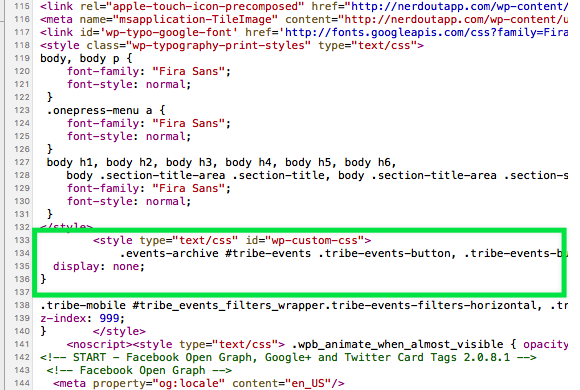
Let me know how it goes, and as always…if you need anything else don’t hesitate to reach out. I’m happy to help 🙂
Cheers,
TrishaMemberHi, Thomas!
Thanks for the report! If you want to open a different thread we can mark yours as pending fix as well. That just means you’ll be notified when the fix is published.
Cheers,
TrishaMemberHi, Logan!
I’m sorry to hear about the fatal. Would you mind sharing the error message? I’d like to see if we can fix that.
As far as the other issues you’re having, that’s a quick code fix which I’ll do for you once I find out what the error is.
I’ve seen this topic come up off and on but there really isn’t a robust solution. I’d like to see that happen but it will take some time.
Cheers,
TrishaMemberHello, Mike!
Thanks for your interest in Events Calendar Pro! I can help you with this 🙂
The filters are on WP Shindig, they’re just a bit hidden. The screenshot below should help out!

I hope this helps, let me know if you need anything else!
Cheers,
TrishaMemberHello, Ken!
Thanks for using The Events Calendar! I can help you with this 🙂
The Tribe Bar Search feature is designed to be used on events pages. It’s possible it could be engineered to work elsewhere but that’s getting into custom development territory.
As an alternative, I can recommend a couple of search plugins that work well for custom post types. The first is Relevanssi https://wordpress.org/plugins/relevanssi/ and the second is SearchWP https://searchwp.com/ I’ve used and highly recommend both.
Does this answer your question? Let me know how it goes!
Cheers,
TrishaMemberHi, George!
Thanks for using The Events Calendar, I can help you with this.
It looks like you did a great job with the KB article! The article does mention a few things to be aware of under “A Couple Notes” and “Wrapping Up” sections.
I think the links https://codex.wordpress.org/WordPress_Feeds and https://digwp.com/2012/10/customizing-wordpress-feeds/ might be particularly helpful. Additionally, I found some semi-related information in the WordPress StackExchange that might get you going in the right direction.
I hope this helps, let me know how it goes!
Cheers,
TrishaMemberHi, Ariane!
So glad to see this worked out for you!
I’m going to close this conversation but if you have any other questions feel free to start a new one! We’re happy to help!
Have a great week!
Cheers,
TrishaMemberHi Logan,
After looking more closely at what you need this is what I recommend.
Install the file I sent just like you would a plugin. It adds a new tab called ‘SEO’ to the ‘Event > Settings’. You can add the meta description there.
Assuming you’re using ‘Yoast SEO’, make the sure Advanced field in checked in the General tab in the settings for that plugin. After that, you can edit site-wide page title configuration. See the screenshot:

Adding the OG:Image is a much bigger customization than we can do but if I remember correctly there are plugins in the WordPress.org repository that will do this for you.
I hope this helps! Let me know how it goes.
Cheers,
TrishaMemberGlad to hear this helped. I’m going to close this out but if you have any additional questions please feel free to open another thread! We’d be happy to assist 🙂
Cheers,
TrishaMemberHi, Titus!
I’m going to go ahead and close this thread out if you need anything else at all feel free to open a new thread. We’re happy to help 🙂
Cheers,
Trisha -
AuthorPosts