

Forum Replies Created
-
AuthorPosts
-
Sky
KeymasterBart,
By default, no. It is possible to customize the RSS feeds however. See this knowledgebase article to get an idea on the process. You would just replace the event date data with output of “the_post_thumbnail()”
Hope that helps!
Thanks,
SkyKeymasterCan you verify that you have configured Auto Return and Payment Data Transfer in PayPal? You can read more about this here.
Thanks,
Sky
KeymasterKyle,
There isn’t a built in way to do this, though it would be possible with some PHP customization. You could create a category for the events that you want to be private, then add a conditional check on the filter for the title that replaces the title with “Private Event.” However, this type of customization is a bit beyond the scope of support we can provide here in the forums. Again, if it is something you would like to pursue, I could provide a bit more information to get you pointed in the right direction.
You can read this knowledgebase article to see how others have approached private events. It is different than what you are wanting to do, but it may give you some ideas on how to approach it.
Let me know if that helps, or if you have any other questions.
Thanks,
SkyKeymasterGreat! Glad that helped.
Please let us know if you have any other questions.
Thanks,
SkyKeymasterI’ve asked about the expected behavior of the redirect after purchase. The redirect should happen automatically after a few seconds, but in case it doesn’t, a link is provided.
How much time are you waiting before clicking the provided link? Can you right click on that link, and copy the url that it is pointing at? I know you said it goes to homepage, but sometimes WordPress will redirect to the homepage if it can’t find the URL. I’d like to see on which end of things the link is not resolving properly.
Thanks,
SkyKeymasterHello Kyle!
Regarding your first question, do you want the events details to be visible, but just change the title to “private event” on the front end? Or do you want the event to only be visible to logged in users, and have the title say “private event” to non-logged in users in the events list/calendar?
As far as displaying the time in the admin list of events: I do not know of any free plugins to do this. It is possible to add this with PHP, but I know this is kind of an involved process. If this is something you would like to pursue, I can look around for some examples to get you pointed in the right direction.
Thanks,
SkyKeymasterHi there!
I’m sorry to hear you’re having issues with this. I’ll try to help get this sorted out.
I’m not sure why it’s showing that message on localhost, which should be exempt from the install limit. In any case, this would just prevent you from updating the plugin through the WordPress interface, and should not limit the use of the plugin in any way. For the time being, you can just log in to your events calendar account and download any new versions manually, until we figure out why this happening on your staging domains.
Can you try removing and re-adding the license key while set up for “localhost”? Does this make the notification go away?
As far as your screenshot goes, the tickets UI will be greyed out if you do not have a payment gateway set up. For me, even just enabling WooCommerce plugin activates it.
Thanks,
SkyKeymasterGreat, thank you for doing that. Sure enough, there it is.
I’m going to have someone else take a look at this ticket later today. I’ll get back to you by tomorrow with an update.
Thanks for your patience!
Sky
KeymasterJordan,
Ah, I see. I apologize for the misunderstanding. The filter in the aggregator does not support the “-” to omit events with certain keywords the way the Tribe Search Bar does. You could assign all non meetings a keyword, but this may be a lot of work if most of your events are not meetings. It would probably be easier to search and delete based on the keyword after import.
I know this is not the answer you were hoping for, and I apologize I don’t have a better answer for you.
Please let me know if you have any other questions.
Thanks,
SkyKeymasterIn the WP Staging settings there is a checkbox for “Disable admin authorization.” This will allow viewing the site without being logged in. Please check this and save the settings.
Thanks,
SkyKeymasterElias,
You can import multiple Google calendars into your site and automatically assign all of those events a category specific to the calendar source upon import. You could then display a calendar using TEC Pro shortcodes that will only show that category.
Let me know if you have any other questions.
Thanks,
SkyKeymasterJordan,
I am able see this working properly on your site.
Here is an event with “meeting” in the description showing in the calendar:

And then I added this in the search filter:
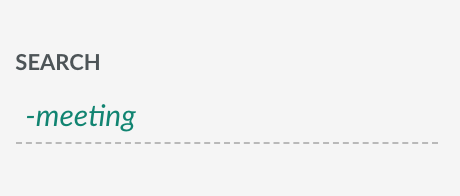
And this is the result I see in the calendar:
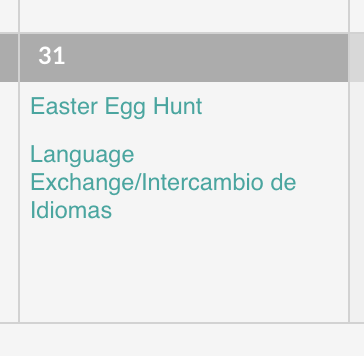
Is there a specific event that is not working that I could look at?
Thanks,
SkyMarch 27, 2018 at 8:25 am in reply to: conflict Events Calendar PRO with a new theme "Appointment Pro" #1489621KeymasterElena,
Events Calendar Pro supports recurring events. You can read more about it here: https://theeventscalendar.com/knowledgebase/pro-recurring-events/
Hope that helps. Let us know if you have any other issues or questions.
Sky
KeymasterMichael,
Thanks for providing that. I set your reply as “private” to protect your information. Looking at your settings, the values related to both of your issues seem to be configured properly in the database.
Can you please provide a link to the same event on the staging site with Twenty Seventeen theme enabled and all non events calendar plugins disabled? I would like to confirm that the login link is still showing with these conditions.
I am asking around about the issue with the redirect to see if anyone has encountered something like this before.
Thanks,
SkyKeymasterHi Jamie,
I am sorry to hear that you are having issues with the Events Calendar shortcodes. I will try to help you get this sorted.
A shortcode is just rendered into html within the content, so it is odd that it would prevent other content from being displayed. Do you have a link to where this is occurring, so I can take a look?
Also, you may want to check for a theme or plugin conflict as is detailed in our Testing For Conflicts Guide.
Thanks,
Sky -
AuthorPosts