Forum Replies Created
-
AuthorPosts
-
Patricia
MemberHey Andrew,
Thank you for reaching out to us!
I’ve accessed your page, opened the console and as I can see from here there are two errors: the first one is saying that you’ve called Google Maps API multiple times and the second one is saying that your API Key is missing.
As a first step, I would recommend you to follow these instructions to setup your Google Maps API key:
I hope this helps!
Let me know if you have any other questions in the mean time and I’ll be happy to assist.
Regards,
Patricia
MemberThis reply is private.
September 15, 2017 at 7:05 am in reply to: Upgrade to 4.4.17 Pro and 4.5.12.2 Broke my widgets #1349672MemberThis reply is private.
MemberHi Marc!
Can you please send me a screenshot so I can better understand what is the issue you are experiencing and help you to solve it?
Thanks,
Patricia
September 15, 2017 at 5:35 am in reply to: How do I delete old event data from my event calendar? #1349650MemberHey Shane,
Thank you for reaching out to us!
There’s nothing in the plugin itself that will do a mass cleanup of that, but some of my colegues had a good experience with Bulk Delete plugin.
It allows you to select a specific post type (in this case tribe_events) and add parameters for which posts to remove.
Please backup your database before doing any bulk event cleanup.
I hope this helps!
Let me know if you need anything else,
Best Regards,
Patricia
September 14, 2017 at 12:22 pm in reply to: Upgrade to 4.4.17 Pro and 4.5.12.2 Broke my widgets #1349427MemberThis reply is private.
September 14, 2017 at 12:18 pm in reply to: Widget has endless spinner with after PRO 4.4.17 update #1349423MemberHey Tim,
Thank you for reaching out to us!
Can you please send me the link to the private page so I can check if there is a specific JavaScript error causing the problem?
I would suggest you to send the link via private reply.
Thanks!
Patricia
September 14, 2017 at 12:10 pm in reply to: Changing month view – Spinner just keeps spinning and nothing loads #1349419MemberHey Rachel,
Thank you for reaching out to us! I’m very sorry about this issue you are experiencing, let me help you to solve it!
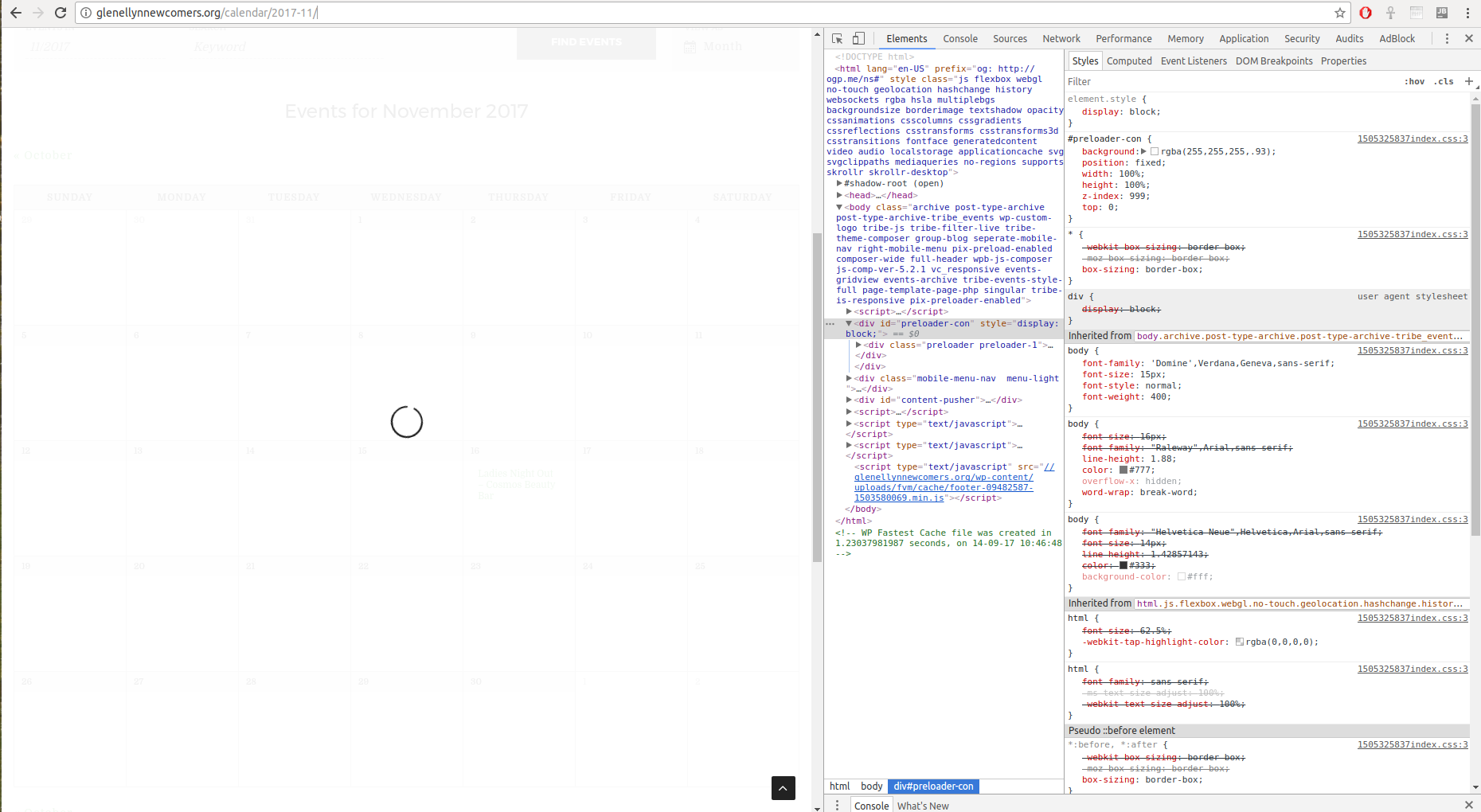
I’ve accessed your calendar page ( http://glenellynnewcomers.org/calendar/2017-11/ ) and could reproduce the issue you are experiencing.
I believe this is a bug associated with your preloader and not with the calendar itself, because you can see that the month was changed behind the preloader layer.
Can you please temporarily disable your preloader and let me know if the problem is solved after that?
Thanks!
Patricia
MemberHi David,
I’m sorry to know that the code didn’t help you to change your page title.
Can you please try different settings for Events Template under Events -> Settings -> Display? Sometimes, that works.
If changing these settings doesn’t help, I would suggest you to tweak your theme files like archive.php or page-title.php or header.php, to return a chosen title when Archive pages are displayed.
If that doesn’t help, could you please send me a copy of the latest version of your theme/child theme via Dropbox or Google Drive so that I can run some tests on my end ?
I recommend a private reply for that purpose.
Please ensure you are using the latest files as found on your actual website.
This way I will get access to any updates or customizations you might have made.Regards,
Patricia
MemberHey Herve,
Thank you for reaching out to us!
I’ve opened one of your events with a venue in Luxembourg (http://thedaily.finance/event/global-distribution-conference-1920-september-2017/),
but in this specific case the venue name is alfi and not luxembourg: http://thedaily.finance/lieu/alfi/
Is this the venue you are referring to? If it is not, can you please send us an event example with this specific venue since the example you sent ( http://thedaily.finance/events/list/ ) is the main calendar in list view?
Thanks!
Patricia
MemberHi Steve,
I’ve asked one of my colegues to test these snippets and he verified that you must have at least 1 Event Category in place, otherwise the Taxonomy module won’t be displayed.
I didn’t notice this before because I already had multiple event categories AND post categories created in my website.
Can you please make sure that you are adding the taxonomy.php file in your child theme at econature-child/tribe-events/community/modules/ ?
Also, please make sure that you have at least 1 event category registered so the Taxonomy Module will be displayed in the Community Events Submission Form.
I hope this helps! Le me know if everything works as expected now.
Regards,
Patricia
MemberHi Chip,
This is happening because this specific text is generated by a different file (orders-link.php).
To achieve what you want and customize this specific text, I would recommend you to use the a new template override.
Please access your site via FTP and copy the following file:
wp-content/event-tickets/src/views/tickets/orders-link.php
Paste it into:
[your-theme]/tribe-events/tickets/orders-link.php
Open the file you just copied to your theme’s directory and modify lines 45 and 46 to achieve what you want:
$message = sprintf( esc_html__( 'You have %s for this %s.', 'event-tickets' ), implode( __( ' and ', 'event-tickets' ), $counters ), $events_label_singular );

$message .= ' ' . sprintf( esc_html__( 'View your %s', 'event-tickets' ), $this->get_description_rsvp_ticket( $event_id, $user_id, true ) ) . '';
I hope this helps you! Let me know if you need anything else in the mean time and I’ll be happy to assist!
Regards,
Patricia
MemberHi Marc!
Can you please make sure that you did change your event end time correctly?
Please check this example: if I set the start and end times to 6AM and 8PM, I can see the change from my dashboard.
Let me know if everything works as expected after updating your time!
Thanks,
Patricia
September 14, 2017 at 6:04 am in reply to: Moving to Event ticket plus and keep event calendar #1349120MemberHi Vanina,
You are welcome!
Let me know if you need anything else and have a great day 🙂
Regards,
Patricia
MemberHey David,
Thank you for reaching out to us!
The word Archive is being added because the event views are archives in WordPress, so most likely it is some coding from the theme or a plugin that adds that to every archive.
Can you please enable the constant mentioned here in your wp-config.php file and let me know if it helps to solve your problem?
Thanks!
Patricia
-
AuthorPosts