

Forum Replies Created
-
AuthorPosts
-
December 14, 2016 at 6:31 pm in reply to: Events Ticket Plus – connection to Mailchimp and Receipts #1206233
Nico
MemberHi Katie,
Thanks for getting in touch with us and for considering our products for your projects 🙂
I’ll help you out deciding if our plugins are the right ones for the job:
1. Are we able to customize the information collected before the ticket is purchased (for example, we’d like to gather name, email, phone number and whether they need continued education credits or not.
Yes, this is possible via a feature we call attendee meta. This knowledge base gives an overview of how the feature works → Collecting attendee information.
2. Does the purchaser receive a receipt? We intend to use Paypal, so I would assume they would get a receipt through Paypal? Can we customize what it says?
Yes, customers will get a receipt sent by the e-commerce platform via email. Depending on the e-commerce plugin you use alongside Event Tickets Plus this might be slightly different. The available options are: WooCommerce, Easy Digital Downloads, WP-Ecommerce or Shopp. All of them are very popular plugins and take care of the cart, checkout process, payment, receipt, refunds, etc.
3. Is there a way to link up the purchasers email so it automatically gets added to her mailchimp account?
Not a feature of our plugin, but surely possible. For example if you use WooCommerce, there’s an integration available to do this: WooCommerce Mailchimp. Most probably there are solutions for the other e-commerce platforms. In any case, it’s something you can do using the e-commerce platform actions once the order is submitted.
Finally let me say that while we don’t have a trial period, you can go ahead and purchase the products for testing. If you decide they are not what you are looking for, you can ask for a full refund within 30 days of purchase. For more information take a look at our refund policy.
Please let me know if there’s anything else I can help you with,
Best,
NicoMemberHey Mark,
Thanks for the patience while we worked on this! We’ve been indeed pretty busy these past weeks.
The code you shared, it’s actually working, you just needed to add the CSS to your theme stylesheet to make it look like a button. Anyway I made a shorter version of the code:
// Change Event URL to button

add_filter('tribe_get_event_website_link', 'tribe_custom_event_website_link');
function tribe_custom_event_website_link ($link) {
if ( !empty($link) ) $link = 'Visit Website »';
return $link;
}// Change Organizer URL to button
add_filter('tribe_get_organizer_website_link', 'tribe_custom_organizer_website_link');function tribe_custom_organizer_website_link ($link) {
if ( !empty($link) ) $link = 'Visit Website »';
return $link;
}//Change Venue URL to button
add_filter('tribe_get_venue_website_link', 'tribe_custom_venue_website_link');function tribe_custom_venue_website_link ($link) {
if ( !empty($link) ) $link = 'Visit Website »';
return $link;
}
Replace your old code with the one above in your theme’s (or child theme’s) functions.php file and add the code blow to your theme stylesheet or via Simple Custom CSS plugin:
.website-button {

	background-color: red;

	color: #fff;

	float: left;

	margin-top: 10px;

	padding: 10px;

}
Please give this a try and let us know if it works for you,
Best,
NicoMemberMy bad Murray! The $qr_instance variable should be just $qr:
/* Tribe, remove QR code from tickets email */if ( class_exists( 'Tribe__Tickets_Plus__Main' ) && class_exists( 'Tribe__Tickets_Plus__QR' ) ) {
$qr = Tribe__Tickets_Plus__Main::instance()->qr();
remove_action( 'tribe_tickets_ticket_email_ticket_bottom', array( $qr, 'inject_qr' ) );
}
Let me know if it works now!
Thanks,
NicoMemberHey Murray,
First of all thanks for the patience while we looked into this! By George’s request I reviewed the code above and verified it’s not actually working as you reported. Hence I came up with a new version of the snippet that’s working for me:
/* Tribe, remove QR code from tickets email */if ( class_exists( 'Tribe__Tickets_Plus__Main' ) && class_exists( 'Tribe__Tickets_Plus__QR' ) ) {
$qr_instance = Tribe__Tickets_Plus__Main::instance()->qr();
remove_action( 'tribe_tickets_ticket_email_ticket_bottom', array( $qr, 'inject_qr' ) );
}
Can you please give this new snippet a try and let us know if it works,
Best,
NicoDecember 14, 2016 at 1:11 pm in reply to: Is this plugin compatible with "The Good Life" theme? #1206119MemberHi there Jordan,
Thanks for reaching out to us!
I just searched pas threads to see if I could find any comments of customer using this theme but couldn’t find any. It might be a good idea to reach out to the theme developers on this!
From our side I’d say just go ahead and purchase our products to try them out! While we don’t have a trial period, if you decide they are not what you are looking for, you can ask for a full refund within 30 days of purchase. For more information take a look at our refund policy. Not sure about the refund policy of the theme, but if they have a similar deal I guess you can purchase both products and see how well they play together 🙂
Please let me know if there’s anything else I can help you with,
Best,
NicoMemberHi Mary,
Thanks for getting in touch with us! I can help you out on this 🙂
First thing I’m seeing are JavaScript errors in the console (Using your browser to diagnose JavaScript errors). You can see the error description below:
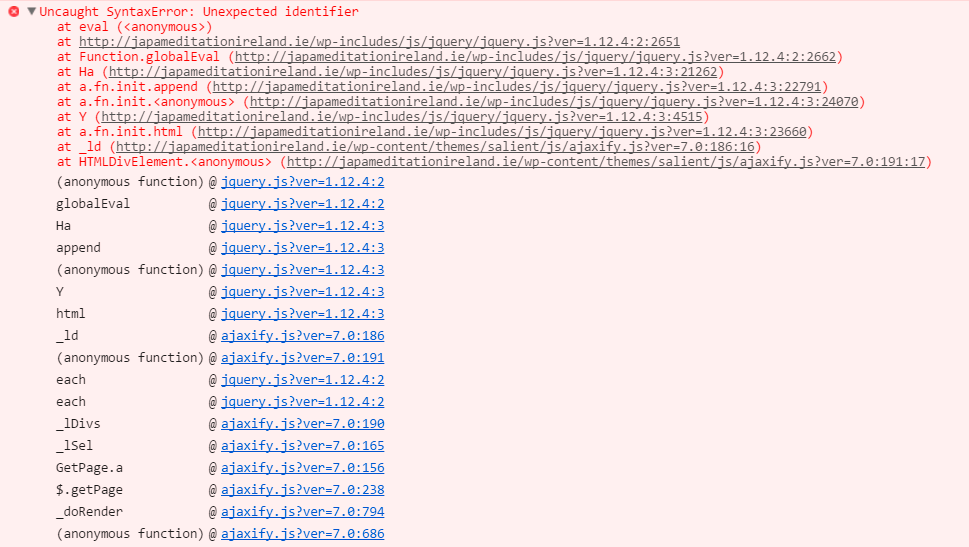
Although the error seems to be generated in the parent theme, try disabling the child theme and confirm to issue is still present. If so, then report this issue to the theme developers.
Hope that helps,
Best,
NicoMemberHi Kebiro,
Thanks for reaching out to us! Unfortunately we are not able to provide support in the pre-sales forum 🙁
We are happy to assist our premium users with support issues via our premium forums, please log into the account that has been created when the purchase was made. If you have not purchased one of our premium plugins, you can post in our open source forum. We review that forum weekly, mainly for bug reports.
This question has been asked a in the past quite a bit, here you can find a lot of possible solutions.
I’ll go ahead and close out this thread, but please do post in the appropriate forum and we will be happy to assist you.
Best,
NicoDecember 14, 2016 at 10:50 am in reply to: CSV Importing not importing Event Calendar Google Maps Link or Google Maps #1206040MemberHey @lbethke,
Thanks for getting in touch with us, and sorry to hear about this issue 🙁
I’ve searched our products backlog and could find this is known issue that was reported not so long ago by other customers in the forums. We are working on a solution, but I still don’t have any dates for the fix to be released. As it’s impacting a lot of folks we will try to include this in the upcoming maintenance release, but as the holidays are coming soon I’m not sure we will be able to do so.
I’ve added your case to the bug report this way you’ll get a heads-up here when the fix is released.
Sorry for the hassle this might cause until fixed,
Best,
NicoMemberHey Dean,
I have some news on this! Brook from the support team, commented that deleting the events via MySQL as opposed to using WordPress wp_delete_post function might not be the best. He suggest you run ‘tribe_get_events()’ request, iterate through each id, and do a ‘wp_delete_post()’ on each. You could even wrap this up into a function and have it run on ‘wp_schedule_event()’. Or maybe put a limit on it of 50 events, and run it several times on page load.
If you decide the go the MySQL way here’s a base SQL query that only needs a ‘WHERE’ clause that searches the ‘postmeta’ table for events with an ‘_EventEndDate’ from four+ months ago:
https://gist.github.com/elimn/e5de5d2037678de0b926c307022571c5
Read the comments, it’s crafted to delete recurring events instances not single events, but the modifications should be simple enough. He also mentioned that deleting events this way might lead to orphan recurring child events. Are you just using single events in your site? How many events do you actually have in the site?
Please let me know if you are able to modify the query to make this work, or if you still need further help on this,
Best,
NicoDecember 14, 2016 at 7:16 am in reply to: How to limit number of events in photo format, that does not affect the list. #1205809MemberExcelente, gracias por confirmar Miquel!
No hay problema, seguro vas a ir aprendiendo a medida que uses el plugin… mientras tanto aqui estamos para ayudarte 😉
Voy a cerrar este ticket, pero no dudes en abrir uno nuevo si tienes nuevas dudas.
Saludos, buena semana,
NicoMemberHey Pete,
Thanks for getting in touch with us! I can help you on this 🙂
I think the problem here is the end date of the event, let me explain. For example, let’s say I want to create a Xmas event that is taking place every year on December 25 the recurring settings for such event should be:
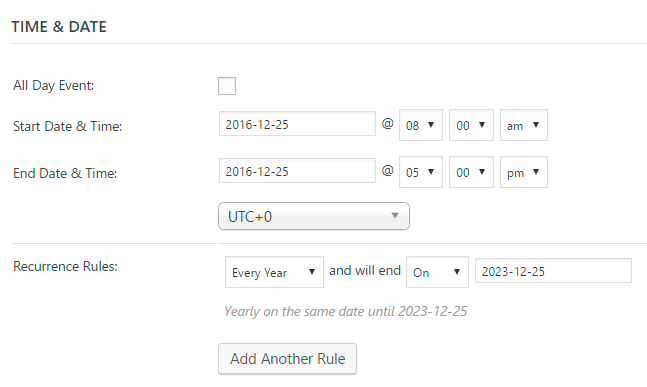
Note in the example above the event end date should be the one for the first instance of the event. Not the one in which you want the recurrence to end!
Please let me know if this helps,
Best,
NicoMemberHi there Toby,
Thanks for getting in touch with us!
If you are using the widget via Admin > Appearance > Widgets, you can just leave the title field blank in the widget setup. On the other hand if you are using the widget via shortcode then the title won’t get printed.
Please let me know if this helps or if I’m missing something,
Best,
NicoMemberHey Ant,
Thanks for getting in touch with us! I can help you here 🙂
First of all please review this article → New User Primer: The Events Calendar and Events Calendar PRO.
From what you describe my guess is that you didn’t download Events Calendar PRO from your account in this site and installed it. As the user primer described Events Calendar PRO is an add-on for The Events Calendar, this means you need to install both plugins. Once both plugins are installed and active you should see the license key input field for PRO.
Please let me know if this helps,
Best,
NicoMemberHola Miguel Ángel, como estas?
Gracias por ponerte en contacto con nosotros y bien venido a nuestros foros de soporte 🙂
Primero que nada revisa que Events Calendar PRO este instalado y activo en el sitio. Por otro lado si estas usando el shortcode directamente en un template deberías usar la función do_shortcode para ejecutarlo. Si vas a utilizarlo dentro del campo de contenido de un post o pagina u otro post type entonces si podes usarlo ‘directamente’.
Espero haber sido de ayuda,
Saludos,
NicoMemberHi there,
Thanks for reaching out to us! Unfortunately we are not able to provide support in the pre-sales forum 🙁
We are happy to assist our premium users with support issues via our premium forums, please log into the account that has been created when the purchase was made. If you have not purchased one of our premium plugins, you can post in our open source forum. We review that forum weekly, mainly for bug reports.
This said, I can give you a quick tip. Check this article out → Using tribe_get_events
I’ll go ahead and close out this thread, but please do post in the appropriate forum and we will be happy to assist you.
Best,
Nico -
AuthorPosts