

Forum Replies Created
-
AuthorPosts
-
Hunter
ModeratorHi and thanks for the updates,
I just did a few tests on my local environment using the latest version of Avada and our plugins. I was unfortunately unable to reproduce the issue you’re experiencing.
When you activate the default WordPress theme, does the problem still occur? Additionally, would you mind sharing your System Information as a private reply?
If you enable wp_debug, do you get any errors displaying at the top of your website?
Lastly, we have a number of customers using the Avada theme and have not seen an influx of similar issues. This leads me to believe the issue lies within your development environment (hosting, theme, plugins, etc).
I wish I was able to provide more assistance but with all I can do is point you in the right direction. Best of luck resolving the issue and thank you for the patience exercised on your end. Have a good weekend 🙂
ModeratorHey Kate,
Glad to hear you were able to get the event to import the correct times 🙂
I don’t think you should encounter any issues when keeping the Timezone setting to “New York”. Just keep an eye on your event import times when Daylight Savings rolls around. Hopefully we have a fix for the issue before then; if not, be sure to check on it.
Thanks for the patience and willingness to work with me on a resolution. Have a good weekend and stay tuned to your WP admin and our blog for a potential fix.
ModeratorHello Russel,
Welcome back and thanks for posting.
We don’t have a built-in feature to achieve what you describe, but one of our support team members put together a handy snippet:
/*

* The Events Calendar Get Events for 1 Year from Today in iCal Export File

* add coding to theme's functions.php

* @version 3.12

* trigger export with link: http://yoursite.com/events/?ical=1&year-feed

* change 365 for a different range

*/

add_action( 'pre_get_posts', 'tribe_one_year_ics_export' );

function tribe_one_year_ics_export( WP_Query $query ) {

	if ( ! isset( $_GET['ical'] ) || ! isset( $_GET['year-feed'] ) ) {

		return;

	}

	if ( ! isset( $query->tribe_is_event_query ) || ! $query->tribe_is_event_query ) {

		return;

	}
$query->set( 'eventDisplay', 'custom' );
$query->set( 'start_date', 'now' );
$query->set( 'end_date', " + 365 day" );
$query->set( 'posts_per_page', - 1 );
}Please note – I won’t be able to provide much more support around this snippet, but it should get you headed in the right direction. You can adjust the “365” according to how long a feed you want. Hopefully this helps and thanks again for posting to the support forums. Have a good one!
March 3, 2016 at 12:28 pm in reply to: Content Encoding Error when trying to view calendar event #1085007ModeratorHello and sorry to hear about the troubles,
I visited the link provided but am not experiencing the “Content Encoding Error” – are you still experiencing issues?
Additionally, theme customization/support is unfortunately out of our hands due to the sheer number of themes available, but a good starting point to narrowing down the culprit would be to read through our Testing for conflicts article. You may also want to contact your theme author to see if they have any insight on the matter.
We don’t have any logged bugs of other users experiencing the same issue, so again, there’s not much we can do :-/ Best of luck addressing the problem and thank you for choosing PRO!
ModeratorHello and welcome back 🙂
Sorry to hear about the issue. To expedite a resolution, would you mind sharing your System Information as a private reply? Additionally, did the issue seem to arise after updating from a previous version?
When attempting to recreate the issue, I added 3 new events for today and tried making each event “Sticky in Month view” individually, but it didn’t seem to honor the request. With that said, I believe you’re experiencing a bug. I’ve gone ahead and created a ticket in regards to the issue and added this forum thread as reference for the developers.
Stay tuned to your WP admin and theeventscalendar.com/blog for a potential fix. Thanks for the patience while we investigate the issue. Have a good one and thank you for choosing PRO!
ModeratorHey Andrea,
Sorry to hear about the troubles. Would you mind sharing your System Information as a private reply? I’ll do a bit of testing and research on my end in regards to the issue you’re experiencing and we’ll touch base once you get that info over to me.
Thanks for posting and I look forward to resolving this issue. Have a great week!
ModeratorHey Todd,
Welcome back 🙂
The templates you’ll need to override (organizer.php and venue.php) are located in src/functions/template-tags.
For example, you’ll need to edit line 414 in venue.php from:
apply_filters( 'tribe_get_venue_website_link_target', '_self' ),to:
apply_filters( 'tribe_get_venue_website_link_target', '_blank' ),Best of luck with the overrides and thanks for choosing PRO!
ModeratorHey Nima,
I compared the code you provided against the code I replied with and they are in fact different, so please try and let me know if it works for you.
You can enable the ability to input custom excerpts by selecting “Screen Options” in the top-right hand side when adding/editing an event. (see screenshot below)
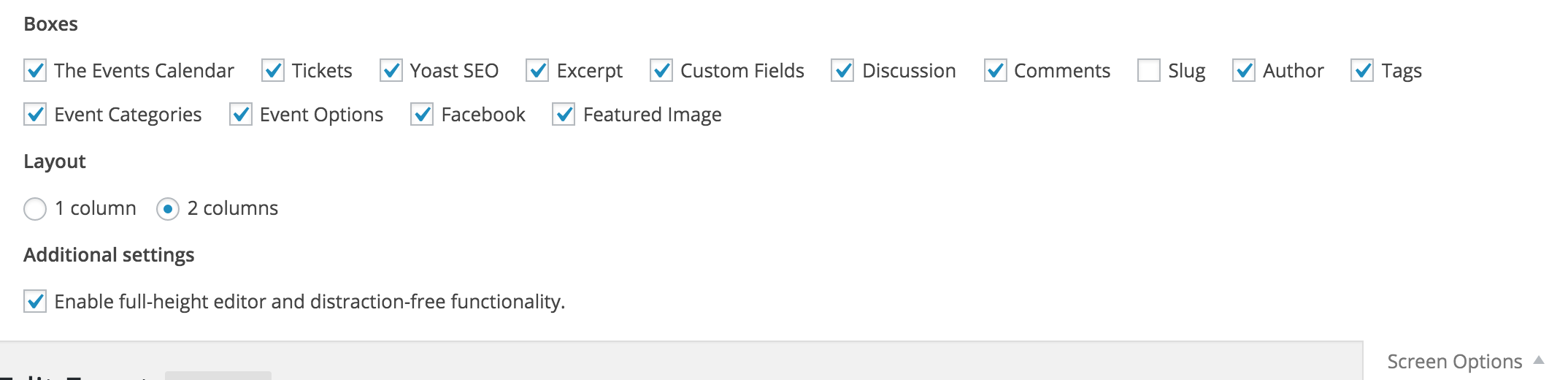
Additionally, I was able to get it to work on the default WP theme; so if it’s not working on your Avada theme, you may want to try contacting them about the excerpt length. Theme customizations/support extend beyond the scope we are able to provide through the support forums.
Also, we are unable to log into client sites, so please refrain from sending over credentials. Thanks again and best of luck with the excerpt length!
ModeratorHey Johan,
Welcome back to the forums.
Does the issue still occur when reverting back to the default theme as outlined in our Testing for conflicts article? If you’re using Yoast SEO, this is another article worth reading.
Thanks for the post and I look forward to hearing back. Have a good one!
ModeratorHello Matt,
Welcome to the forums 🙂
I took a look at the link provided and noticed some missing images as described. Are you using a shortcode to call the events onto your home page?
Additionally, does the issue occur when reverting back to the default WP theme as outlined in our Testing for conflicts guide? Theme customizations/support unfortunately extend beyond the scope of support we’re able to provide through the forums, so please be aware of that.
One more bit of information I can provide would be to look over our tribe_event_featured_image documentation. You should be able to pull in the image with this information.
I hope this helps and have a good week. Thanks for choosing PRO!
ModeratorHey Nima,
Welcome to the forums!
I added the following code in my functions.php file and it worked for me in photo view on the default WP Twenty Sixteen theme:
function custom_excerpt_length( $length ) {

	return 20;

}

add_filter( 'excerpt_length', 'custom_excerpt_length', 999 );
Try copying and pasting the exact code I used and see if it works for you. Have a good one and thanks for choosing PRO 🙂
ModeratorHello and welcome back,
It sounds like you are experiencing a theme conflict – which are unfortunately outside the scope we are able to provide via support forums.
I do have some experience with Avada, so my first recommendation would be to look into the Advanced and Extra options found under Avada’s Theme Options.
I wish there was more I could do and best of luck narrowing down the conflict. Have a good one 🙂
March 3, 2016 at 8:36 am in reply to: Can't see title of first event in List View when using X Theme #1084863ModeratorHey Carlos,
I completely understand where you’re coming from, but again, with the sheer amount of themes available, there is just no feasible way for us to guarantee compatibility with all of the right out-of-the-box. We test our plugins thoroughly using the default WP theme before release.
One option I recommend would be to contact your theme author and explore their support forums (if available). I really do wish there was more I could assist with and best of luck addressing the issue. Have a good one!
ModeratorHi Kate,
Welcome back 🙂
I attempted to import the event and ran into the same issues you described. It appears we have a bug when attempting to import events while the Timezone setting under Settings > General is set using UTC timezones. Try deleting the event, then if possible, run the following SQL query (back up your database before doing so):
DELETE FROM `wp_posts` WHERE post_type = 'deleted_event'Once you’ve deleted the event from your database, go back to Settings > General and set your Timezone setting to New York, then try re-importing the iCal event. It should import the event with the correct times.
This isn’t an ideal solution, but until we address the problem in an upcoming maintenance release, it is a viable workaround.
Thanks for the patience while I did testing and research on my end and I hope this information helps. I’ve added this forum thread to the logged bug ticket so the developers can reference it when working towards a solution.
Stay tuned to your WP admin and theeventscalendar.com/blog for potential fixes. Have a good week and thanks for choosing PRO!
ModeratorHello and welcome back 🙂
After 20 minutes I thought there must be an issue
I usually give it 30, but that’s just me 😉
Sorry to hear about the troubles! Have you tried reverting back to the default WP theme and deactivating all other plugins besides ours? Read through our Testing for conflicts article real quick to see if you can narrow down the exact cause, whether it be your theme and/or another plugin.
Thanks for posting to the forums and also for choosing PRO – have a good one!
-
AuthorPosts