Forum Replies Created
-
AuthorPosts
-
George
ParticipantHi Steve,
At this time, our PRO code is not publicly available on Github. It doesn’t open up with license keys or anything, though if you do have specific code suggestions or anything, we’re not completely opposed to opening things a bit to certain customers. If that happens, just email us at [email protected] and we can help you out from there.
Cheers,
GeorgeParticipantHey Andrew!
Great question – and great timing, too 🙂 We have a new Multisite License launching on the site very soon, which will let you license one network installation of WordPress (regardless of the number of sites on it).
I don’t have a specific launch date for the new license at hand, so it could take up to a couple of weeks from now before you actually see it on the site. I totally understand if that’s too long to wait for a “proper” license, but we’re happy to help you out in the meantime – shoot us an email at [email protected] and we can help sort things out from there.
Cheers,
GeorgeJune 14, 2015 at 1:35 pm in reply to: display all events with same post title in a different template #969339ParticipantHi Thomas,
The full extent of your customization unfortunately is a bit outside the scope of the support we can provide, so we unfortunately won’t be able to write a complete solution for you here.
The first complexity to wrestle with is the very premise of your customization – getting events that have the same title. There are functions within WordPress like get_page_by_title(), so you can check that out, but it would likely not work well in any capacity for getting multiple events by title. It seems like the best way to do that reliably would be to write custom SQL queries using $wpdb.
As for displaying events in single.php with the date.php template, that should fortunately be quite simple – you can just the function tribe_get_template_part(), and reference the date.php file with a relative file path (explore views in the /views folder, like single-event.php, to see how this is done).
When it comes to sorting the results by a certain order, this depends on how you retrieve the events to begin with. They should be sorted by date already in almost all the various options of retrieval already.
I know there’s not much detail here, an I apologize for our limitations that lead to that, but hopefully my reply contains some useful information and you can start making some progress with your customization. If anything I mentioned is something you’re not familiar with, simply searching for more details about it online, or on specific sites like the WordPress codex (http://codex.wordpress.org), should help immensely.
Best of luck with your customizations!
GeorgeParticipantHi Francesco,
Unfortunately, something like this is not possible without very extensive custom coding at this time.
Sorry to disappoint – let us know if you have any other questions or concerns! 🙂
Thanks,
GeorgeJune 14, 2015 at 1:25 pm in reply to: Title "Page not found" when in fact there were just no events on main page. #969335ParticipantHey Glenn,
By default, our plugins return a 404 status for views that are loaded that don’t have any events on them. Depending on your theme and site, this might lead to return values for the page title and such that read like “Page not found”.
You can disable this 404-status default by installing and activating a super-simple and small, free plugin here → http://m.tri.be/no404s
That’s made by one of our core developers, Barry, and is very good code. Disabling the 404 status will not cause problems on your site, but should help prevent things like the “Page not found” text.
Try that out and let us know if it helps!
Thanks,
GeorgeJune 14, 2015 at 1:21 pm in reply to: Are missing semicolons in templates causing my funky sidebars? #969332ParticipantHey Cynthia,
The problem seems to be that your theme is applying custom CSS to events when the .error404 class name is applied to the body tag of your page. This will happen if you go to a date or day where there are not events – for example, contrast the day you linked to (which has no events, thus causing a 404 and that class name) with this day, which does have events and a correct-looking sidebar → http://events.stcwdc.org/events/2015-06-09/
There are a few possible ways to get around this, including modifying your theme and such, but I think the simplest way would be to use a plugin one of our developers Barry made that prevents dates without events from registering as “404s” on your site. That should thus prevent the .error404 class from being applied to your page body tag, and therefore preserve the sidebar styles.
To use this plugin, download it by going to this URL → http://m.tri.be/no404s
That should download a .zip of the plugin for you, which you can then install as a plugin like normal on your site. Activate it after installing, and try going to that Day View you linked me to above.
Let us know what you find! 🙂
— George
ParticipantHi Eve,
This is achieved with some moderately-extensive code customization.
Let us know if that helps here and/or if you have any other questions or concerns! 🙂
— George
ParticipantHey David,
Thanks for reaching out. Unfortunately, we have nothing to do with that WooCommerce extension whatsoever. If it works with WooCommerce “products”, then in theory it should work fine with our ticketing add-on since our WooCommerce tickets are created as normal “products”.
It might not be showing up for reasons related to your theme’s handling of the checkout form or because of a conflict with another plugin, or something unrelated to either thing altogether.
Let us know if you have any other questions or concerns! 🙂
Thanks,
GeorgeJune 14, 2015 at 1:06 pm in reply to: Best Plugin Options for Free Tickets without Customer Account #969327ParticipantHey Phil,
Thanks for reaching out to us. Any of our ticketing add-ons do indeed work well with free tickets, but even with free tickets there is a “checkout” process involved. You mention not wanting to make users go through this to enter their email and such, but you also mentioned wanting to collect data from/about them and be able to collect their email addresses for communication and such.
So, are their emails the only data you’re trying to collect? If so, then something that might work really well for you is something that isn’t even an official product of ours altogether – it’s called “Event Rocket”, and it has a basic minimal “RSVP”-style feature that might work quite well for your needs.
Now, this is not a plugin that you can get support for, since it’s totally free and open-source. It’s also not something we support or officially make ourselves, though it’s created and maintained by one of our awesome developers Barry. He’s Scottish and good at writing at code 🙂
Check out Event Rocket here → https://wordpress.org/plugins/event-rocket/
I’d recommend playing around with that and seeing how it works for you – that would be a great reference point to build off of here, e.g. if you need more features than it I’ll have a better sense of what you need and can help out with more alternatives and such.
Let us know what you think!
— George
ParticipantHey @ernst,
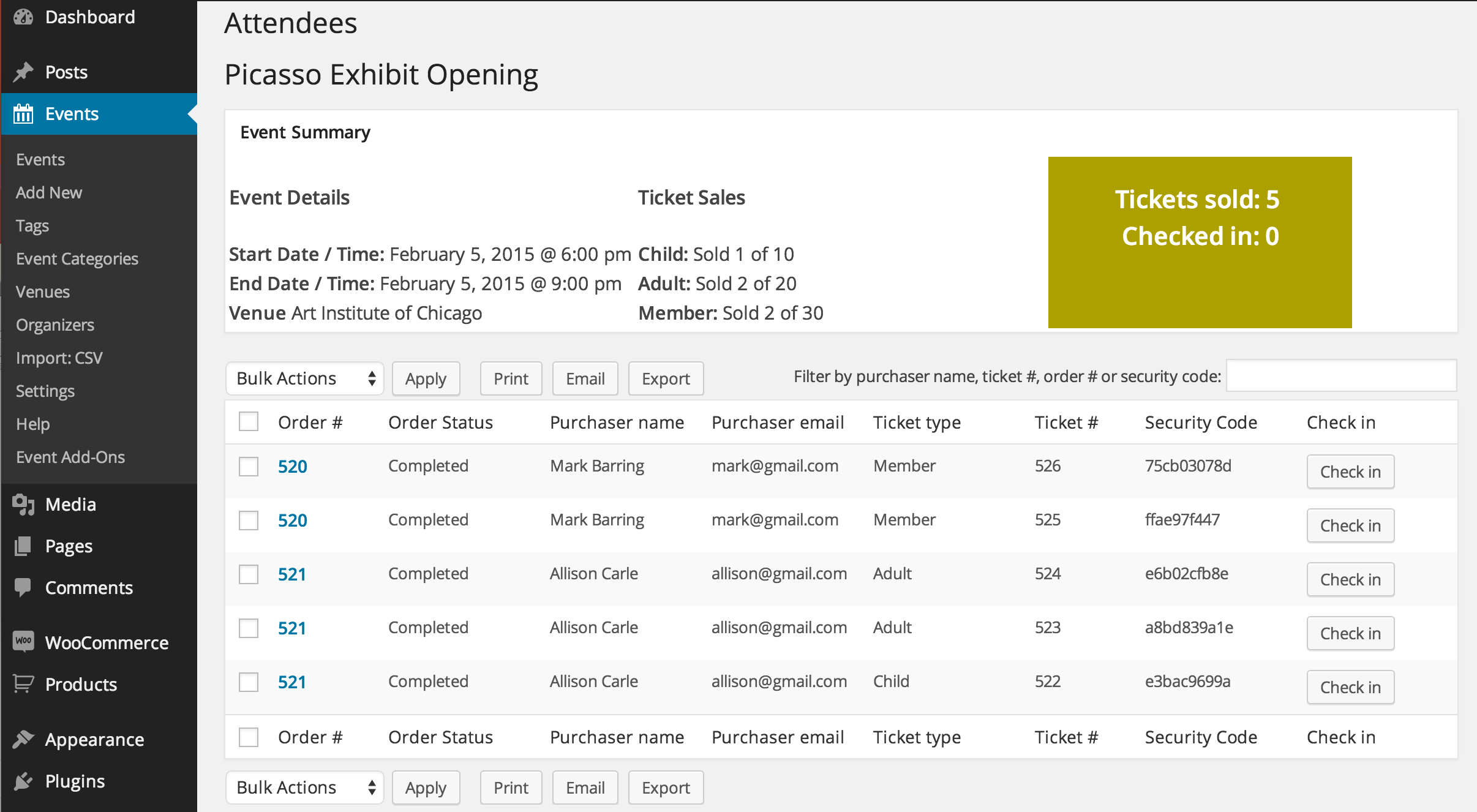
Sounds like a cool project! We have an “Attendees List” feature that sounds like it should suit your needs here quite well.
You can access the attendees list for an event from a few places. Here’s an example of where to access it from the default “Events” list in your admin → https://cloudup.com/cpahu_mjBxw
That leads to an Attendees List with a good amount of data, including the ability to export, print, and even email the list – which includes things like the security code, name of the buyer, all that. Though the only event I had readily on hand was a quickly-made event for testing purposes, and no tickets are actually sold yet, you’ll be able to see all the column headers for the data here → https://cloudup.com/ctUCHHPhk_B
Here’s a screenshot from our marketing page that shows what it looks like with some actual data → https://theeventscalendar.com/content/uploads/2014/08/4-woo-attendees.png
I hope that’s helpful! The digital attendees list itself plus the mailing and printing features should meet your needs – let us know if that’s not the case, or if you have any other questions, comments, or concerns 🙂
— George
ParticipantHi Ian,
Sorry you’ve run into some issues here. What specific Ticketing add-on do you have installed and activated on your site?
Thanks,
GeorgeJune 14, 2015 at 12:43 pm in reply to: Relation between EventPost, EventVenue and custom fields #969319ParticipantHi Xumus,
I’m not sure exactly what you need to build in your custom advanced searcher, but all of these pieces of data are already linked together in your WordPress installation’s MySQL database (and searchable with custom SQL queries, etc.)
So, the way they’re stored there is something I’ll elaborate upon here. 🙂 Let’s hit each point:
Event Custom Fields
Custom fields are not a separate “entity” in and of themselves within the database, like “Posts”, “Events”, “Venues”, etc. are. In fact, a good way to think about custom fields is to note that each of these items I just listed have custom fields of their own. Events have custom fields that store event-specific data (like event start time, end time, etc.). Posts have custom fields, and even “Attachments” within WordPress have custom fields.
Event Posts
The main tribe_events post type is just that – a post type. It’s stored within WordPress like posts, pages, etc.Event Venues
Event Venues are a post type as well. They are linked to a specific event post by way of a custom field on the event post. For example, let’s say you have a venue with an ID of 123. If an event is taking place there, then it will have a custom field called “Venue ID” that is set to 123, linking them together.Event Organizers
Event organizers are custom taxonomies, they work just like “categories” do for normal posts. But beyond that, they are linked to event posts just like venues: by ID in a custom field on the post.I hope this information helps! Something that should be useful along with it is our list of meta fields, which are custom fields just a different name, which you can find here → https://theeventscalendar.com/knowledgebase/wordpress-post-meta-data/
Let us know if this helps!
Cheers,
GeorgeParticipantHey Jeff,
Thanks for purchasing PRO and starting to use that on your site. I’m sorry you’ve run into the problems you mentioned, though I’m curious about what you wrote here:
I get an overview pop-up of the Events Manager
When you wrote “the Events Manager” here, was that just a simple typo, and you meant to say “the Events Calendar“? I only ask about this seemingly-tiny detail because, if it’s not a mistake and you do have some other events plugin on your site called “Events Manager”, then I’d recommend deleting that and ensuring that you install the free version of the Events Calendar right from WordPress.org → http://wordpress.org/plugins/the-events-calendar.
If you already have The Events Calendar installed, be sure you activate it as well, before activating PRO.
Let me know if this helps clarify anything a bit – I’m sorry in advance if it doesn’t! If it doesn’t, could you take a screenshot of your full plugins page and share that here?
Thank you!
GeorgeParticipantHey Jeanie, would you mind posting questions in new threads if you think of it? It’s not big deal at all! 🙂 It just helps us keeps thing organized and give each issue its own attention, which keeps support efficient for all parties involved.
I’m happy to answer your question here though, no worries – although it does mean I have to disappoint you 🙁 The Events Calendar /events/ page is a sort of “faked” page within WordPress, which unfortunately means that it cannot be set as the homepage of your site. Without going to an encyclopedic amount of detail, the basic reasons for this technically speaking are that the “fake” page lets us treat /events/ as a sort of “endpoint” on your site, similar to a feed, which makes sorting things by date across all the different event views much easier, faster, and more stable.
Sorry to disappoint on that. Let us know if you have any other questions or concerns!
— George
June 14, 2015 at 12:22 pm in reply to: Not ouputing html elements. Just displaying plain text. #969312ParticipantHi Mandie,
I’m sorry you’ve run into this problem! What you wrote about switching to a default theme, however, reveals some interesting stuff about this problem:
Issue is not there when:
– Switching to WP 2015 theme or WP 2014 theme
– Clean install (empty database) even with WooCanvas theme activeThese two pieces of information indeed seem to reveal that the issue is not an Events Calendar issue. I’d recommend contacting your web-hosting provider if you haven’t already, since if things worked fine on an “empty database” that could be the result of a wide range of things.
Sorry to disappoint about how little we can do here! Please let us know if there are any other questions/concerns we can help out with 🙂
Thanks Mandie
-
AuthorPosts