
Home › Forums › Welcome! › Pre-Sales Questions › Nowhere to Enter Events Calendar Pro License
- This topic has 9 replies, 2 voices, and was last updated 11 years, 3 months ago by
George.
-
AuthorPosts
-
June 12, 2015 at 1:08 pm #969183
Jeff
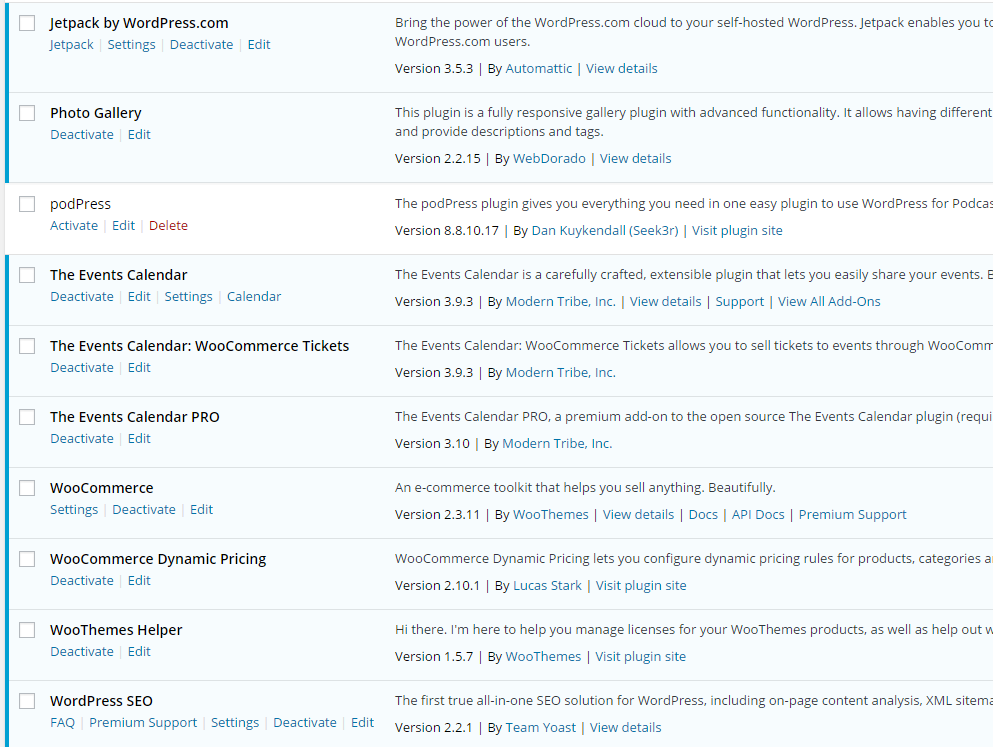
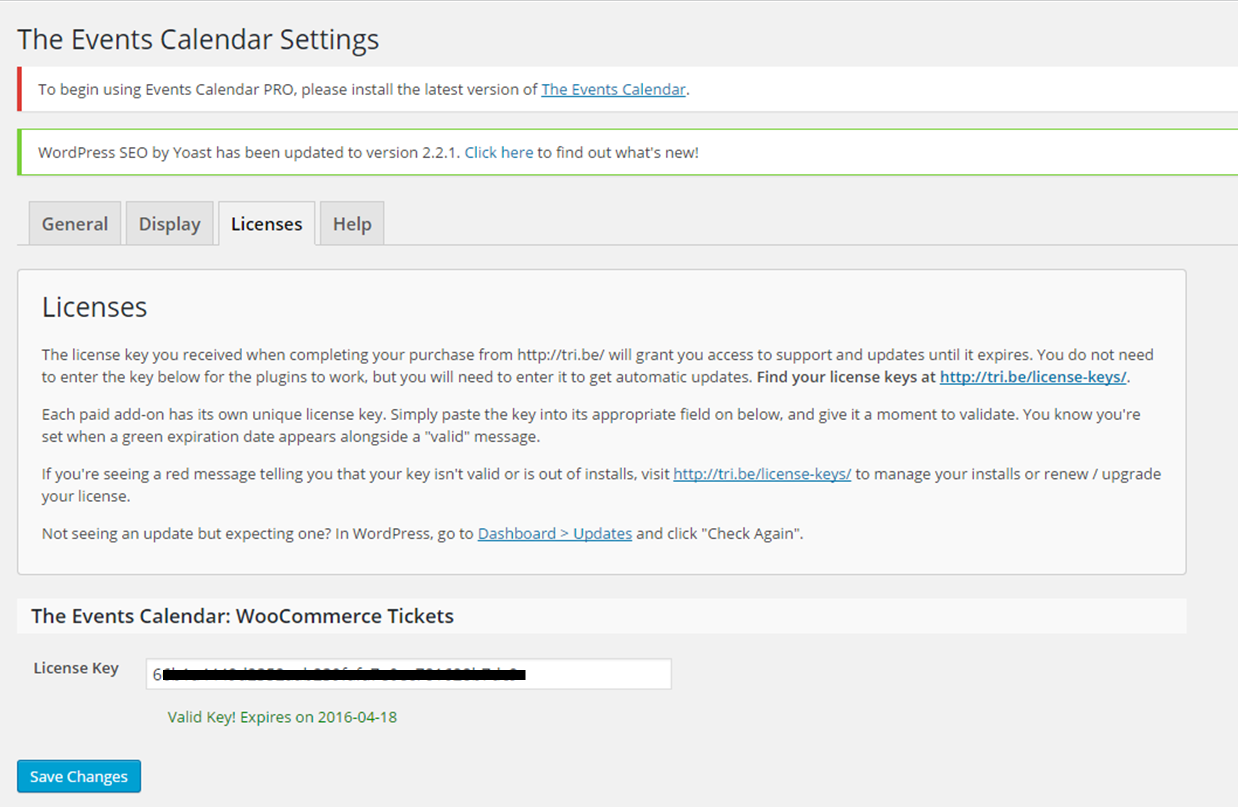
ParticipantI purchased and installed Events Pro (thank you for the info, George) but I’m getting an error that says I need the latest version of The Events Calendar, which I have, and I’m not being prompted in Settings to enter the key for Pro. In plug-ins they are both version 3.9.3 and when I click the link in the message at the top of the screen I get an overview pop-up of the Events Manager and a button that says “Latest Version Installed.” What should I do next? Thanks.
June 13, 2015 at 9:48 am #969258Jeanie Newey
GuestHow do I make the events calendar the home page? I’m testing the free WP version and plan to purchase the pro versions once I make sure it meets our needs.
Thanks!
June 14, 2015 at 12:30 pm #969315ParticipantHey Jeanie, would you mind posting questions in new threads if you think of it? It’s not big deal at all! 🙂 It just helps us keeps thing organized and give each issue its own attention, which keeps support efficient for all parties involved.
I’m happy to answer your question here though, no worries – although it does mean I have to disappoint you 🙁 The Events Calendar /events/ page is a sort of “faked” page within WordPress, which unfortunately means that it cannot be set as the homepage of your site. Without going to an encyclopedic amount of detail, the basic reasons for this technically speaking are that the “fake” page lets us treat /events/ as a sort of “endpoint” on your site, similar to a feed, which makes sorting things by date across all the different event views much easier, faster, and more stable.
Sorry to disappoint on that. Let us know if you have any other questions or concerns!
— George
June 14, 2015 at 12:34 pm #969316ParticipantHey Jeff,
Thanks for purchasing PRO and starting to use that on your site. I’m sorry you’ve run into the problems you mentioned, though I’m curious about what you wrote here:
I get an overview pop-up of the Events Manager
When you wrote “the Events Manager” here, was that just a simple typo, and you meant to say “the Events Calendar“? I only ask about this seemingly-tiny detail because, if it’s not a mistake and you do have some other events plugin on your site called “Events Manager”, then I’d recommend deleting that and ensuring that you install the free version of the Events Calendar right from WordPress.org → http://wordpress.org/plugins/the-events-calendar.
If you already have The Events Calendar installed, be sure you activate it as well, before activating PRO.
Let me know if this helps clarify anything a bit – I’m sorry in advance if it doesn’t! If it doesn’t, could you take a screenshot of your full plugins page and share that here?
Thank you!
GeorgeJune 15, 2015 at 9:51 am #969505ParticipantHi George, thank you for the reply. You are right, I meant to say “Event Calendar,” which I’ve been using for a couple months. Here is a screenshot of the Plug-in screen and also the Settings screen, which also shows the message at the top that says I need the most recent version.
 June 15, 2015 at 12:41 pm #969556Participant
Doh, sorry I made a mistake here Jeff, I missed the detail in your original post about having PRO version 3.10!
3.10 is not officially being released until tomorrow or Wednesday – you’re using a Release Candidate that we let out of the gates early for folks who didn’t want to wait.
This means that nothing is broken or wrong with your site, but just that, because The Events Calendar and Events Calendar PRO’s version numbers do not match, that the notice will display to install the latest version of The Events Calendar.
I’m sorry about both the confusion on my end that led me to miss this detail, and the frustration the comes with it.
Some sites are able to activate fine, but if you cannot get PRO to activate, then unfortunately the only way to fix this right now would be to manually edit code within The Events Calendar core plugin to bump its version number.
However, since that could then cause the communication between your site and the update server that says “Hey, there’s a new version out, so update this site”, I’d recommend not making such a change.
Would you be able to downgrade your version of PRO to the last one you were at, for another 24 hours or so? The official releases will be coming very soon, whereupon you should update Core and PRO on your site to he new, official 3.10 release, and they’ll be able to activate alongside each other without issue.
— George
June 15, 2015 at 12:51 pm #969562ParticipantI guess that was my mistake because I thought the version said 3.9.3 but I guess I was comparing to the WooCommerce plug-in, which is also 3.9.3. This is a brand new purchase/installation so I guess you are you saying I should uninstall 3.10 and download and install 3.9.3? If I can activate it in 24 hours or so I’d rather wait. But if it’s going to be weeks then I definitely would uninstall. Thank you.
June 15, 2015 at 1:15 pm #969572ParticipantNo worries Jeff!
so I guess you are you saying I should uninstall 3.10 and download and install 3.9.3? If I can activate it in 24 hours or so I’d rather wait.
Yes, that is what I’m saying, and I totally understand your apprehension about not wanting to wait long for an upcoming release – but don’t worry, our official release is planned to happen tomorrow unless some major unforeseen catastrophe occurs 🙂
June 20, 2015 at 7:41 am #971588ParticipantHi George, I updated The Events Calendar so both versions are the same and was able to add the key so I’m good. Thanks for your help.
June 20, 2015 at 9:26 am #971622ParticipantThanks for the update Jeff, and for your patience with this issue! Best of luck with your site.
— George
-
AuthorPosts
- The topic ‘Nowhere to Enter Events Calendar Pro License’ is closed to new replies.