

Forum Replies Created
-
AuthorPosts
-
November 2, 2015 at 5:56 am in reply to: Pro plugin infinite loop in wp-cron, exhausts SQL queries and brings site down #1020694
George
ParticipantHey @Duane,
Really sorry to hear about this. I’m curious – what is the largest size of recurring events on your site? For example is it an event series that has hundreds of events in it, like something happening every day for a year?
Also, what are your current option values for the “recurrence cleanup” options on your site? To find these, simply head to Events > Settings in your wp-admin. Right on the main “General” settings tab, you’ll find these two options as shown in this screenshot:
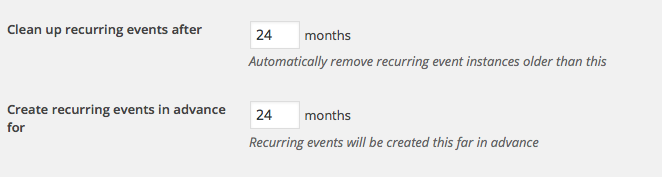
Thank you!
GeorgeParticipantHey @Quincy,
This here is a support ticket, you’ve opened successfully 🙂
Getting the Photo View to be the front-page of your site is unfortunately not possible without something like a redirect on your site at this time. If you’re not familiar with a URL redirect, I would advise against trying to use one because if you’re not familiar with it then problems could arise.
I’m sorry to disappoint!
— George
ParticipantHey @TF,
This is an interesting question – unfortunately at this time neither Event Rocket nor our own plugins will allow for the RSVP functionality on community events.
The new RSVP functionality coming in The Events Calendar 4.0 does not currently enable this either 🙁
But there’s a new plugin coming called Community Tickets, which will enable ticketing features on the front-end Community forms. If this is activated, then RSVP features on the front-end community should work well.
I hope this helps!
— George
ParticipantHey @Mark,
Sorry to hear about this on your site – I went to the URLs you provided and found that the error is this one specifically:
Catchable fatal error: Object of class stdClass could not be converted to string in /var/sites/v/visitbude.info/public_html/wp-content/themes/Avada-child/functions.php on line 1473This is coming directly from your Avada child theme’s functions.php file, and so it doesn’t seem outright like this is related to The Events Calendar.
If you think it is related to The Events Calendar, can you clarify precisely why? Apologies if this connection is obvious, I just don’t see it at this time.
Thank you!
GeorgeParticipantHey @allan,
Thanks for reaching out!
Just to be clear, do you mean the customized widget in this screenshot:
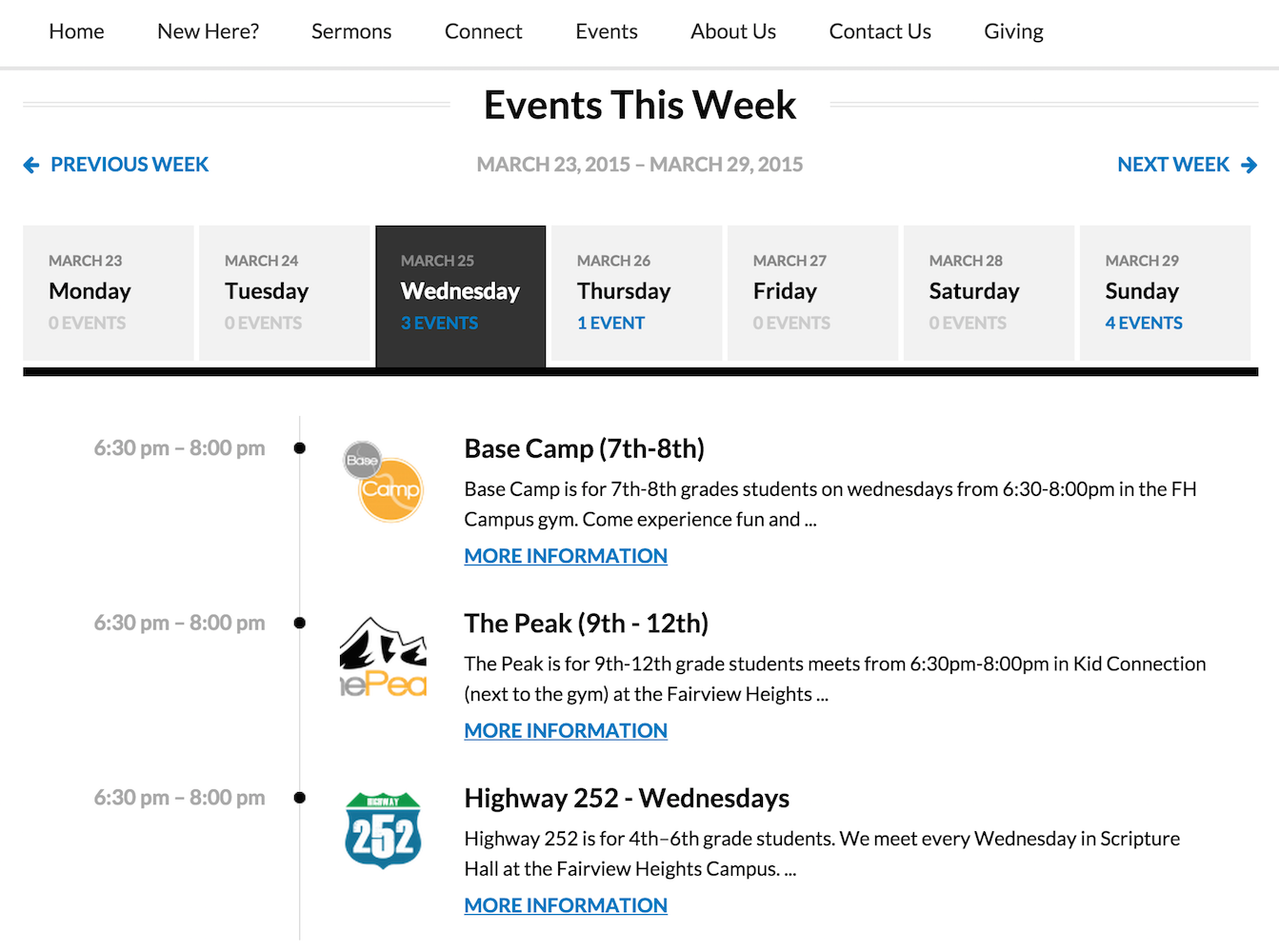
If so, this is unfortunately not anything that is included with our plugins by default 🙁 They custom-built that for their own site.
Sorry to disappoint!
GeorgeParticipantHey @Joke,
Unfortunately you can only do this with custom code 🙁
While we can’t quite help with all of the custom coding, you can learn how to do this by reading our Themer’s Guide here → https://theeventscalendar.com/knowledgebase/themers-guide/
The file you’d need to use those methods would be this one in your Events Calendar Pro files:
src/views/pro/widgets/modules/single-event.php
You can add custom code there that will display the location information – try playing around with the function tribe_get_coordinates()
Cheers!
GeorgeOctober 30, 2015 at 9:20 am in reply to: Woo Themes Halloween Sale Discount not showing up in shopping cart #1020304ParticipantHey @Mattboggs,
Can you clarify what you mean here? If you are referring to a discount code, can you link to the specific place online where you say this code mentioned?
Thanks!
GeorgeParticipantThanks for testing all of this Ryley!
I’m curious – how are you hosting your web site specifically? Are you using a shared webhost like GoDaddy for example? Are you hosting this yourself or something? Just curious as that may be a factor here…
Thank you!
GeorgeParticipantThank you for your patience here @Nicholas; and for the patience of your client(s).
I have set up hourly imports and will pay close attention to the behavior on my site to try and replicate these problems.
Thank you!
GeorgeParticipantMy personal recommendation would be to do the exact steps as follows:
- Make a complete backup of your entire site network and database! Literally do not proceed until you have one or more complete backups that you know you can restore from should things go wrong. There are numerous ways of backing things up so choose whatever method is easiest/most preferable to you.
- Once you have everything backed up, I would recommend deactivating Events Calendar Pro on your site.
- Go to the “Developers” tab on The Events Calendar’s wordpress.org page, which is here → https://wordpress.org/plugins/the-events-calendar/developers/
- This page contains download links for all old versions of The Events Calendar. You say your last-installed version of The Events Calendar is version 3.4.1, which is very old, so what I’d recommend is manually updating version by version…so, in other words, instead of manually updating from version 3.4.1 to version 3.12, first go to version 3.5.x. Then go to version 3.6.x. And then 3.7.x, and so on.
- This process should hopefully introduce small errors instead of just a big, “all my events are gone” issue. Leave that WP_DEBUG option on and pay attention to how your sites behave after each update. Update → fix anything post-update → update again and repeat.
- Once you get to the point where just the core plugin The Events Calendar is at 3.12.2, then try installing the oldest of version Events Calendar Pro 3.12.5
I hope this all helps!
And please note: I am using notation like 3.6.x here, because in doing the manual-update process with The Events Calendar you do not have to update from, for example, version 3.6.0 to 3.6.1 and then to 3.6.2, and so on. You can ignore the “point releases”, which are the third digit; in this previous example, then, you could just go from 3.6.0 to 3.7.0 and so on.
Cheers!
GeorgeOctober 30, 2015 at 9:01 am in reply to: Week View is Wonky – and yes, I did just activate the 3.12.5 #1020289ParticipantHey @Carole,
Thanks for clarifying things! Your questions relate to The Events Calendar: Category Colors. This is NOT a plugin we make or offer any support for. It is not an official plugin made by us, it is a plugin here where you can post support to the plugin developer → https://wordpress.org/support/plugin/the-events-calendar-category-colors
—
As for the “distortion” of the Week View, I do not see distortion on your site 🙁 The “height” of the events is accurate, albeit tall because of the relative shortness of your week view grid which is because of your theme. But e.g. for the event that goes from 10am to 2:30pm, it fills up each hour block accurately and is as tall as it should be. If you don’t mean height, but do mean width, unfortunately this is dictated by your theme’s content area’s width and so you’d need to customize your theme or contact the theme developer for more assistance on changing that.
—
Finally, regarding the “exclude” option not working: this is a known bug and we have several fixes for “exclusions” coming in the next two releases.
I hope this all helps!
GeorgeParticipantThanks for sharing your solution @Mad Dog!
Best of luck with your project 🙂
— George
October 30, 2015 at 8:51 am in reply to: Combination of Events Calendar Pro and Community Events #1020280ParticipantCool, thanks for the update and for trying our products Pauli! 🙂
Best of luck with your project,
GeorgeParticipantNO worries!
ParticipantHey @jessica,
When I view things on my iPhone, any time I click a filter there the filters themselves collapse; so in other words even if the button I pressed did have its “active styles” (white bg, blue border) the whole set of buttons itself would be hidden and so I (or, another user) won’t see it anyways.
Upon further inspection I’ve found this to basically be by design, so that after clicking a filter the filters don’t just stay open taking up a bunch of unnecessary screen space…
To change all of this, your best bet is unfortunately to write some custom code. You’ll likely need to write custom JavaScript to add a custom class to the buttons when a filter is clicked, and use this new CSS class instead of the ‘checked’ attribute to apply styles to active filters and such.
— George
-
AuthorPosts