

Forum Replies Created
-
AuthorPosts
-
George
ParticipantHey Christina,
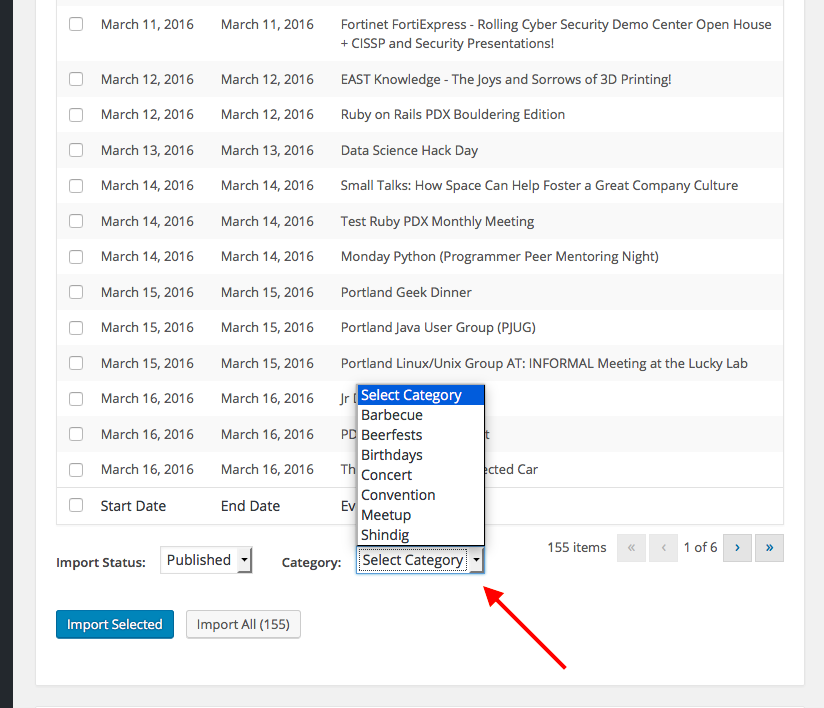
There is indeed a way to set the category for an import—however, to be clear it really is setting the category for an import—the whole import.
You cannot specify a different category for each event within the import, you can only specify a category for the whole import; all events in that one import will be in that one chosen category.
Sorry to bold all of that text! Just wanted to make sure it was clear. Here’s a screenshot of the category selection option:
I hope this helps!
GeorgeParticipantHey Amber,
Thanks for sharing this—I’ve put something together that might help. Try adding the following snippet of code to your theme’s functions.php file:
add_filter( 'tribe_events_template_data_array', 'tribe_urldecode_tooltip_excerpts', 30, 3 );function tribe_urldecode_tooltip_excerpts( $json, $event, $additional ) {
if ( isset( $json['excerpt'] ) ) {
$json['excerpt'] = urldecode( $json['excerpt'] );
}return $json;
}
ParticipantHey @imaginewebcreation,
Our plugins are indeed built for WooCommerce—I do not know of any WooCommerce extensions that do exactly what you describe, unfortunately, but if you ever find one that does this specific task, if you buy it from the official WooCommerce website there is a 30-Day “No questions asked” refund policy on their site. So you can try out extensions there and get a refund immediately if it doesn’t do what you need it to do.
The same goes for all of the products here on http://theeventscalendar.com, too—just wanted to mention this in case you wanted to try software out but are a bit uncertain of whether it will work exactly as you want it to or not.
I hope this information helps!
— George
ParticipantGlad to hear it Nicholas, thank you for the update—best of luck with your project!
— George
ParticipantNo problem! 🙂
March 8, 2016 at 7:37 am in reply to: Resynch event button fires tribe_events_facebook_event_created #1086231ParticipantThanks for this feedback Keith—using terminology like “updated” or “maybe_updated” instead of “created” might indeed make this section of our code a bit more clear and readable, especially outside of its normal contexts.
Best of luck with your project,
GeorgeParticipantHey @Amber,
I’m sorry to hear about these issues! What you’re trying to do might not be possible at this time for two reasons: we do not have any specially-coded support for VC Tables, and the content for tooltips is shared via JSON, which does not allow for certain types for characters and content.
Can you share what some of the table content is, or what some of the shortcodes are that generate it?
I will try to write a snippet of code that will at least, as you mention, replace the %20 characters with real blank spaces. That may be possible and I will try to do that! 🙂
Thanks,
GeorgeParticipantHey Gail,
Thanks for reaching out! What you describe here is unfortunately not possible:
Would any of your plug-ins allow me to change the “start date” and “end date” right from my Event’s list page
I’m sorry to disappoint!
You can edit single events in a recurring event series, but it requires going into the wp-admin of your site.
I hope this information helps—let me know!
— George
ParticipantHey Craig,
Thanks for reaching out!
Something like this indeed possible, with a bit of clever application of Events Calendar Pro’s recurrence exclusions feature.
There are a few steps to creating an event with the properties you describe:
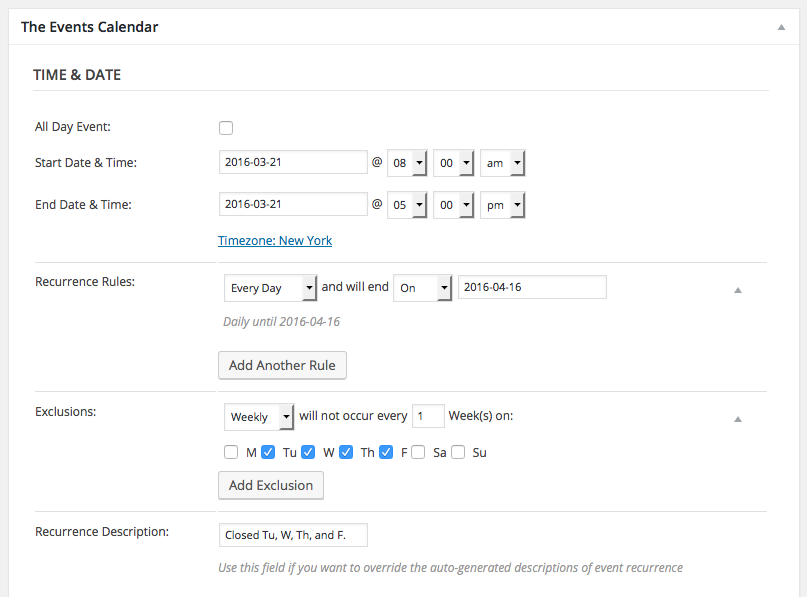
• Set the start and end time for the event to be on the same day. So, for example, if the event is always starting at 8am and ending on 5pm, then you would make the event Start Date be March 21, 8am and its End Date be March 21, 5pm.
• Have this singular event instance recur every day until the end of the exhibition—Saturday, April 16.
• Then, set Exclusions weekly for the days that are closed: Tuesday, Wednesday, Thursday, and Friday.
This configuration will generate the event sequence you need. Here is a screenshot of how this configuration looks in the “Edit Event” screen in your wp-admin:
I hope this information helps!
If this inspires you to try Events Calendar Pro, but you find that it doesn’t work quite as you want, or find it difficult to work with, please keep in mind that we are happy to refund the purchase in full if you request that refund within thirty days of your purchase—just follow the steps here to get a refund: https://theeventscalendar.com/knowledgebase/refund-policy/
If you would like to learn more about configuring recurring events, check out this page here → https://theeventscalendar.com/knowledgebase/pro-recurring-events/
Thank you,
GeorgeMarch 7, 2016 at 4:31 pm in reply to: Resynch event button fires tribe_events_facebook_event_created #1086073ParticipantHey Keith,
Thanks for reaching out!
The tribe_events_facebook_event_created action indeed does fire upon clicking the resync button—I will address your specific questions as follows:
I don’t know if this happens in all cases, or only when the event date has been updated.
The firing of that action happens in all cases. This is because the action itself is inside the create_local_event() function, which fires when an event is created OR updated—the action is at the end of the function and fires regardless of whether specific fields are even altered or not.
Is there any simple way to determine whether the event has been fired as a result of clicking the resynch button?
At this time, there is not. 🙁 Can you elaborate a bit more on your goals here? I might be able to offer some specific advice on how to add some context to the firing of that action.
Thank you!
GeorgeMarch 7, 2016 at 4:16 pm in reply to: event ticket: Billet doesn't appear at the bottom of the page #1086058ParticipantHey gildelau,
Thank you for reaching out. I’m sorry to admit this, but am unfortunately having trouble understanding your question.
Can you clarify exactly you are trying to do? What are you trying to show in your screenshot, for example?
If you are wondering if Event Tickets will work with a specific “Page builder,” then the answer is most likely “no” because most page builders do not work well with its features.
Sorry for my trouble understanding here! Try elaborating and providing more detail on what you WANT to happen, compared to what IS happening.
Thank you!
GeorgeParticipantHey Andrzej,
Our plugins unfortunately do not have the features in place where they can pay a small fee, like you describe, to post a premium listing. 🙁
I’m sorry to disappoint! If you have further questions here about this, let me know!
Thank you,
GeorgeMarch 7, 2016 at 4:11 pm in reply to: Add full width header image before template output w/ Genesis Framework #1086053ParticipantHey Evan,
I appreciate your reaching out here, but unfortunately we cannot help with code customizations so I will have to close this thread. I’m sorry to disappoint!
Please see the “Product Support” section of this page to learn about what is allowed on our product support forums → http://theeventscalendar.com/terms
Best of luck with your project,
GeorgeParticipantHey Chris,
Thanks for reaching out!
Can you clarify which specific “ticket number” you are referring to? Is this the quantity number, for example?
Thank you!
GeorgeParticipantHey Patrick,
I’m sorry to hear that your tickets emails are ending up in Spam folders!
That is not something related to our plugins at all—it is indeed related to your server and to possible spam flags that are coming up related to your domain name and/or its email servers.
I would recommend contacting your web host provider for more assistance with this, and I would also recommend looking into using a premium mail delivery system like MailChimp, Mandrill, Postmark, or SendGrid to improve the mail acceptance rates of your emails. Your web host may have a specific option from these ones that they most recommend; ask them for some insight here and I hope it leads to better “deliverability” of your emails!
Best of luck with your project,
George -
AuthorPosts