Hey Craig,
Thanks for reaching out!
Something like this indeed possible, with a bit of clever application of Events Calendar Pro’s recurrence exclusions feature.
There are a few steps to creating an event with the properties you describe:
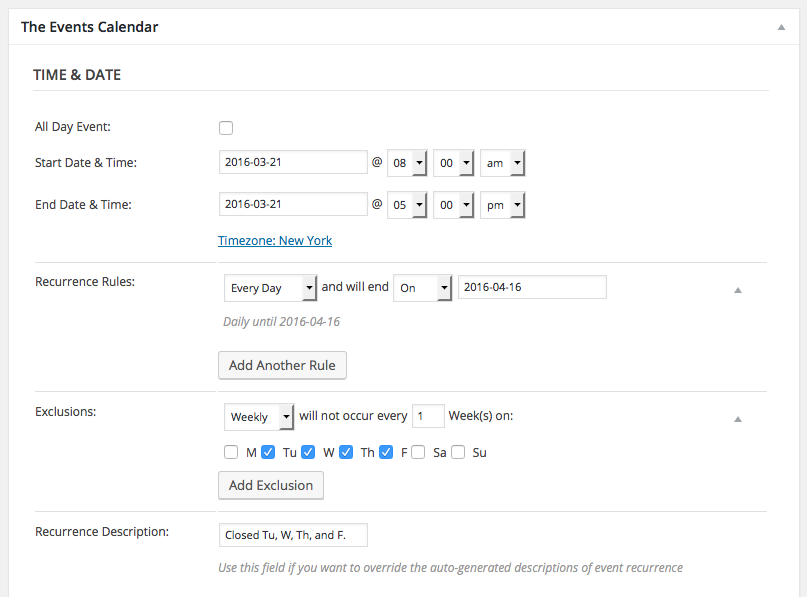
• Set the start and end time for the event to be on the same day. So, for example, if the event is always starting at 8am and ending on 5pm, then you would make the event Start Date be March 21, 8am and its End Date be March 21, 5pm.
• Have this singular event instance recur every day until the end of the exhibition—Saturday, April 16.
• Then, set Exclusions weekly for the days that are closed: Tuesday, Wednesday, Thursday, and Friday.
This configuration will generate the event sequence you need. Here is a screenshot of how this configuration looks in the “Edit Event” screen in your wp-admin:
I hope this information helps!
If this inspires you to try Events Calendar Pro, but you find that it doesn’t work quite as you want, or find it difficult to work with, please keep in mind that we are happy to refund the purchase in full if you request that refund within thirty days of your purchase—just follow the steps here to get a refund: https://theeventscalendar.com/knowledgebase/refund-policy/
If you would like to learn more about configuring recurring events, check out this page here → https://theeventscalendar.com/knowledgebase/pro-recurring-events/
Thank you,
George
.


