

Forum Replies Created
-
AuthorPosts
-
August 2, 2016 at 9:01 am in reply to: One event with two different venues and two different locations #1146564
George
ParticipantHey Austin,
Thank you for the follow-up. If your tickets do not look like that, can you share a screenshot of how they do look?
What is your specific issue? Are you not even sure how to create tickets and such? Or do you create them fine, but when emailed to a customer they look wrong?
Please share screenshots if they look wrong. You can do so by uploading the screenshots to this thread. If you have issues with that, you can upload to Imgur.com, Flickr.com, CloudUp.com, or any similar image-hosting site; then just share the links to those images here and I’ll take a look.
Thank you!
GeorgeAugust 1, 2016 at 11:24 am in reply to: One event with two different venues and two different locations #1146199ParticipantHey Austin!
Thanks for reaching out.
One day occurs in one location, and 2nd day with other location. Each day has different time.
Can you share the good insights to achieve this, or any add-ons for this.
☝️ This is unfortunately not possible with our plugins at this time, nor are there any known add-ons that provide this functionality. 🙁
Also, I want to verify the tickets, since one ticket price is expensive. Any good idea?
☝️ Can you clarify what you mean about “verifying the tickets”? What sort of thing would take place in your mind that counts as a “verification”? If you can provide more detail here I can hopefully provide some insight here.
Thank you!
GeorgeParticipantHey Matt,
Thanks for reaching out!
You’re definitely on the right track by using that Themer’s Guide, but a template file better suited to what you’re trying to do is this file within The Events Calendar:
single-event.phpSo, I would actually recommend ditching the attempted modifications to default-template.php and instead proceeding with making a custom theme template with this file path:
[your-theme]/tribe-events/single-event.phpDuplicate the original single-event.php file, and then tinker from there—you should be able to start piecing something together nicely! 😀
Cheers,
GeorgeParticipantHey Constantino,
I’m sorry to hear about the slow response times on that issue. We are closed on the weekends and so that accounts for much of the time you mention, but there was an opportunity to reply Friday that we failed to take.
I apologize for that and will ensure a response in that thread as soon as possible. Stay tuned to that thread!
Thank you,
GeorgeParticipantHey @Math,
Thanks for grabbing a Business Bundle! I hope it serves you and your project well.
In regards to your questions, you can find the “My Events” page by going to yoursite.com/events/community/list
Obviously “yoursite.com” would be your actual site domain name, but /events/community/list is the “path” to the that “My Events” page….
You can find this any time when you are in the wp-admin by hovering your mouse over the “Events” admin toolbar item, which will reveal a drop-down of several items including a link to the “My Events” page as shown in the following screenshot:
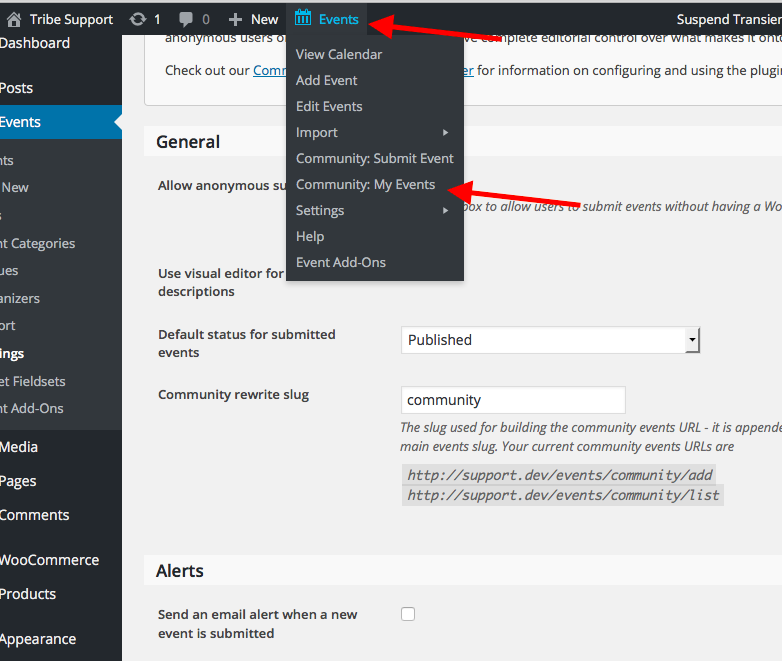
Next, when it comes to changing “community” to another word, I assume that you just mean the URL…if so, then you can change this in the “Community rewrite slug” option shown in the following screenshot:
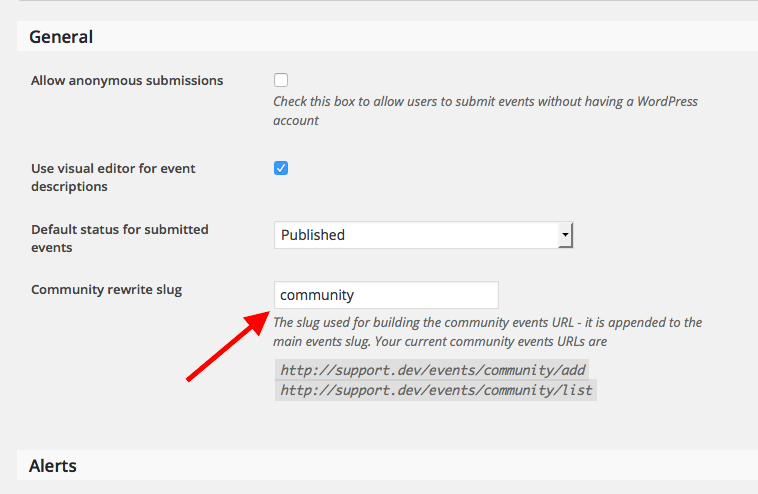
Note that this would change all community front-end URLs. So, for example, if you changed it to /submit, then the “My Events” page mentioned earlier would now exist at events/submit/list
I hope this information helps!
Cheers,
GeorgeParticipantHey Anders,
Thank you for reaching out! We unfortunately do not have the ability to create special bundles. 🙁
However, you mention representing a nonprofit. Are you aware of our Nonprofit Partnership Program? Approved nonprofits receive free licenses for Events Calendar Pro, with a non-profit discount on all other premium add-on licenses….
You can learn more about this program and apply if you haven’t already here → http://theeventscalendar.com/apply-for-npp
I cannot confirm your nonprofit will be approved, of course, but wanted to mention this in case it is helpful.
Cheers!
GeorgeParticipantHey William,
Thanks for reaching out!
That forum exchange touched on other issues, but in regards to the custom price ranges in Filter Bar, the gist of the conversation is that there is unfortunately no way to modify those price ranges without performing extensive code modifications to the Filter Bar plugin.
We cannot help with such modifications, unfortunately, but we do have a list of great developers here if you’re interested in hiring someone to help you modify that code → http://m.tri.be/18k1 (and we have no affiliation with any of these folks–they’re simply some well-respected names in the community that we’ve compiled).
If you yourself are comfortable diving into the code, then while I cannot help with writing the complete necessary code, I’m to help point you in the right direction for getting started here. Which would be to look for this filter within the Filter Bar plugin files:
tribe_events_filter_values☝️ You can write a filter callback that modifies the output of the values with that filter. To get started, you’d do something like this in your theme’s functions.php file:
add_filter( 'tribe_events_filter_values', 'tribe_modify_the_price_range_filters', 10, 2 );function tribe_modify_the_price_range_filters( $values, $slug ) {
print_r( $values );
var_dump( $slug )return $values;
}
You’ll have to take the reins from there and tinker around, but I hope this information helps!
Cheers,
GeorgeParticipantHey @Mariano,
Sorry to hear about some issues with the featured images. In the last update, there were no changes, but I am referring to a one-version jump. For example, version 4.1.2 to 4.2.2.
1. What version of the plugin was your client upgrading from?
2. Can you post the system information of that site to this thread? Here is how → https://theeventscalendar.com/knowledgebase/sharing-sys-info/
3. Can you explain what the actual newfound issues with featured images are? Are they just not showing up? Please share a link to a page on your site where this can be seen, if possible…
Thank you!
Cheers,
GeorgeParticipantHey Allan,
Thanks for reaching out. This is an interesting project, but in thinking about how our ticketing plugins could be applied here they unfortunately fall short on a few things you mention.
So, while our ticketing plugins work well and have good stock management features, there is no built-in support for the sort of “minimum number of purchases” thing you describe—nothing in place in our code, in other words, to trigger the reserving of a theater based on ticket sales.
Nor is it possible to include paid-for upsells with tickets based on the ticket choices at this time.
Doing either thing is indeed possible with some extensive custom code-writing, but not with our out-of-the-box plugins.
When it comes to getting things custom made, we are unfortunately not able to help with projects like you describe but have a whole page that covers options for achieving a customization here where you can learn more → http://theeventscalendar.com/customizations
I’m sorry to disappoint, but hope this information is clear and helps you proceed with your project. Let me know what you think and if you have any other questions I can try to help with! 😀
Sincerely,
GeorgeParticipantHey Mark,
Thanks for reaching out. I’ll address as many of your points as possible, but before getting into the detailed items, I want to make it clear that we do not make any themes. We do not make or specifically recommend any “Calendar themes”.
We only make plugins.
Next, I would also like to highlight the fact that The Events Calendar is the core version of the plugin, and it also happens to be free. So you can start tinkering with it and see how it looks and feels first-hand without paying a cent to a soul! 😀
Here is where you can find the core plugin, The Events Calendar → http://wordpress.org/plugins/the-events-calendar
• Visitor can enter the event themselves – Does not need to create an account
• Event submission form requires start and end date
• Submissions (paid or free) are based on categories & subcategories
• Repeat Visitors (paid or free) can create an account.
• Accounts cannot and should not give access to backend of WordPress Admin.
• Free submissions will not be previewed by me, But I should have access to all entries if I need to review any of them
• Hopefully the theme has a SPAM filter that blocks unsavory posts.
• Theme allows user to return to edit the entry, using their unique ID number and password attached to that ID number. This also works with any accounts they create for themselvesThese things are possible with our premium Community Events add-on, which you can learn more about here → https://theeventscalendar.com/product/wordpress-community-events/
• Visitor Information (name, email, phone#) needed to track entry collected in the event submission form
• Event Submissions are 2 types – “Free” events (as above) and “Paid” events.
• Paid submissions are handled in the submission form, same as free plus a payment process included, submission cannot be accept without payment first
• Connects with payment process and submits after payment confirmed
• When posting finished, Calendar theme sends confirmation email to the user of the necessary information as “date of submission, details submitted (excluding images), unique ID number so if they need, they can contact me to address concerns about the submission.These things are not possible on the event submission form itself. However, we have a suite of “ticketing” plugins that provide much of this functionality for tickets on individual events once the event is already submitted. You can learn about these ticketing plugins here → https://theeventscalendar.com/product/wordpress-event-tickets/
• Each post (paid or free) is assigned a unique ID number, preferably one that I can create a prefix to, such as marking it as a free one or paid one and the year included. Example: p-2016-A01234 (means paid-2016-id#). With the ID number is linked to a password the user creates, that allows editing at a later time.
While the custom ID can be achieved with our aforementioned ticketing plugins, having the ID “linked to a password the user creates” is not something our plugins support.
And these things have no out-of-the-box support in our plugins:
• Submission form must have a filter where I can limit the number of characters and number of images
• Edit form only allows edit of details of event, replacement of the single image. Does not allow date change, user has to create a new entry for different dates. User can use the edit form to delete the entry from the calendar.
• Cannot create a “new” event with edit form, only edit a current entry
• Edit form cannot access expired postings, those get deleted when end date arrives
I hope all this information helps!
Cheers,
GeorgeParticipantHey Erik,
Thanks for reaching out!
Your goal is an interesting one, and after thinking about this for a bit I have some good news to share and some bad news.
The bad news first is that, even if you were to buy a Pro license, what you’re seeking to do is possible but is not something we would be able to provide meaningful assistance with. It would require a good deal of custom coding and tinkering to get things working just right.
With that being said, however, there is some good news here in the sense that what you’re trying to do is possible without needing to upgrade to Pro or anything.
Why? Well, the “Venues” post type within The Events Calendar is what is used by default for event locations and all of that. So if you’re essentially trying to “hijack” the normal Venues post type with your own database tables, you could start working on this without paying a dime for a premium plugin. You could just get to work with the core plugin, The Events Calendar → http://wordpress.org/plugins/the-events-calendar
In fact, I would very much recommend starting with the core plugin before buying any premium add-ons. Because if you get the Venue replacement done right with the core version, then all add-ons just hook into the core version and your workload for ensuring compatibility with add-ons from there would be minimal.
Apologies for the lengthy reply here, Erik. I just wanted to cover this issue as well as I could, and offer some suggestions on where to get started.
To sum things up:
• yes, you can hook up your own database tables instead of using the default Venues post type.
• However, this is a quiet involved customization and thus even if you bought a premium license you would have to implement this customization on your own.
• With this in mind, then, I would recommend not buying any premium add-ons and just testing your ideas with the core, free plugin The Events Calendar.
Let me know if you have any further thoughts on this or if there is anything else I can try to help with!
Cheers,
GeorgeParticipantHey Geoff,
Thanks for reaching out, and for your interest in our plugins.
Your hunch is unfortunately correct here—we do not have any shortcodes at the moment that would embed the whole calendar into a page or other post type.
There are some methods for inserting calendar content into a post or page, which are covered in this knowledgebase article → https://theeventscalendar.com/knowledgebase/inserting-calendar-content-post-page-content/
But none of those methods are “complete”; i.e., you can only ever embed widgets or shortcodes of the widgets, which are never the full calendar with all of the Pro views and date filters and all of that good stuff… 🙁
Sorry to disappoint! Let me know if this information helps you move forward in your search for the right plugin, and/or if there’s anything else I can try to help with.
Sincerely,
GeorgeAugust 1, 2016 at 8:20 am in reply to: We were unable to sync your event to Eventbrite. Here's what happened: #1146103ParticipantHey Jessie,
I am so sorry to hear about the snowballing of issues here! I am determined to help figure out what’s happening. Let’s review some steps for the two separate issues:
1. Page load / “Calendar page will go here”
For this issue, regarding the page load time and the ‘Calendar page will go here’ text, I am wondering:
• 1A. If you head to the “Pages” menu in your wp-admin, which lists all of the pages on your site, are there any pages whose title is “Events”? Your events slug is /events, and so if there is a page titled “Events” it may be trying to also use that /events URL slug. This could create odd issues like the one you described in your second-most-recent reply.
• 1B. Is the loading slow-down a constantly-reproducible thing? Or intermittent? If you try loading the page 10 times over the course of one hour, does it load slowly every single time? Or maybe only, say, five times, with the other five times seeming normal and quick?
2. Eventbrite Sync Issues
The nature of the Eventbrite sync issues here is complicated and I am going to work with a developer to take a deeper look at our code and our API integration with eventbrite.com. In the past, Eventbrite has made unannounced changes to their API which caused problems akin to what you describe on your own site.
I am not saying that’s the problem here! But there could be some similar API mixup going on. While I’m sorry to say that I don’t have any immediate action to recommend to you at this moment, here is what I am going to do to investigate this in the meantime:
• I will create numerous test events on my own test site, and check their ability to be exported to Eventbrite and then updated from the local site.
• I will create some test events on Eventbrite, and check their ability to be imported to my local site and then updated from the local site.☝️I’ll do this today and share my findings with a developer on our team, and hopefully arrive at some conclusions about what’s going on here.
Thank you so much for your patience. Stay tuned!
GeorgeParticipantThis reply is private.
ParticipantThis reply is private.
-
AuthorPosts