
Home › Forums › Calendar Products › Community Events › where do i find the my events page
- This topic has 6 replies, 3 voices, and was last updated 10 years, 2 months ago by
Math.
-
AuthorPosts
-
August 1, 2016 at 7:41 am #1146080
Math
ParticipantHi There
Just bought your wonderful business bundle. I’ve two silly questions:
1) Where do i find the “my events” page that community users go to to view and edit their events? how do you access it from the front page. I see the link but i don’t know to place it.
2) How do i change community to another word?
Thanks
August 1, 2016 at 11:06 am #1146188George
ParticipantHey @Math,
Thanks for grabbing a Business Bundle! I hope it serves you and your project well.
In regards to your questions, you can find the “My Events” page by going to yoursite.com/events/community/list
Obviously “yoursite.com” would be your actual site domain name, but /events/community/list is the “path” to the that “My Events” page….
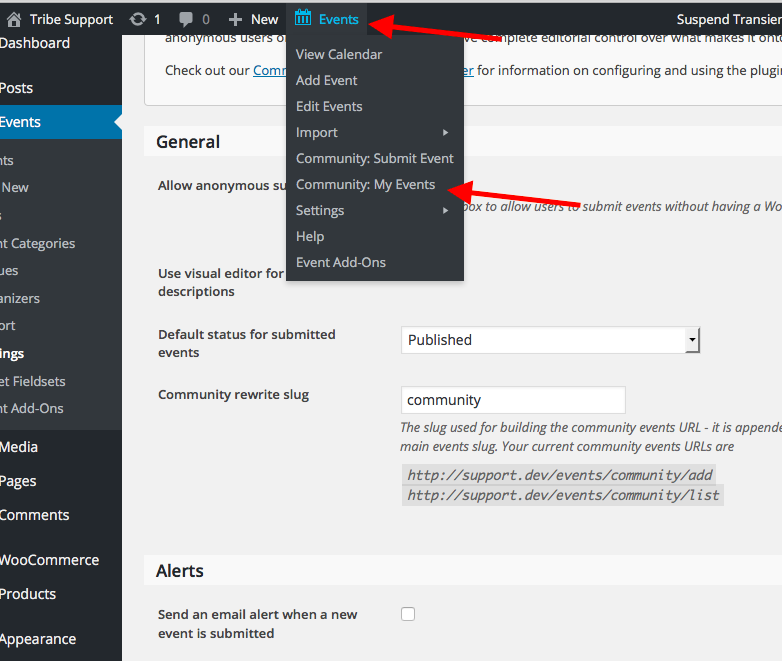
You can find this any time when you are in the wp-admin by hovering your mouse over the “Events” admin toolbar item, which will reveal a drop-down of several items including a link to the “My Events” page as shown in the following screenshot:
Next, when it comes to changing “community” to another word, I assume that you just mean the URL…if so, then you can change this in the “Community rewrite slug” option shown in the following screenshot:
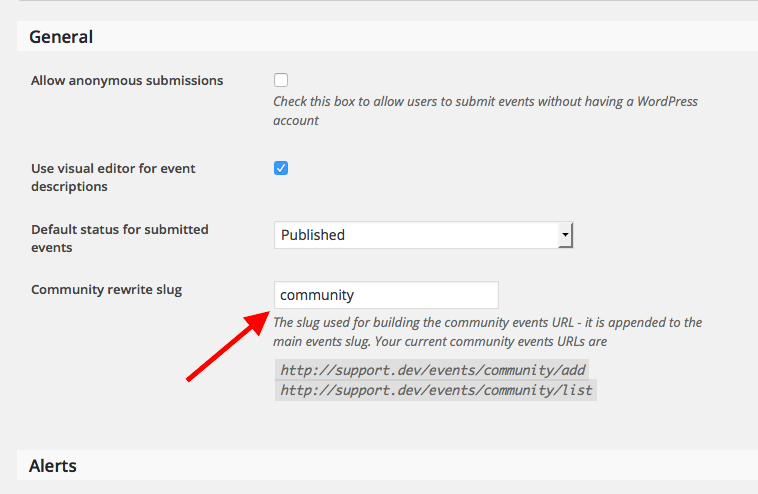
Note that this would change all community front-end URLs. So, for example, if you changed it to /submit, then the “My Events” page mentioned earlier would now exist at events/submit/list
I hope this information helps!
Cheers,
GeorgeAugust 2, 2016 at 4:22 am #1146462ParticipantHi George
Thanks for getting back.
How do my clients who submit their events access the my event page. Is it automatically linked to their Accounts page when they sign up. I’ve submitted test events as community user but for the life me i can’t find “my events”.August 2, 2016 at 9:23 am #1146573ParticipantHey Math,
Only users on your site who have an account will be able to access their “My Events” page.
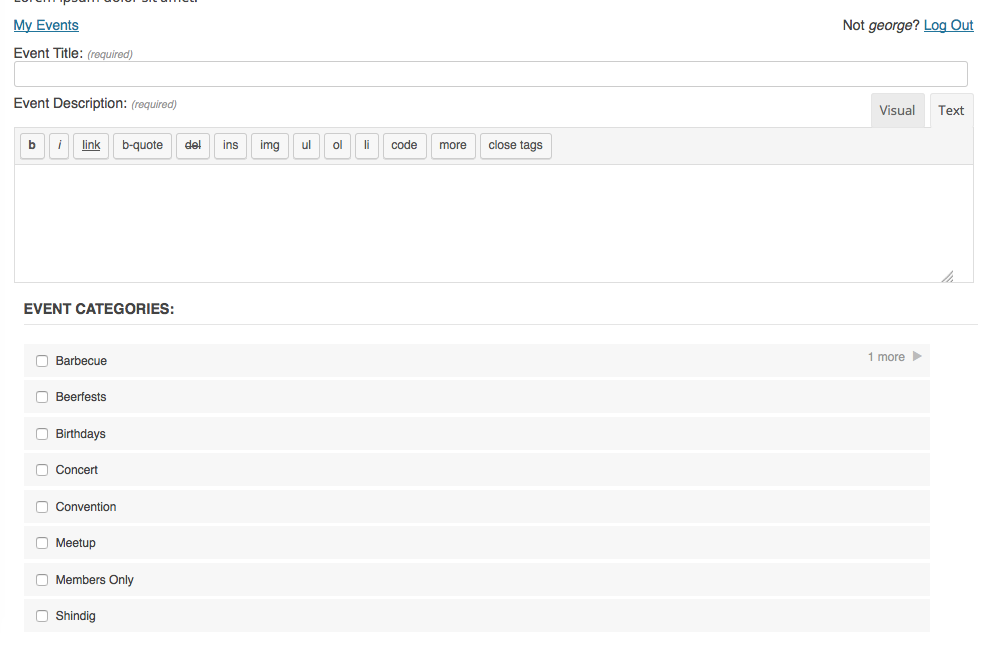
When they are logged into their account, if they go the community submission page, the “My Events” link is in the top left of the submission form as seen in this screenshot:
This link will NOT appear if:
• they do not have a user account on your site
• or if they do have a user account on your site, but are not logged in to it.I hope this helps!
— George
August 3, 2016 at 3:20 am #1146957ParticipantThank you.
Your support gives us your customers a peace mind.
August 3, 2016 at 7:02 am #1147000ParticipantNo problem, @Math! I appreciate the kind words and wish you the best of luck with your project.
Feel free to open a new thread any time if other questions or issues ever arise.
Cheers,
George -
AuthorPosts
- The topic ‘where do i find the my events page’ is closed to new replies.