

Forum Replies Created
-
AuthorPosts
-
George
ParticipantHey Amrita,
Unfortunately there is no out-of-the-box support for printing the calendars. It may work if you try it on your site, based on your WordPress theme, but it is not something supported or possible by default with just the plugin itself. 🙁
At this time, there also is not a “notifications” feature of our products.
I am sorry to disappoint. Please let me know if you have any further questions!
Cheers,
GeorgeSeptember 14, 2016 at 3:55 pm in reply to: Created an alternative cost filter, looking for second opinions. #1164311ParticipantHey Jay,
Sounds good. When it comes to leaving the thread open, I would recommend instead leaving a website contact page any interested folks can contact you through, or your twitter profile, or something.
We try to keep threads closed to make the forums more manageable—it makes a big difference.
Cheers,
GeorgeParticipantSure thing, boxchilli.
Open a new thread any time if other questions or issues arise! 😀
Cheers,
GeorgeParticipantSounds good, @mariasole—best of luck with your project!
— George
ParticipantThanks Ann!
I’m a bit puzzled as to why this happened, because your account should have access to the latest version of Event Tickets Plus. Weird!
In any case, here is what I have done to try and get things working:
• I have removed the WooCommerce Tickets license since that is a defunct plugin, and the license key was inactive anyways.
• I have manually “rebooted” the Event Tickets Plus license, so to speak, and it should now definitively be activated until February 22, 2017—at which point it would need to be renewed again, etc.
If you check out the page at http://theeventscalendar.com/my-account/downloads now, are you able to get version 4.2.6 of Event Tickets Plus?
Let me know!
Thanks,
GeorgeParticipantThis reply is private.
September 14, 2016 at 11:29 am in reply to: Created an alternative cost filter, looking for second opinions. #1164103ParticipantHey Jonathan,
Thanks for reaching out.
This is an awesome customization, but we are unfortunately not able to help with writing custom code or with providing analysis/insight on your own custom code. Please read our support policy to learn more about this → https://theeventscalendar.com/knowledgebase/what-support-is-provided-for-license-holders/
I’m sorry to disappoint.
While I cannot help with the code that you have posted, one thing I can recommend is to just skip the “Cost” filter altogether and make the categories of events you’ve made (Free, Inexpensive, Moderate, Professional) actual event categories.
Then, you can manually put events in these price ranges into those categories, and allow folks to filter by the category that way.
This isn’t ideal, but may be much simpler than trying to redo the cost filter and be less problematic.
Sincerely,
GeorgePS
Despite the policies I mentioned above, I did take a gander at your code. It’s unfortunately true that you have to pretty much copy the whole class just to modify that one method, because the values for that method are not currently filterable at this time.
So, despite the additional URL characters and your concerns, the back-end code changes you’ve made are actually pretty in line with what would be required to make these sorts of front-end changes you want here. If it works and you don’t run into issues or bugs, then I can’t honestly think of many ways to improve upon the current configuration you’re using.
If you are really keen on getting a Pro to help you implement this customization as perfectly as possible, I would recommend checking out the options on our Customizations page here → http://theeventscalendar.com/customizations
ParticipantHey Ann,
Really sorry for the mixup here!
I am not quite sure where things went wrong, because I can indeed verify that you made a successful renewal of your Business License for Event Tickets Plus last night.
If you head to http://theeventscalendar.com/my-account/downloads, can you click the version number selector for Event Tickets Plus, go as far down the list as possible, and share a screenshot of the full list? Here is an example of how this would look:
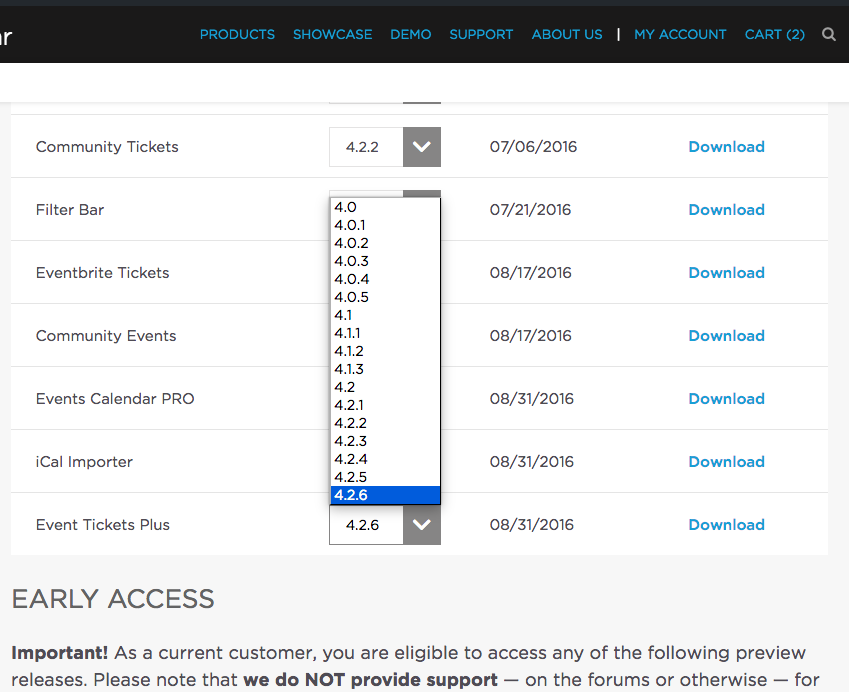
You can share the images by uploading the screenshots to this thread. If you have issues with that, you can upload to Imgur.com, Flickr.com, CloudUp.com, or any similar image-hosting site; then just share the links to those images here and I’ll take a look.
If you have difficulty getting this screenshot, then can you at least manually let me know what the highest version numbers are available for each plugin on that Downloads page? (http://theeventscalendar.com/my-account/downloads)
Thank you!
GeorgeSeptember 14, 2016 at 8:12 am in reply to: Simplified Attendee List with Attendee Information #1163907ParticipantHey @wineschool,
Thanks for reaching out.
Simplifying the attendee list is technically possible at this time, but unfortunately not without making some extensive code modifications. 🙁
I say “unfortunately” because we are not able to help with writing custom code, and so it’s a project that you would have to take the reins on: either writing code yourself, or hiring a professional to assist you.
Many of the customizations required also require modifying core plugin code, which is a tricky thing because that means that each time the plugins are updated, the custom code will be overwritten and would have to be re-implemented.
I’m sorry to bear this bad news, but hope that the information is helpful nonetheless. Please let me know what you think and if there is anything else I can try to help with!
Sincerely,
GeorgeParticipantThis reply is private.
ParticipantThis reply is private.
ParticipantSorry to hear about this, @tsunamie!
Can you clarify what domain name you are seeing this error in?
Also, can you copy the full text of your license keys and paste theme here? Be sure to check the “Private reply” option before submitting your reply, so that the license keys are only visible to you and us on the support team, and not the general public.
I will take a closer look with this information in hand and see what’s going on!
Thanks,
GeorgeParticipantHey Chris,
Thanks so much for sharing your fix—the width="100% tip is a great one and I’m sorry that I wasn’t able to reproduce your problem and recommend something like this myself!
Best of luck with your projects—open a new thread here any time if other issues or questions arise!
Sincerely,
GeorgeParticipantHey Roger,
Thanks for following up here. To be clear, I do agree that having our Ticketing plugins fully integrate with WPML is ideal! 😀 Our developers are working on this, but this is a big project and not something that I could pull off either on my own, or in a short time frame.
It is a big project and our developers are working on it. We unfortunately are not likely to have full WPML integration with our ticketing plugins for at least a few more months. 🙁
Sorry to disappoint on this topic, Roger!
Sincerely,
GeorgeSeptember 13, 2016 at 2:12 pm in reply to: Calendar on the Homepage – Is this bad practice? #1163620ParticipantHey @Simoncarr,
Thanks for reaching out.
The main hindrance to having the calendar load on the home page thus far has been neither a concern of performance nor of SEO/redirect/etc. issues. It has really mainly just been a technical limitation of our plugins based on how they work.
In the next version of The Events Calendar, version 4.3, there will be full support for embedding complete calendar views anywhere you want—even on the homepage. And that would be fine—no permalinks issues, etc.
Until that release happens (which should be some time in the next two to four weeks, if all goes to plan), then the only way to approximate the functionality of a homepage calendar is to use the methods in this knowledgebase article → https://theeventscalendar.com/knowledgebase/how-to-make-your-calendar-your-sites-home-page/
I hope this information helps!
Cheers,
George -
AuthorPosts