

Forum Replies Created
-
AuthorPosts
-
George
ParticipantHey Greg,
1. Let us know if you find anything that confirms that many people are using the Preview Button.
2. Let us know if when you yourself use the preview button in the process of creating new events with new venues if that seems to lead to some duplication like you originally reported.
Cheers!
GeorgeParticipantHey Chris,
Thanks for elaborating on the behaviors here!
You say:
it seems to me that work needs to be done to stop venues/organisers being replicated on each ‘Preview’ click.
☝️ I agree and we are investigating these issues.
ParticipantHey Conny,
There was actually much more involved in getting WPML to work with recurring events, and the workarounds hinted at by Geoff there are not recommended:
1. First, because they are complex customizations to make.
2. Next, because they will soon be overwritten anyways by our fast-approaching 4.3 release.
When our 4.3 release comes out—which should be sometime in the first week of October if all goes to plan—recurring events should work well with WPML.
If you don’t want to wait, then head to http://theeventscalendar.com/my-account/downloads and scroll down until you see the “Early Access” downloads. In this section you will find Release Candidates for version 4.3—these are versions that are still being tested for the official release, but they are quite stable and should offer better support for WPML with recurring events than current code.
If you’re interested in the Release Candidates, you will have to download the Release Candidate versions of all plugins that you currently have on your site. Then perform manual updates to use the Release Candidates on your site and hopefully have some better experiences with WPML and recurring events.
Cheers,
GeorgeParticipantHey Jens,
Thanks for reaching out.
We unfortunately cannot provide support for snippets and unofficial “helper” plugins like that one—just wanted to mention this fact, but of course I’m happy to answer basic questions like you ask here!
There is no “include” or “only” feature of the shortcode that does the inverse of the “exclude” feature. 🙁 Sorry to disappoint!
Cheers,
GeorgeParticipantHey Lee,
Thanks for the update! Glad to hear that some progress has been made here.
Open a new thread any time if other issues or questions arise. 🙂
Cheers,
GeorgeParticipantSure thing!
Open a new thread any time if other issues or questions ever arise.
Best of luck with your project,
GeorgeParticipantHey Taylor,
Thanks for reaching out!
While our ticketing plugins would indeed provide the ability for folks to sign up for individual classes, there unfortunately is not any functionality at this time that logs timestamps of individual button clicks.
I’m sorry to bear that news, but I hope to help with any further questions you might have on this topic. Let me know what other thoughts you have and if there’s anything else I can try to help with or elaborate on.
Thanks!
GeorgeParticipantHey Robert,
Interesting! Can you share a screenshot of where you see the wrong date being used when you preview an event? I took a look on my local site just now with the latest version of all our software and did not notice a discrepancy anywhere—maybe I’m missing something, though!
You can share screenshots by uploading the images to this thread. If you have issues with that, you can upload to Imgur.com, Flickr.com, CloudUp.com, or any similar image-hosting site; then just share the links to those images here and I’ll take a look.
Can you also share your site’s System Information? That will help me investigate this if I still don’t find the same result after having your screenshot to exactly compare my own findings to…here is how to share system information, it’s very easy to do! ? https://theeventscalendar.com/knowledgebase/sharing-sys-info/
Thanks,
GeorgeParticipantHey Edmonodo,
Thanks for reaching out!
Just to set expectations up front, we cannot help or provide insight into custom coding projects, custom implementations of things, etc., per our support policy which can be found online here.
With that being said, I’m happy to at least try and provide a bit of help here. When it comes to pagination and offsets, for example, you should be able to patch something together by tinkering the very same offset and pagination attributes of the WordPress WP_Query class. tribe_get_events() is essentially a “wrapper” for this class, so any attribute that works for WP_Query can be passed as an argument to tribe_get_events, and it should take effect.
So when it comes to making custom pagination and such, I would recommend simply reading through the official WP_Query documentation here and tinkering with the options it provides → https://codex.wordpress.org/Class_Reference/WP_Query
Best of luck with your customizing! Sounds like an interesting project.
Sincerely,
GeorgeParticipantHey Rachel,
Thanks for reaching out.
Yes, this is possible but only with some custom coding at this time. To do this, try adding CSS like the following to the bottom of your theme’s style.css file:
#tribe-events-footer {

    display: none !important;

}
☝️ I hope this helps!
Cheers,
GeorgeParticipantHey Vlad,
You can only make repeating (or “recurring”) events if you have the Events Calendar Pro add-on installed on your site. If you only have the core plugin, The Events Calendar, you will not be able to make repeating events.
Do you have Events Calendar Pro installed and activated on your site? If so, you can learn how to make recurring events here → https://theeventscalendar.com/knowledgebase/pro-recurring-events/
Cheers,
GeorgeParticipantHey Mike,
Thanks for reaching out, and for the kind words about the plugin.
When it comes to displaying things by event category, you should be able to do this without issue with the core plugin, The Events Calendar, alone. For example, if you have an Event Category called “barbecue”, and your events page is example.com/events, then you can see a calendar that is made up only of events in the “barbecue” category by going to the URL example.com/events/category/barbecue.
When it comes to displaying events by specific organizers, then yes, this is only possible when the Events Calendar Pro add-on is activated. With this activated, if you have an Organizer named “Elvis”, and your website is example.com, then you can see a list of events that Elvis is organizing by going to example.com/organizer/elvis/
☝️ I hope this information helps!
Let me know if so and if there is anything else I can try to help with or elaborate on.
Cheers,
GeorgeParticipantHey Jacob,
It should be coming the first week of October, if all goes to plan! 😀
You can sign up to get notified of its launch (no spam) here if you’d like → https://theeventscalendar.com/wordpress-event-aggregator/
Cheers,
GeorgeParticipantHey Michael,
I’m glad that helped. Sorry for missing your original question about collecting telephone numbers; this is indeed possible, but takes some extensive custom coding. We have made this easier in Event Tickets Plus, where you can use the Attendee Meta feature to collect any information from customers. You could very easily add a text field for phone numbers with that feature.
Otherwise, your best bet is to hire a customizer to build that field out specifically for you. Here is a list of some great customizers if you’re interested → http://theeventscalendar.com/customizations
When it comes to adding text to the input field to label it as the “attendee count”, you can do this but again it would require custom coding. There aren’t a ton of options here, unfortunately. For example, basically all you can do is generate the sort of text label shown in the following screenshot (click for larger version):
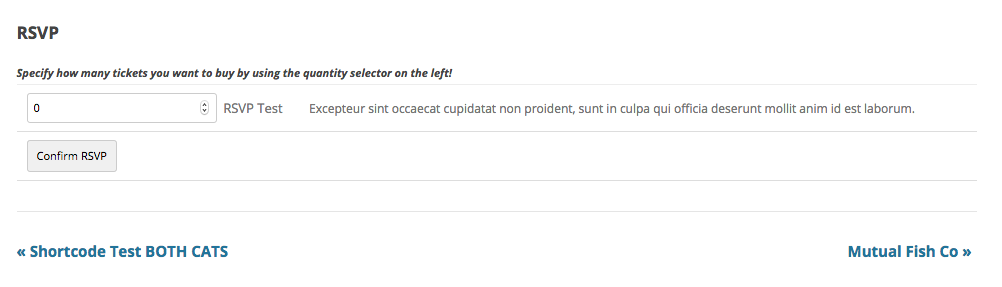
☝️ To do this, I have simply added the code from the following Gist to my theme’s functions.php file:
I hope this helps!
GeorgeParticipantHey Luciana,
Thanks for reaching out! Sorry to hear about these issues.
When you mention trying out the “Events template” options, do you mean you have tried out every template option listed there, and none of the templates look any better?
If you have not done this, I would recommend doing so and letting us know if any template looks better than others.
In the meantime, can you also post links to pages on your site where we can see the distorted footer firsthand? I’ll take a look and try to identify the problem.
Also, it doesn’t currently appear that you have a premium license with us. If this is wrong, and you do have a premium license with us, then apologies for my misunderstanding! Can you log into your account on this site that has a license key, and post all follow-up replies from that account on this thread?
Thanks!
George -
AuthorPosts